
Introduction
AI fashion photography has created a new class of storage challenge. A single AI fashion shoot can produce dozens of 4K images per SKU across multiple colorways and model variants. Platforms like MetaModels.ai routinely generate hundreds of photorealistic images per catalog batch — and that volume accumulates fast.
That volume becomes a bottleneck when the storage layer can't keep up. Images pile up without organization, client deliveries lag, and collaboration across retouchers, marketers, and brand managers breaks down. Generic cloud tools simply weren't designed for the demands of AI-generated fashion content.
This guide covers the five best cloud storage options evaluated specifically for AI fashion photography workflows in 2026. Each was assessed against four criteria that matter most to e-commerce teams:
- Bulk image handling — ingesting and organizing high-volume AI output
- API integrations — connecting with DAM systems, e-commerce platforms, and creative tools
- Team sharing — multi-user access for retouchers, marketers, and brand managers
- Delivery speed — getting final assets to storefronts and clients without friction
Key Takeaways
- AI fashion photography generates large file volumes that need storage built for media-heavy e-commerce workflows
- Top five platforms: Cloudinary, Adobe Creative Cloud, Dropbox Business, Google Drive, and Backblaze B2 — each suited to a different workflow need
- Most teams run best on two platforms: one for active workflows, one for low-cost archiving
- Selection depends on bulk handling, RAW previews, API integrations, team sharing, and per-terabyte pricing
- MetaModels.ai — which produces AI fashion imagery at scale — pairs best with API-enabled, high-volume storage
Why Cloud Storage for AI Fashion Photography Has Unique Demands
AI fashion photography storage works differently from standard photography backup. Volume is higher, files are larger, and the workflow spans multiple stakeholders — brand teams, marketers, e-commerce managers, and retouchers — who all need fast, organized access simultaneously.
Three Core Storage Jobs
- Active collaboration — editing, approving, and downloading in real time across distributed locations
- Client and platform delivery — pushing finals to Shopify, ad platforms, or brand portals without manual steps
- Long-term archive — preserving source packshots, model variants, and campaign originals for reuse or compliance
The Scale Challenge
According to LetsEnhance's 2026 research, more than 15 billion AI-generated images have been created since mid-2022. The AI-generated fashion photography market grew from $1.51 billion in 2024 to $2.01 billion in 2025 at a 32.5% CAGR, with projections reaching $6.12 billion by 2029 (ResearchAndMarkets via Yahoo Finance).
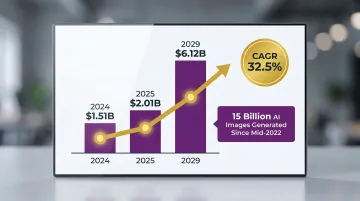
Platforms generating 4K content across entire product catalogs can produce thousands of files per month. At that scale, file organization, searchability, and fast retrieval matter just as much as raw storage capacity.
Best Cloud Storage for AI Fashion Photography in 2026
The five platforms below were evaluated on image handling quality, collaboration features, API integrations, pricing at scale, and fit for high-volume AI fashion workflows.
Cloudinary
Cloudinary is a cloud-based media management platform purpose-built for digital assets in e-commerce and media pipelines. It stores, organizes, transforms, and delivers images via CDN, well-suited for fashion brands managing thousands of AI-generated SKU images.
Key capabilities include:
- Automatic image transformations (resize, crop, format conversion) via URL parameters
- AI-powered tagging and search across large libraries
- Direct integration with Shopify, Magento, and headless commerce stacks
AI-generated fashion images can be stored and delivered to product pages without manual intervention.
Real-world results: Neiman Marcus manages 18M+ assets via Cloudinary, achieving 75% time savings in asset management and 3x faster page loads.
| Feature Category | Details |
|---|---|
| Key Features | AI-powered tagging and search, dynamic image transformations, CDN delivery via Akamai/Fastly/Cloudflare, API and SDK integrations with e-commerce platforms, bulk upload for high-SKU catalogs |
| Pricing | Free tier with 25 credits/month; Plus plan at $89/month (yearly billing); Advanced at $224/month; Enterprise pricing requires sales consultation |
| Best For | Fashion e-commerce brands and agencies that need automated delivery of AI-generated images to product pages, ads, and social channels with minimal manual workflow |
Adobe Creative Cloud
Adobe Creative Cloud is the industry-standard creative storage and editing ecosystem. It offers cloud-synced Lightroom libraries, Bridge for asset management, and seamless collaboration between retouchers and creative directors. This makes it a natural fit for fashion teams that blend AI-generated images with traditional editorial work.
It stands out for native RAW and high-resolution JPEG/TIFF preview rendering, deep Lightroom Classic and Photoshop integration for post-processing AI fashion outputs, and Adobe Portfolio for presenting lookbook content. The trade-off: higher cost per terabyte and limited branded client delivery features.
Adobe supports camera RAW, DNG, AVIF, HEIF, JPEG XL, TIFF, PSD, and PNG, with file dimensions up to 65,000 pixels per side and 512 megapixels maximum (Adobe Help).
| Feature Category | Details |
|---|---|
| Key Features | Native RAW and high-res file previews, Lightroom cloud sync across devices, Photoshop and Premiere integration, Adobe Portfolio for lookbooks, shared libraries for team collaboration |
| Pricing | Photography Plan at $19.99/month (1 TB); additional storage pricing unpublished—contact Adobe sales directly |
| Best For | Creative teams and fashion studios that edit and retouch AI fashion outputs in Lightroom or Photoshop and need a tightly integrated cloud storage and editing ecosystem |
Dropbox Business
Dropbox Business is a widely-adopted team file management platform known for reliable sync, intuitive folder sharing, and Dropbox Transfer. Fashion brands and agencies use it primarily to share final AI-generated image deliverables with clients, external photographers, and social media managers.
Dropbox Transfer allows sending up to 250 GB per link with password protection and download tracking, useful for delivering large batches of AI fashion images to retail clients or ad agencies. Smart Sync lets teams browse full folder structures without downloading large files locally. It lacks AI content search and fashion-specific organizational features.
Version history ranges from 180 days (Professional/Business) to 1 year (Advanced) to 10 years with the Extended Version History add-on (Dropbox Help), which matters for teams tracking revisions across retouching projects.
| Feature Category | Details |
|---|---|
| Key Features | Smart Sync for large library browsing without local download, Dropbox Transfer (up to 250 GB per link), version history up to 180 days (1 year on Advanced), team folders, integrations with Slack and Zoom |
| Pricing | Plus plan at $9.99/month (2 TB individual); Professional at $16.58/month (3 TB); Business Standard from $15/user/month (yearly billing) |
| Best For | Fashion brands and agencies that frequently deliver large AI-generated image batches to clients or external collaborators and need reliable, branded file transfer without a complex DAM setup |
Google Drive (Google Workspace)
Google Drive and Google Workspace remain the most accessible and cost-effective general-purpose cloud storage options for small to mid-sized fashion brands, offering straightforward folder organization, real-time document collaboration, and broad device compatibility.
For AI fashion workflows specifically, Google Drive has real limits: no native RAW file previews for CR2, NEF, or ARW formats (Google Drive Help), no AI-powered image content search, and no branded client delivery pages. It works best as a secondary organizational layer rather than a primary DAM for high-volume pipelines.
| Feature Category | Details |
|---|---|
| Key Features | 15 GB free per Google account; folder sharing and real-time collaboration; Google Photos integration for JPEG browsing; Google Workspace includes shared drives for teams; compatible with all major devices |
| Pricing | Google One plans from $1.99/month (100 GB) to $9.99/month (2 TB); Google Workspace Business Starter from $7/user/month with 30 GB pooled storage |
| Best For | Small fashion brands and startups managing moderate AI image volumes who need affordable, familiar cloud storage for team collaboration and basic file organization |
Backblaze B2
Backblaze B2 is a low-cost cloud object storage service designed for bulk archiving, not active workflow. It works best as a second layer for fashion brands that generate thousands of AI images monthly and need cost-effective off-site archive for original packshots, AI model source files, and seasonal campaign assets.
At approximately $6 per terabyte per month, Backblaze B2 is 77% less expensive than AWS S3 at $26/TB/month. It offers 11-nines data durability and supports API-based uploads via S3-compatible API, so archiving from an active workflow tool can be fully automated. Note that it provides no image preview, no client delivery, and no collaboration features, functioning purely as a secure storage layer.
Backblaze B2 integrates with free egress partners including Cloudflare, Fastly, and bunny.net, eliminating download costs when paired with CDN platforms.
| Feature Category | Details |
|---|---|
| Key Features | S3-compatible API for third-party integrations, unlimited storage at flat per-terabyte rate, 11-nines data durability, supports external hard drive and NAS backups, 10 GB free tier |
| Pricing | Approximately $6/TB/month for storage; download costs apply (free up to 3x average monthly storage); first 10 GB always free |
| Best For | Fashion brands and studios with large, growing AI image archives that need low-cost off-site backup and long-term preservation of source assets without requiring browsing or delivery features |
How We Chose the Best Cloud Storage for AI Fashion Photography
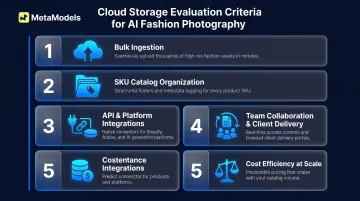
Most teams evaluate cloud storage using general photography criteria: RAW file support, Lightroom integration, and folder structure. That approach misses the mark for AI-generated content. AI fashion workflows introduce distinct requirements — bulk image volumes, SKU-level organization, e-commerce platform integrations, and API-based delivery pipelines — that most general-purpose storage platforms aren't designed to handle.
Five Selection Criteria Applied
- Ingests high-volume AI outputs without bottlenecks — platforms like MetaModels.ai deliver 300+ images monthly on Pro Plans, so storage must keep pace with batch uploads.
- Supports SKU-heavy catalogs through metadata tagging, AI-powered search, and hierarchical folders. Cloudinary's AI tagging helped Neiman Marcus manage 18M+ assets efficiently.
- Connects directly with AI fashion tools and e-commerce platforms via API. Cloudinary offers certified integrations with Adobe Commerce, Shopify, commercetools, and Salesforce Commerce Cloud.
- Enables team collaboration and client delivery through branded sharing pages, version control, and large file transfers — Dropbox Transfer's 250 GB links and Google Drive's real-time co-editing cover both ends.
- Stays cost-efficient at scale: Backblaze B2 at $6/TB/month versus AWS S3 at $26/TB/month is a 77% cost difference for archival storage as libraries grow to tens of thousands of assets.
Conclusion
No single cloud storage platform perfectly serves every AI fashion photography team. The right choice depends on whether the priority is active workflow and e-commerce delivery (Cloudinary), creative editing integration (Adobe CC), team collaboration (Dropbox), accessibility and cost (Google Drive), or bulk archival (Backblaze B2).
Before selecting or switching platforms, identify your actual storage pain point:
- Disorganized SKU libraries with no consistent naming or metadata
- Slow client delivery causing approval bottlenecks
- Rising per-terabyte costs eating into margins
- Missing integrations with your e-commerce platform
Test with a real campaign before committing at scale.
Most professional fashion teams benefit from a two-tool stack: one active workflow platform for daily collaboration and delivery, paired with one low-cost archive layer for long-term asset preservation.
If the bottleneck is upstream—producing enough high-quality AI fashion images efficiently—platforms like MetaModels.ai eliminate traditional model and photoshoot costs while generating ready-to-deploy visuals at scale. The more assets your production pipeline outputs, the more your storage architecture needs to be intentionally designed around volume, retrieval speed, and delivery channel requirements.
Frequently Asked Questions
How much cloud storage do I need for AI-generated fashion photography?
Storage needs scale fast. A single AI fashion shoot at 4K across 50 SKUs in multiple colorways can produce 10-20 GB, and brands scaling to thousands of SKUs annually often need multiple terabytes. Plan for at least two years of projected volume, plus buffer for working files.
Can I use Google Drive or Dropbox for AI fashion photography?
Both work for basic file storage and sharing, but they lack AI content search, native high-res previews for all formats, and e-commerce delivery integrations. Better suited as secondary tools for small teams than as primary platforms for high-volume AI fashion workflows.
What cloud storage integrates best with AI fashion photography tools and e-commerce platforms?
Cloudinary offers the strongest e-commerce integration, with API connections to Shopify, Magento, and headless commerce stacks, plus dynamic image transformation capabilities that let brands serve correctly-sized images to any channel automatically.
How should I organize thousands of AI-generated SKU images in cloud storage?
Use a consistent folder hierarchy based on collection, SKU, and variant (e.g., /collection/sku-id/colorway/channel/), combined with metadata tagging for model type, resolution, and intended use. Platforms with AI-powered tagging like Cloudinary cut manual organization time considerably.
Is there a difference between cloud backup and cloud storage for fashion photography?
Yes — cloud backup (e.g., Backblaze B2) handles disaster recovery but offers no browsing, search, or delivery features, while workflow platforms (e.g., Cloudinary, Dropbox) support active collaboration at a higher cost per terabyte. Most professional teams use both in combination.
What is the cheapest cloud storage option for large AI fashion image archives?
Backblaze B2 at approximately $6/TB/month is the most cost-effective option for bulk archiving. Best used as a second layer behind an active workflow platform rather than standalone, since it provides no client delivery or preview features.