Introduction
Many fast fashion teams struggle with content production bottlenecks that can't keep pace with rapid drop schedules. Global clothing production doubled between 2000 and 2014, and at the extreme end, Shein adds between 2,000 and 10,000 individual styles to its app daily. Each SKU typically requires 3-7 images across multiple channels, creating a content demand that traditional photography simply cannot match.
A structured AI fashion photography workflow solves this directly: packshots or flatlays are transformed into on-model, publish-ready images without booking models, studios, or photographers. This guide is written for fast fashion marketing, e-commerce, and content leads who need high volumes of consistent, brand-accurate imagery across rapid seasonal cycles.
Without a defined process, AI imagery produces inconsistency and wasted effort at scale — undermining brand trust and driving up return rates.
What follows covers how the workflow operates end-to-end, what drives output quality, and where fast fashion teams most commonly lose time and consistency.
Key Takeaways
- AI fashion photography workflows convert packshots into on-model images across four stages: input prep, model configuration, batch generation, and QA review
- Fast fashion teams cut production timelines from 6-8 weeks to 3-4 days while eliminating model booking and studio rental costs
- Quality is determined by input image standards, locked model parameters, and integrated QA review — prompt quality alone won't compensate for weak inputs
- Most failures trace back to poor input prep, skipped garment accuracy checks, or treating catalog production as campaign creative
- Best suited for regular drops and catalog refreshes — not a replacement for hero campaigns that need hands-on creative direction
What Is the AI Fashion Photography Workflow and Why Fast Fashion Teams Need It
The AI fashion photography workflow is a repeatable, team-executable process that takes raw product imagery as input and produces on-model, background-composed, channel-ready fashion images using AI generation at batch scale. This is a defined production process — with set inputs, model configurations, QA checkpoints, and export standards — built to run consistently across hundreds of SKUs.
Fast fashion teams face unique content production pressures. Fashion e-commerce sales reached $821.1 billion in 2024 and will hit $1.16 trillion by 2030, with 47.9% of fashion retail now occurring online. Traditional photography workflows typically require 6-8 weeks from shoot to publication, but Zalando compressed this to 3-4 days using AI — an 80% reduction in time-to-market. With each SKU requiring multiple platform-specific images (Zalando mandates five images per apparel listing), traditional production cannot scale to match drop frequency.
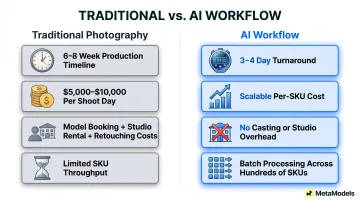
That scale problem is largely a cost problem. A single-day small e-commerce shoot runs $5,000-$10,000 before post-production, with costs broken down roughly as:
- Model day rates: $750-$1,000+
- Studio rental: $500-$1,000+
- Post-production retouching: $50-$150 per hour per image
At high-SKU volumes, those numbers multiply fast. This workflow targets that overhead — replacing the logistical cost of physical production for repeatable catalog and social content. It does not replace creative direction, brand strategy, or editorial judgment for brand-defining campaign work.
How the AI Fashion Photography Workflow Works
The end-to-end flow moves through four stages: product image in → AI model assigned → image generated with scene direction → human QA applied → channel-ready output exported. Each stage has defined quality gates, not just a single generation step. Success depends on treating this as a production system, not a one-off creative experiment.
Step 1: Prepare Your Product Inputs
Input standards determine downstream output quality. Packshots or flatlays should be shot against neutral backgrounds with consistent lighting, capturing the full garment front and back. Teams should target the most demanding platform in their distribution mix during input preparation.
Resolution minimums vary by channel:
| Platform | Minimum Resolution | Notes |
|---|---|---|
| Zalando | 1,800 × 2,600px | Sharpness required — pixel count alone insufficient |
| Amazon | 1,000px (2,000px recommended) | Higher res strongly preferred |
| Walmart | 1,500 × 2,000px | Fashion category requirement |
AI photography platforms accept four primary input types:
- Flatlay — Product displayed on a flat surface
- Ghost mannequin — Product on transparent or invisible mannequins
- Packshot — General product photography against neutral backgrounds
- Existing on-model shots — Previously photographed model imagery
Flat, well-lit images outperform rushed or stylized inputs at the generation stage. AI systems amplify what exists in the source image — crisp, high-resolution inputs produce marketable outputs, while inconsistent inputs require heavy post-processing or rejection. Avoid heavy shadows, partial garment framing, and mixed lighting.
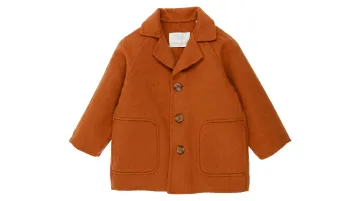
Zalando explicitly states it will reject blurred images even if they meet pixel-count minimums, confirming that resolution alone is insufficient without actual image sharpness and lighting consistency.
Step 2: Select and Configure AI Models
Model selection involves choosing from curated AI model libraries filtered by ethnicity, body type, age, and demographic representation — or creating custom models trained to match brand identity. Model consistency must be maintained across SKUs so a catalog reads as a unified visual system rather than a collection of mismatched outputs.
Research shows shoppers feel more confident in purchasing decisions when they see models of different sizes, ages, and races. Conversely, shoppers report feeling "alienated" when they don't see themselves represented. AI systems structurally enable diverse representation without proportional cost increases — a single garment can be shown on models of varying body types and skin tones without additional casting or shoot costs.
Platforms like MetaModels.ai offer curated libraries of diverse AI models alongside custom model creation, allowing fast fashion teams to configure representation standards once and apply them across full seasonal drops — eliminating repeated casting and usage rights negotiation.
Step 3: Generate Images with Scene and Style Direction
Generation is directed through scene parameters configured before batch processing begins:
- Background type — Studio white, lifestyle environment, or custom scenes
- Lighting style — Soft natural, dramatic studio, or outdoor ambient
- Pose direction — Standing neutral, walking, seated, or dynamic movement
- Channel-specific requirements — PDP clean studio, social lifestyle, lookbook editorial
Distinguish between prompt-driven generation (flexible but variable) and template-based generation (consistent but structured) for high-volume catalog work. Template-based approaches ensure visual consistency across large product ranges.
Batch processing capability makes this workflow viable for fast fashion. Once inputs and model configurations are set, the system processes multiple SKUs simultaneously, applying the same visual standard across the full product range. Pixel Moda produces 14 million images and videos annually for over 900 brands, demonstrating enterprise-scale throughput is achievable.
Step 4: QA Review and Export
Human QA is non-negotiable. AI generation can misrender garment details — sleeve length, print placement, logo accuracy, fabric drape — that damage brand trust if published. Approximately 16% of fashion e-commerce returns occur because the product did not match digital imagery, and 68% of consumers would stop buying from a brand entirely after receiving a product that didn't match its description.
A QA pass should cover:
- Garment accuracy (color, texture, fit, proportions)
- Model naturalness (pose realism, lighting consistency)
- Background consistency (style alignment, no artifacts)
- Resolution check (meets platform minimums)
The export stage sizes and formats images for destination channels — e-commerce PDP, social feed, marketplace listing, lookbook PDF — with consistent cropping, aspect ratios, and resolution standards applied in batch. MetaModels.ai integrates this QA step directly into the platform workflow, so verification happens before output reaches the brand team — not after.
Key Factors That Affect Output Quality in AI Fashion Photography
Four variables consistently separate high-performing AI fashion catalogs from ones that demand constant rework.
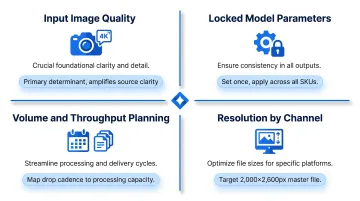
Input image quality is the primary determinant. AI generation amplifies whatever exists in the source file — crisp, well-lit, high-resolution packshots produce marketable outputs, while rushed inputs create images that require heavy post-processing or outright rejection. High-quality images can boost conversions by up to 30%, and 93% of shoppers prioritize visuals when deciding to buy — the source image is not a place to cut corners.
Consistent output across a catalog depends on locking model parameters before bulk generation begins. Lock physical characteristics, styling preferences, and pose ranges once. Teams that reconfigure models per SKU end up with inconsistent looks across their catalog — different lighting moods, mismatched styling, or shifting proportions that undermine a coherent brand aesthetic. Set representation standards (body type, ethnicity, age) once and apply them systematically.
Volume planning and resolution requirements tend to be treated as afterthoughts, but both decisions ripple across the entire workflow:
- SKU volume and throughput: Map your drop cadence against platform processing capacity before committing to a workflow. Factor in credit-based versus subscription pricing structures and plan for seasonal spikes. A brand adding 1,000 SKUs weekly at 5 images per SKU needs 5,000 images per week. That volume demands batch processing capability and predictable output timing.
- Resolution by channel: Marketplace PDPs often require 4K zoom-ready images; social content can run lower. Configure resolution per channel at setup rather than upscaling after the fact. Targeting at least 2,000 x 2,600px lets a single master file serve all major e-commerce and social platforms.
Common Mistakes and Misconceptions About AI Fashion Photography
The most widespread mistake is treating AI fashion photography as a one-click tool rather than a structured workflow. Teams who generate images without defined input standards, model configurations, or QA checkpoints produce inconsistent output that erodes brand trust at scale. Teams that invest in workflow setup upfront — running the process as a production system — achieve predictable quality and operational efficiency.
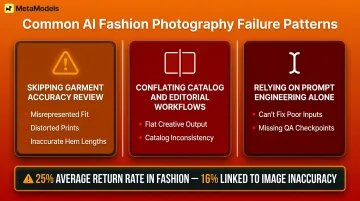
Three failure patterns show up repeatedly across fast fashion teams:
- Skipping garment accuracy review — failure modes include AI-generated fabric drape that misrepresents fit, distorted print details, and inaccurate sleeve or hem lengths
- Conflating catalog and editorial workflows — each has different generation requirements and QA standards that don't transfer between use cases
- Relying on prompt engineering alone — better prompts improve scene direction but can't compensate for poor input images, misconfigured model parameters, or missing QA steps
Garment accuracy errors are the most damaging in fast fashion, where product accuracy directly affects return rates. The fashion industry faces returns averaging 25% of online orders, representing a $218 billion challenge — and approximately 16% of those returns occur specifically because the product did not match imagery. Human-reviewed workflows are the operational fix, not catch-all prompt engineering.
The catalog vs. editorial confusion causes teams to apply the wrong standards in both directions. Using a catalog workflow for campaign creative produces images that are technically accurate but creatively flat. Applying editorial workflows to catalog production introduces inconsistency that hurts e-commerce performance. Keeping these workflows distinct — with separate model configurations and QA criteria — prevents both failure modes.
Workflow infrastructure matters more than prompt sophistication for high-volume production. Prompt engineering improves scene direction, but it can't substitute for clean input images, correctly configured model parameters, or a functioning QA process.
Conclusion
The AI fashion photography workflow is only as reliable as the process built around it. Input standards, model configuration, generation direction, and human QA collectively determine whether the output is publishable at scale or a source of brand inconsistency. Zalando achieved 90% cost reduction and compressed timelines from 6-8 weeks to 3-4 days, but this success came from building AI into a disciplined production system with repeatable standards at every stage.
Fast fashion teams benefit most from investing in workflow structure rather than treating AI photography as ad-hoc tool use. The competitive advantage isn't access to the technology — it's the operational discipline to run it as a repeatable system that keeps pace with collection release cadence.
When executed correctly, the workflow eliminates model booking costs, studio rentals, and multi-week production timelines while maintaining the garment accuracy and visual consistency that drive conversion and reduce returns.
Frequently Asked Questions
How long does an AI fashion photography workflow take from packshot to publish-ready image?
Well-structured workflows produce publish-ready outputs in hours rather than days. Input preparation and initial model configuration require upfront time, but subsequent drops run faster once the system is set up — Zalando compressed timelines from 6-8 weeks to 3-4 days at enterprise scale.
What input image quality is needed for AI fashion photography to produce good results?
Inputs should be cleanly lit, sharp, and show the full garment against a neutral background. Resolution, lighting consistency, and correct framing are more critical than camera quality — a well-lit smartphone shot outperforms a poorly lit DSLR image. Target minimum 1,800 x 2,600px to meet the most demanding platform specifications.
Can AI-generated fashion images maintain accurate garment details for e-commerce use?
Garment accuracy depends on input quality, platform capability, and whether the workflow includes human QA review. Print details, logos, and structural features like seams require specialist review before publishing.
How does AI fashion photography handle diverse model representation across a catalog?
Platforms with curated diverse model libraries allow teams to configure representation standards — body type, ethnicity, age — and apply them consistently across an entire drop or catalog refresh without additional casting costs. Research confirms shoppers feel more confident when they see models of different sizes, ages, and races, making this a measurable commercial advantage, not just an ethical one.
Is AI-generated fashion imagery legally safe to use in commercial advertising?
Commercial usage rights depend on the platform's licensing terms — proprietary model libraries carry cleaner IP standing than scraped-likeness alternatives. Disclosure requirements are tightening: the EU AI Act mandates machine-readable labeling of synthetic content by August 2026, while New York's synthetic performer law takes effect June 2026 with $1,000–$5,000 per-violation penalties. Verify regional requirements before publishing.
When does an AI fashion photography workflow not make sense for a fast fashion team?
The workflow is less suited for hero campaign imagery requiring strong human authorship, editorial narratives, or brand-defining moments where craft and emotional resonance outweigh production speed. Very low SKU volume operations may not see enough efficiency gains to justify workflow setup investment. The workflow excels at repeatable catalog production, not one-time creative statements.