Introduction
Traditional model photography is expensive and slow. Studio rentals, photographer fees, model bookings, and post-production typically run $5,000–$25,000 per shoot day. For emerging designers on tight budgets — or established brands managing large catalogs — those costs add up fast.
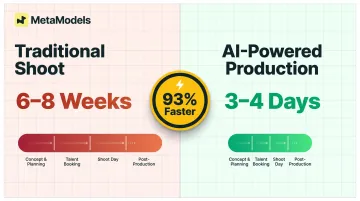
Production timelines of 6–8 weeks make it nearly impossible to respond to trends or launch collections on short notice.
AI model photography removes that bottleneck. Upload a product shot or packshot, select a virtual model, and get professional on-model imagery in minutes — no studio, no booking, no logistics. The output is ready for e-commerce listings, lookbooks, or social media. This guide covers how the technology works, what it costs, and how to get the best results for your collections.
TLDR:
- AI model photography generates photorealistic on-model imagery from product shots in minutes, eliminating studio costs
- Traditional shoots cost $150–$500 per final image; AI platforms cost $1–$15 per image — savings of 85–99%
- Designers can visualize full collections before physical samples exist, speeding up buyer presentations and seasonal launches
- Platforms like MetaModels.ai offer diverse model libraries and human-verified outputs for garment accuracy
What Is AI Model Photography?
AI model photography uses machine learning to digitally place garments onto photorealistic virtual models, creating imagery that mirrors traditional photoshoots in visual quality—including fabric drape, lighting, and poses—using only a product photo as input.
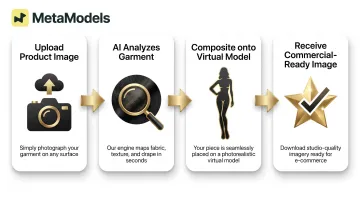
The process follows four steps:
- Upload a clean product image — flat-lay, ghost mannequin, or packshot
- The AI analyzes the garment's structure, color, texture, and shape
- It composites the item onto your chosen virtual model, pose, and setting
- You receive a finished image ready for commercial use
Adoption has accelerated fast. More than 35% of fashion executives now use generative AI for image creation, according to McKinsey's 2026 State of Fashion report.
Major retailers have already moved beyond testing. Zalando reported that 70% of its editorial campaign images in Q4 were AI-generated using digital model twins, while Guess featured an AI-generated model in Vogue with imagery described as "virtually indistinguishable" from real photography.
Why Fashion Designers and Stylists Are Switching to AI Model Photography
Cost and Time Reduction
Traditional catalog shoots involve significant line-item costs:
| Cost Category | Typical Range |
|---|---|
| Photographer | $1,000–$5,000/day |
| Models (agency) | $600–$4,000/day |
| Studio rental | $300–$2,500/day |
| Hair & makeup | $400–$1,200/day |
| Post-production | $20–$120/image |
| Stylist, crew, misc. | $1,000–$4,000/day |
| Total per shoot day | $5,000–$25,000+ |
| Per final image | $150–$500 |
AI platforms flip this equation. Subscription-based services cost $29–$200 monthly, translating to $1–$15 per image depending on volume. Zalando cut campaign production costs by approximately 90% after adopting AI-generated imagery—a reduction that scales for designers managing multiple collections or seasonal launches.
Speed to Market
Traditional fashion campaigns take 6-8 weeks from concept to delivery. AI-powered production compresses this to 3-4 days, a 93% reduction in timeline. For designers working on seasonal collections, limited drops, or trend-responsive pieces, that gap is impossible to ignore. Zalando produces same-day content in under 24 hours using AI models, enabling real-time marketing that traditional shoots simply can't match.
Design Visualization Before Physical Samples Exist
Designers can generate model imagery from flat technical sketches, early-stage prototypes, or packshots of pre-production samples. This means collection presentations, buyer meetings, and lookbook drafts are ready before manufacturing is complete. For pre-orders, trade shows, or investor pitches, polished visuals validate concepts without waiting for full production runs.
Inclusive Representation Without Added Cost
AI model libraries offer diverse body types, ethnicities, ages, and demographics that would be expensive or logistically complex to represent in multi-model traditional shoots. 63% of consumers say diverse representation in advertising is important, and 47% are more likely to buy from brands that include diversity in their ads. AI platforms enable designers to build brand identity around representation without the cost of booking specialized talent.
Scale Without Compromise
For stylists or multi-brand designers managing large SKU catalogs, AI model photography enables batch generation across entire collections while maintaining visual consistency in lighting, pose, and background. MetaModels.ai, for example, manages the full production process to ensure consistent quality as brands scale across products, regions, and seasons, with no reshoots required.
How to Create AI Model Photos: A Step-by-Step Workflow
Step 1 — Prepare Your Product Images
Start with clean, well-lit images on a plain or white background. Flat-lays, ghost mannequin shots, and packshots all work as inputs.
What the image should show:
- Full garment visible (no cropping at edges)
- Clear seam and construction details
- Print, embroidery, or texture detail visible
- Sharp focus throughout
Common mistakes to avoid:
- Heavy shadows that obscure garment structure
- Clipped or cropped garment edges
- Low resolution (blurry or pixelated images)
- Busy or cluttered backgrounds
Well-lit phone photography often outperforms dark or cluttered studio shots. Resolution matters less than clarity and proper lighting.
Step 2 — Select or Customize Your AI Model
Most platforms provide curated model libraries with filters for body type, age, ethnicity, and gender. MetaModels.ai covers diverse ethnicities, demographics, and body types, including plus-size and non-binary options.
Custom model creation takes this further — matching a brand's specific aesthetic and target audience so every visual feels intentional, not generic. That consistency matters most when building cohesive lookbooks or seasonal catalogs.
Step 3 — Choose Pose, Setting, and Styling Direction
With your model selected, define the pose (from presets or reference images), background (studio-neutral for e-commerce, lifestyle or editorial for lookbooks), and any styling notes. More specific prompts consistently drive better outputs.
Example prompts:
- "Show the dress falling at knee length with a relaxed A-line drape"
- "Pair with neutral footwear and simple jewelry"
- "Editorial background with soft natural lighting"
Curated background libraries and custom scene creation enable brand-specific visual environments that stay consistent across an entire collection.
Step 4 — Generate, Review, and Refine
Generate the initial output, then review garment accuracy — fabric drape, fit proportions, print fidelity. Use platform tools to regenerate or adjust as needed.
MetaModels.ai adds a human review layer to this step: fashion specialists verify color, shape, and proportions before images are delivered, catching accuracy issues that automated systems typically miss.
Step 5 — Export and Deploy
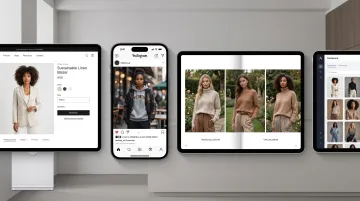
Finished images are ready for e-commerce product pages, social media, lookbooks, wholesale presentations, or print. MetaModels.ai delivers ready-to-post content up to 4K resolution, ensuring images meet technical requirements for web, social, and print use cases.
What to Look For in an AI Model Photography Platform
Garment Accuracy and Fabric Rendering
For designers and stylists, fabric accuracy separates a usable image from a wasted one. Ask any platform whether it uses real-time fabric draping technology or static image compositing — real-time draping handles flowing fabrics, structured garments, and knits with far more realism.
Also check how the platform deals with detail work: prints, embroidery, sheer layers. Silhouette approximation is not enough for professional catalog use. Platforms that include human review in their workflow catch proportion errors and garment distortions before images reach you.
Model Diversity and Customization
A diverse model library means real control over body type, ethnicity, age, and gender — not a handful of preset options with limited variation. When evaluating platforms, look for:
- Adjustable body type and size range (not just S/M/L approximations)
- Ethnic and age diversity with consistent image quality across all options
- Custom model creation for brands that want proprietary visual identity
- Gender-inclusive options covering the full range of your product line
MetaModels.ai offers custom model creation alongside a curated library spanning diverse ethnicities, body types, and demographics — useful when a brand's visual identity needs to be consistent across every campaign.
Quality Assurance and Output Reliability
Consistency across a full catalog is where many AI platforms break down. Single images may look strong; batch outputs often reveal color drift, inconsistent lighting, or fit variations that require manual cleanup.
Look for platforms with defined QA processes — specifically, human review rather than automated checks alone. MetaModels.ai routes every image and video through fashion specialists who verify color accuracy and proportions before delivery, which matters when you're producing dozens of SKUs at once.
Production Scale and Commercial Rights
For designers handling multiple collections or clients, the operational details matter as much as image quality. Before committing to a platform, confirm:
- Batch processing that handles full catalog volumes without manual intervention
- Resolution options up to 4K for lookbooks, print, and high-quality digital campaigns
- Commercial usage rights included by default, not priced as a separate tier
- Consistent output quality across products, regions, and seasonal campaigns
Platforms built for professional use should handle enterprise-level volume without brand consistency slipping between the first product and the fiftieth.
Use Cases: How Designers and Stylists Apply AI Model Photography
Lookbooks and Collection Presentations
AI model photography enables designers to produce full lookbook imagery—including editorial-style backgrounds and diverse model representation—without a photoshoot budget. This is especially valuable for independent designers presenting new collections to buyers, press, or at trade shows. VENUS Fashion produced 30 photorealistic campaign images in two weeks using AI-generated models, with full creative control over poses, styling, and set design.
E-Commerce and Marketplace Listings
Stylists and fashion brand operators use AI model imagery to populate product pages with consistent, professional on-model shots across entire catalogs. Major platforms accept AI-generated imagery when it meets accuracy and quality standards:
- Amazon — permits AI imagery and offers its own built-in image generation tools for sellers
- Shopify — supports AI-generated product visuals across storefronts
- Etsy — allows AI imagery with disclosure requirements
Portfolio Building and Client Pitches
Emerging designers and stylists use AI model photography to build visual portfolios of designed pieces before physical production. This lets them pitch to clients, investors, or licensing partners with polished imagery rather than technical flats. Concepts get validated and funding secured before any manufacturing begins.
Frequently Asked Questions
Frequently Asked Questions
Can AI model photography accurately show how fabrics drape and move?
Quality AI platforms simulate drape, weight, and texture using advanced fabric rendering technology. Platforms with real-time draping capability and human-reviewed outputs (like MetaModels.ai) improve accuracy for complex materials — sheer layers, embroidery, and heavy knits included.
How can fashion designers use AI model photography before physical samples exist?
Designers can use flat-lay images, packshots of prototype fabric, or cleaned-up technical illustrations as input. The AI generates model imagery from these inputs, allowing lookbook creation and presentations ahead of full production—essential for pre-orders, trade shows, and investor pitches.
What image quality do I need to upload to get professional AI model photos?
Well-lit, in-focus images on a plain or white background produce the best results. Resolution matters less than clarity—sharp phone photography often outperforms dark or cluttered studio shots. Avoid heavy shadows, clipped garment edges, and busy backgrounds.
Is AI-generated fashion model imagery accepted on major e-commerce and fashion platforms?
Amazon and Shopify actively support AI-generated content; Etsy restricts AI images as primary photos for physical goods. Most platforms accept AI imagery when it accurately represents the product — always verify current guidelines before publishing.
How diverse are the AI model libraries available for fashion photography?
Leading platforms offer models across ethnicities, body types, ages, and genders — including plus-size, kids, and non-binary options. True range varies by platform, so test before committing to a subscription.
Can I create a consistent model identity across an entire collection?
Some platforms maintain the same virtual model's face, body, and style across multiple garment generations — essential for lookbook cohesion and seasonal catalogs. MetaModels.ai offers brand-specific model customization to keep visuals consistent across an entire collection and its marketing assets.