Introduction
Latency in AI-generated fashion imagery has become a measurable operational challenge for mid-to-large brands. 67% of fashion companies generating over $10M annually now use AI product photography — yet per-image generation times range from under 2 seconds for optimised API infrastructure to approximately 30 seconds for fashion-specific platforms.
That gap compounds fast. A brand processing 500 SKUs for a seasonal drop hits nearly three hours of pure generation time at a 20-second average — before a single image goes through review, correction, or re-generation.
Against tight launch windows, that overhead is a real constraint. ASOS processes over 4,000 new styles weekly — traditional photography once consumed 11 days per product cycle before AI adoption. SHEIN cut new-item introduction from 14 days to 3 using AI workflows. Those gains only hold when latency is managed across the entire pipeline, not just at the generation stage.
Slow generation is typically a symptom, not a given. Resolution demands, fabric rendering complexity, poor input quality, fragmented tool handoffs, and general-purpose models untrained on apparel data each contribute in different ways. This article breaks down each driver and how to address it — so brands can hit their timelines without trading off garment accuracy or image quality.
Key Takeaways
- Per-image generation speeds range from under 1 second to 30+ seconds, and compound rapidly across catalog-scale batches
- Resolution is the largest controllable latency multiplier—moving from 1024×1024 to 2048×2048 can increase processing time nearly 5x
- 89% of AI product photography failures trace to poor input quality, driving costly re-generation cycles
- Fashion-specific platforms reduce iteration counts through apparel-trained models, integrated QA, and end-to-end workflows
- Latency fixes span three layers: pre-generation decisions, workflow management, and infrastructure integration
How Latency Accumulates in AI Fashion Model Workflows
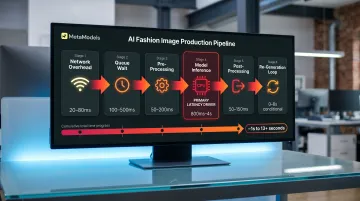
Latency in AI fashion model photo shoots rarely presents as a single visible delay. It compounds across multiple pipeline stages: input pre-processing, model inference (the core denoising loop), fabric rendering passes, quality review, correction iterations, and export formatting. Each stage contributes overhead that becomes significant at batch scale.
Pipeline breakdown:
| Stage | Latency Contributor | Optimisation Target |
|---|---|---|
| Network overhead | Request transmission to/from API | Infrastructure routing |
| Queueing time | Wait before processing begins | Concurrency/scaling |
| Pre-processing | Text encoding, image conditioning, validation | Input standardisation |
| Model inference | Core denoising steps (primary driver) | Step count, caching, quantisation |
| Post-processing | Decoding, format conversion, export | Workflow integration |
Inference latency—the sampling loop where the AI generates the image—is the primary target of most optimisation techniques. However, end-to-end latency also includes network delays, queue wait times, and pre/post-processing overhead. FP16 quantisation reduced P95 latency by 35% in one AWS benchmark, demonstrating that infrastructure choices matter as much as model speed.
The accumulation is easy to miss at low volume. A team generating 10 images daily may not notice the drag — but brands running 200–500 SKU batches for seasonal drops find that latency becomes their longest production stage. At 30 seconds per image, a 300-SKU catalogue with three angles per product (900 total images) requires 7.5 hours of pure generation time, before accounting for re-generation triggered by fabric accuracy issues or colour mismatches.
These costs fall into two categories:
- Direct: Delayed launches, missed trend windows, and lost first-mover advantage on seasonal drops
- Indirect: Idle team hours during batch waits, last-minute manual fixes when errors surface late, and re-generation loops triggered by poor inputs or platform constraints
Most brands don't feel the full weight of these costs until a workflow that handled small batches fine breaks down under catalogue-level volume.
Key Latency Drivers for AI Fashion Model Photo Shoots
Resolution Requirements
Resolution is the single largest controllable latency multiplier in AI fashion photography. Fashion e-commerce standards demand minimum 2048×2048 output for product pages, with luxury brands requiring 4K for hero imagery and zoom functionality. These requirements significantly increase computation time compared to default 1024×1024 generation.
Resolution scaling impact:
- 1024×1024: Approximately 20 seconds (FLUX-1 Dev, 30 steps)
- 2048×2048: Approximately 95 seconds (same model, same steps)—a 4.75x increase for 4x pixel count
- Optimised 2048×2048: Approximately 10 seconds (FLUX 1.1 Pro Ultra), demonstrating that architecture matters as much as resolution
Credit-based pricing reflects this compute cost: Claid.ai charges 4 credits for standard resolution, 10 for Studio quality, and 24 for 4K—a 6x multiplier from standard to 4K. Every resolution tier increase multiplies processing time unless the platform uses specialised optimisation for high-resolution output.
Fabric Rendering Complexity
Complex fabrics impose disproportionate processing time because they require additional sampling passes to render accurately. Garments with transparency (organza, tulle), intricate texture detail (jacquard, brocade), or complex draping (silk charmeuse, bias-cut designs) challenge generic AI models not trained on apparel-specific data.
Error rates and bottlenecks:
- 23% error rate for complex textures and materials (silk, lace, patterned knits) in AI generation
- 70% of designers cite draping inaccuracies as a primary supply chain bottleneck
Every error triggers re-generation, multiplying effective latency. A 30-second generation requiring two correction cycles consumes 90 seconds of total processing time. At catalogue scale, a 20% re-generation rate on a 500-SKU batch adds 100 additional images to the workload—equivalent to 50 extra minutes at 30 seconds per image.
Fashion-specific platforms address this through fabric-aware rendering trained on apparel datasets, reducing the iteration count needed to achieve acceptable drape, texture, and transparency. Generic platforms rely on broader training sets and require more sampling passes to approximate garment-specific physics.
Input Quality and Re-Generation Loops
Poor-quality packshot inputs create feedback loops that multiply latency across the batch. Low-resolution source images, inconsistent lighting, colour casts, and non-standard angles force the AI to compensate—often unsuccessfully—producing outputs that require re-generation.
Approximately 89% of AI product photography failures trace directly to unprocessed or poorly processed inputs. A targeted pre-processing workflow fixes 90% of these failures, but brands skipping this step pay for both AI subscriptions and traditional photography fallback, effectively doubling per-image cost while increasing latency through multiple generation attempts.
Common input issues that trigger re-generation:
- Resolution below 1200×1200px on longest edge
- JPEG compression artifacts (quality below 95)
- Colour casts from uncorrected white balance
- Inconsistent lighting across batch
- Non-neutral backgrounds requiring additional segmentation passes
Re-generation cycles add the full per-image processing time back into the workflow. Input standardisation—though it adds 90 seconds per image upfront—eliminates the 2-3x latency multiplier caused by re-generation loops.
Generic vs. Fashion-Specific AI Platforms
General-purpose image generators carry a structural latency penalty for fashion applications because they are not trained on apparel-specific datasets. These platforms require more inference iterations to approximate garment fit, model pose naturalness, fabric drape physics, and colour accuracy—domains where fashion-specific models perform natively.
Fashion-specific platforms close this gap through capabilities general tools don't offer out of the box:
- Fabric-aware rendering trained on apparel datasets, not broad image libraries
- Consistent model identity across batches, reducing pose correction passes
- Integrated quality assurance that catches garment fit errors before manual review
- Apparel-specific colour accuracy without additional correction steps
78% of brands maintain hybrid workflows—using traditional photography for hero images and AI for variants—which reflects the gap general-purpose tools leave unfilled for production-grade fashion imagery.
Multi-Tool Workflow Integration Latency
Brands using separate tools for background removal, model placement, resolution upscaling, and quality review accumulate wait time at each handoff. This integration latency doesn't appear in any single tool's benchmark but becomes significant at batch scale.
A typical multi-tool workflow involves:
- Background removal tool (30-60 seconds per image)
- AI model generation platform (20-30 seconds)
- Upscaling service for resolution boost (15-30 seconds)
- Manual QA review and approval (variable)
- Format conversion and export (10-20 seconds)
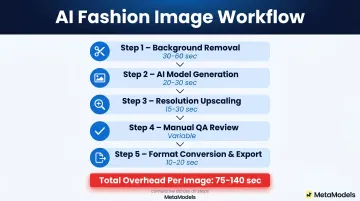
Even optimistically, this workflow adds 75-140 seconds of overhead per image beyond raw generation time. For a 300-image batch, integration latency alone adds 6-12 hours to the production timeline. Platforms offering end-to-end workflows—combining automated processing, quality review, and export formatting in a single pipeline—eliminate these handoffs entirely.
Strategies to Reduce Latency in AI Fashion Model Photo Shoots
Latency reduction strategies fall into three categories: decisions made before generation begins, how production runs are managed, and the infrastructure surrounding the workflow. Addressing all three layers delivers the most meaningful gains.
Before You Generate: Decision-Level Fixes
Pre-generation decisions shape every subsequent step, making them the most effective place to start.
Select a fashion-specific AI platform over a general-purpose image generator
Platforms trained on apparel datasets understand garment draping, fabric texture, and model proportions natively, reducing the number of sampling iterations needed to produce acceptable output. Fashion-specific platforms also integrate garment accuracy review directly into the workflow, catching errors before delivery rather than forcing re-generation cycles after publication.
Standardize input packshot specifications before running any batch
Define required resolution (minimum 1200×1200px, recommended 2000px after upscaling), lighting setup (neutral white balance, consistent intensity), and angle consistency across all SKUs. Export at JPEG quality 95+ or PNG to prevent compression artifacts. White balance neutralisation is the most impactful correction for AI colour accuracy.
Pre-processing adds approximately 90 seconds per image upfront but eliminates the 2-3x latency multiplier caused by re-generation triggered by poor inputs. For a 500-SKU batch, this represents 12.5 hours of initial investment versus 25-40 hours of cumulative re-generation time.
Right-size resolution to channel requirements
Not every image needs 4K output. Match resolution to where the image will be used:
- Thumbnails and grid views: 512×512 to 800×800
- Product detail pages: 2048×2048
- Hero banners and zoom: 4K
Generating only what each channel requires avoids over-processing across the full SKU range. Moving from 2048×2048 to 1024×1024 for non-hero images can reduce generation time by 75% on those assets.
Pre-define model, pose, background, and styling templates
Removing real-time creative decisions cuts prompt ambiguity and the approval delays inconsistent outputs create. Platforms with template libraries let brands select pre-configured options rather than describing requirements from scratch for each SKU — reducing both generation time and variability.
During Production: Workflow Management
Operational decisions control when, in what order, and at what scale generation runs happen—factors that determine whether latency becomes a bottleneck or remains invisible.
Implement priority queuing for hero products and high-velocity SKUs
Process new arrivals, bestsellers, and campaign hero images first, even if the full batch takes longer. This ensures the items with the greatest commercial urgency are ready earliest, allowing staged launches rather than all-or-nothing deadlines.
Separate real-time and batch generation by use case
Use real-time generation for urgent or individual product needs (same-day drops, flash sale items, influencer requests). Schedule catalog updates and lifestyle imagery as overnight or off-peak batch runs. Mixing both in the same queue degrades the performance of both—real-time requests wait behind batch jobs, while batch jobs are interrupted by priority inserts.
Build intermediate review checkpoints into the workflow
Catch garment accuracy or colour issues at the batch midpoint rather than reviewing all outputs at the end. Identifying systematic problems (such as consistent colour shift or drape error on a specific fabric type) after 50 images prevents full re-generation runs and limits rework to a fraction of the total volume.
Use a two-tier image strategy for large catalogs
Apply fast, automated packshot-to-model conversion for standard catalog imagery. Reserve full-generation runs with custom model styling, multiple poses, and lifestyle backgrounds for campaign hero images. This reduces average processing time per image across the full catalog without sacrificing quality where it matters commercially.
Around the Workflow: Infrastructure and Platform
Infrastructure decisions often go unexamined because they don't touch the generation step directly — yet they account for significant cumulative delay. Fixing them reduces latency without changing a single prompt.
Integrate AI image generation directly with product information systems
Auto-trigger generation when new products are added to your catalog feed, so images are processing in the background before the launch deadline arrives. This removes the "latency spike" that occurs when teams generate all images under time pressure immediately before a drop.
Use prompt caching and style templates for recurring product categories
Storing previously validated generation parameters for standard SKU types (t-shirts on white background, jeans lifestyle shot) eliminates repeated model interpretation overhead. Academic research demonstrates 1.97x to 3.37x speedup on diffusion transformer models through learned caching schedules, and caching schedules optimised at low resolution transfer effectively to higher resolutions without re-optimisation.
Run parallel generation pipelines for large seasonal drops
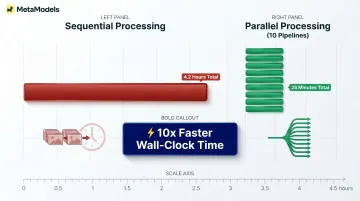
Distribute requests across multiple simultaneous processes rather than sequential processing. Platforms supporting batch jobs that process 100+ images in parallel compress total batch time from days to hours. Sequential processing of 500 images at 30 seconds each requires 4.2 hours; parallel processing across 10 simultaneous pipelines reduces this to 25 minutes.
Choose a platform with end-to-end production management
Platforms that handle automated processing, quality review, and output formatting in a single workflow eliminate the tool-switching handoffs that create the most invisible latency in multi-platform setups. MetaModels.ai, for instance, combines automated generation with human-verified garment accuracy review and ready-to-post export in up to 4K resolution, delivering marketplace-compliant imagery for Amazon, Myntra, and other channels without downstream formatting steps.
Conclusion
Latency in AI fashion model photo shoots is not a fixed cost of the technology. It is the cumulative result of platform choices, workflow decisions, and management gaps—each of which can be addressed independently. Brands that treat latency as a workflow design problem, rather than a speed benchmark, will see compounding returns in faster launches, lower cost per image, and greater campaign agility.
The difference between a 20-second and a 2-second per-image generation time matters less than whether your workflow triggers re-generation loops through poor input quality, or whether multi-tool handoffs add 90 seconds of invisible overhead per image.
A fashion-specific platform processing images in 30 seconds end-to-end will outperform a 5-second generic API if it eliminates the 60 seconds of manual background removal, quality review, and format conversion that follow.
Brands managing thousands of SKUs across seasonal drops, regional markets, and multiple sales channels cannot afford workflows where latency compounds invisibly until deadlines force compromise. The strategies outlined in this guide address latency at the layers where the highest-leverage improvements occur:
- Input standardisation — eliminating re-generation loops before they start
- Resolution right-sizing — matching output specs to actual delivery requirements
- Platform consolidation — removing multi-tool handoff overhead
- Batch scheduling — shifting volume to off-peak processing windows
- Parallel processing — running independent jobs simultaneously to reduce wall-clock time
Frequently Asked Questions
How fast is AI image generation?
AI fashion image generation speed varies significantly by platform and resolution. Optimized API infrastructure achieves under 2 seconds at 1024×1024, while fashion-specific platforms with integrated post-processing typically deliver in approximately 30 seconds. High-resolution outputs (2048×2048 and above) sit at the slower end of this range due to increased computation demands.
What is the best AI image generator for fashion?
The best option depends on use case, but fashion-specific platforms outperform general-purpose tools because they are trained on apparel datasets. Key criteria include fabric rendering accuracy, model diversity, batch processing support, and integration with e-commerce workflows. Platforms that handle the full production pipeline — from generation to marketplace-ready output — cut the most latency.
What causes latency in AI fashion model photo shoots?
The main drivers are high-resolution requirements (2048×2048 minimum for e-commerce), fabric rendering complexity (silk, lace, patterned knits require more sampling passes), poor input image quality triggering re-generation loops, and the use of non-fashion-specific AI platforms that require more iterations to achieve garment accuracy.
Does higher image resolution increase AI generation time?
Yes, each resolution tier increase multiplies processing time. Moving from 1024×1024 to 2048×2048 can increase generation time by approximately 4.75x depending on the model architecture. Fashion e-commerce standards (2048×2048 and above) create longer generation times than default settings, making resolution right-sizing critical for latency management.
How can fashion brands reduce time-to-market with AI photography?
AI fashion model photo shoots compress visual production from weeks to hours when latency is managed through batch scheduling, pre-defined templates, and platform integration that eliminates manual handoffs. ASOS reduced per-product cycle from 11 days to 72 hours; SHEIN compressed new-item introduction from 14 days to 3 days. These gains materialize only when workflows address input quality, resolution strategy, and integration bottlenecks.
Is batch processing or real-time generation better for fashion e-commerce?
Neither is universally better. Real-time generation suits urgent individual SKUs (same-day drops, influencer requests, flash sales), while batch processing is more cost-efficient for large catalog updates and seasonal launches. Most effective workflows combine both tiers, using priority queuing to push high-urgency SKUs ahead regardless of batch size.