
Introduction
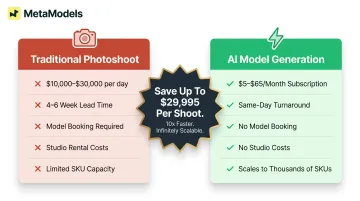
Fashion and e-commerce brands face a constant demand for on-model imagery across hundreds or thousands of SKUs, yet traditional photoshoots are slow, expensive, and nearly impossible to scale. Traditional fashion shoots cost between $10,000 and $30,000 per day, with production timelines stretching 4-6 weeks per campaign. When brands like Shein add 1.5 million new products annually compared to Zara's 40,000, traditional photography simply cannot keep pace with modern e-commerce velocity.
AI model photo generation changes how brands approach this entirely. Converting product packshots into photorealistic on-model imagery eliminates the overhead of traditional shoots — no model booking, no studio rental, no weeks of production coordination.
The concept is straightforward. Execution is not. Output quality depends heavily on:
- Asset preparation — how your packshots are shot and formatted
- Model selection — matching the right AI model to garment type and brand positioning
- Parameter configuration — pose, lighting, background, and styling inputs
- Quality control — the review process that keeps results consistent at volume
This guide covers each of those variables in order — from asset prep through QC — so your team can build a workflow that produces consistent results across hundreds of SKUs, not just a handful of hero shots.
Key Takeaways
- Scaling AI model photos requires clean packshots, a configured model library, and consistent batch workflows
- Best suited for fashion and e-commerce brands managing large SKU catalogs that need on-brand imagery fast
- Output quality hinges on garment fit accuracy, model diversity settings, background consistency, and resolution
- Watch for: low-quality inputs, skipping human review, and inconsistent parameters across batches
- Platforms combining automation, human review, and diverse AI model libraries cut turnaround time and manual rework
How to Generate AI Model Photos at Scale
Step 1: Prepare and Standardize Your Product Assets
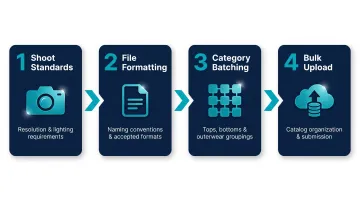
Input quality determines output quality in AI model photography. The algorithms cannot fabricate accurate garment details from low-resolution, poorly-lit, or inconsistently shot packshots. Production-ready source images share clear markers: clean white or neutral backgrounds, the full garment visible without cropping, and consistent lighting angles that reveal fabric texture and color accurately.
Technical requirements for bulk processing:
- Minimum resolution of 2,000 x 2,000 pixels (4K preferred for zoom functionality)
- Accepted formats typically include JPEG and PNG
- Consistent file naming conventions (e.g., SKU-producttype-colorway.jpg)
- Catalog organization that enables bulk uploads without manual intervention
Batch by product category before you begin. Tops, bottoms, and outerwear each require different generation parameters to handle fabric weight, draping behavior, and fit accurately. Applying blanket settings across mismatched items produces inconsistent results that require expensive regeneration. Group similar garments together so parameters can be calibrated per garment type.
Step 2: Build and Configure Your AI Model Library
Select AI models from a pre-built library or create custom models that match your brand's visual identity. Configure parameters including body type, ethnicity, age demographic, and pose style. Diversity across these dimensions matters for both conversion performance and brand inclusivity—64% of consumers take action after seeing ads they consider diverse or inclusive, with action rates reaching 85% among LGBTQ and Latinx+ audiences.
Map specific models to particular product categories or campaigns before bulk runs begin:
- Sportswear → active poses, athletic body types
- Formalwear → editorial stances, varied age demographics
- Luxury collections → custom models matching brand aesthetic
Platforms like MetaModels.ai offer curated libraries of diverse AI models with custom model creation options, allowing brands to match their exact visual identity without sourcing real models. No royalties, no booking logistics, no release form paperwork.
Step 3: Configure Generation Parameters and Run Bulk Output
Before launching a bulk run, configure core settings that control output consistency:
- Background type: Studio white, lifestyle environment, or branded backdrop
- Lighting preset: Soft studio lighting, natural daylight, or dramatic editorial
- Output resolution: 4K for premium channels, 2K minimum for standard e-commerce (platforms like Shopify recommend 2,048 x 2,048 pixels for optimal zoom functionality)
- Angle variants per SKU: Front, back, detail shots, or three-quarter views
Reliable platforms save prompt templates or parameter presets as reusable profiles per product type. This ensures every image in a 500-SKU batch uses the same logic — not ad-hoc inputs that create visual inconsistency. The difference between single-image workflows and true bulk pipelines matters: look for platforms that support batch operations without manual re-prompting for each SKU.
MetaModels.ai handles this end-to-end: real-time fabric draping technology preserves garment color, shape, texture, and proportions, delivering content ready to publish in up to 4K resolution.
Step 4: Review, Quality-Check, and Publish
Even with automated generation, human review is critical. A structured review pass catches garment accuracy issues before images go live—misaligned seams, fabric draping errors, distorted logos, or unnatural cloth physics that mislead shoppers. 43% of UK consumers returned products specifically because pre-purchase product information was incorrect, with inaccurate imagery driving approximately 30% of all e-commerce returns.
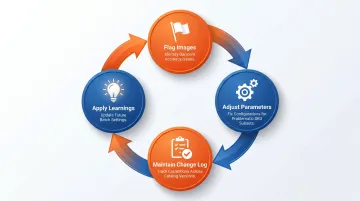
Establish a feedback and regeneration loop:
- Flag specific images for re-generation
- Adjust parameters for problematic SKU subsets
- Maintain a change log tracking corrections across catalog versions
- Apply learnings to future batches
The final export and publishing step requires formatting for different channels. PDP images require different specifications than social media crops or lookbook layouts. File naming conventions must integrate seamlessly with your catalog management system. Choose platforms with direct e-commerce integrations so assets move from generation to live product page without a manual upload queue slowing you down.
What You Need Before You Start
Preparation directly impacts the speed and quality of scaled output. Brands that skip this stage end up regenerating large batches after discovering input or configuration problems mid-run.
Equipment and Platform Requirements
Minimum technical requirements include:
- API access or a SaaS subscription tier that supports bulk processing
- Sufficient storage capacity for high-resolution outputs
- Integration compatibility with your existing PIM or e-commerce platform
Enterprise-level operations typically also need dedicated account management and analytics to monitor performance across large catalogs.
Input Asset Readiness
Source images must meet production standards to generate usable output. A production-ready packshot shows the complete garment with no partial crops, maintains consistent lighting that reveals fabric texture, and uses clean white or neutral backgrounds that don't confuse draping algorithms.
Common disqualifiers that prevent processing:
- Over-compressed JPEGs that lose fabric detail
- Partial garment crops missing sleeves, hems, or key design elements
- Heavy shadows that distort garment shape
- Inconsistent backgrounds across product categories
- Resolution below 2,000 pixels on the longest side
Team and Workflow Readiness
Identify internal roles before scaling operations. Three functions need clear ownership:
- Asset management: uploading files and maintaining catalog organization
- Review: checking outputs for garment accuracy and brand consistency
- Publishing: pushing approved images to live channels
Even with full automation, defined ownership prevents bottlenecks. Without it, images sit in review queues, regeneration requests go unaddressed, and catalog updates miss launch deadlines.
Key Parameters That Affect Output Quality at Scale
Scaled AI model photo generation is not a single-click process. Quality, consistency, and commercial usability depend on controlling several interdependent variables across every batch.
Garment Fit and Fabric Draping Accuracy
Fabric behavior on a virtual model must reflect how the garment actually fits. Misrepresented draping or unnatural cloth physics directly misleads shoppers, driving up return rates. With retail return rates approaching 17% and costing the industry close to $900 billion annually, accuracy is a business-critical requirement.
Look for platforms using real-time fabric simulation or physics-based draping rather than static texture overlays. This determines whether images look photorealistic or artificially flat. MetaModels.ai drapes actual garment fabric onto AI-generated models in real-time, preserving garment details and natural cloth behavior. Every image receives human fashion specialist review before delivery — garment accuracy that static overlay tools cannot match.
Model Diversity and Representation Settings
Generating all catalog images on a single model type limits market reach, creates representation gaps, and produces a visually monotonous catalog. Diversity settings control ethnicity, body type, age range, and pose variation across your catalog.
Brands that configure model variation across SKU categories see measurable engagement gains. The data is clear:
- Purchase intent among Black customers increased from 17% to 40% as brand inclusion perceptions improved
- 69% of Black consumers are more likely to purchase from brands whose advertising reflects their race/ethnicity
- 71% of consumers expect brands to promote diversity and inclusion in their marketing
Brands that skip representative imagery don't just miss a demographic — they signal to the majority of shoppers that inclusion wasn't considered.
Background and Environment Consistency
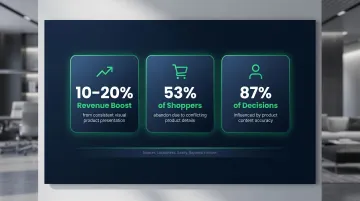
A catalog mixing studio backgrounds, lifestyle scenes, and mismatched lighting looks unprofessional and creates friction at the product page level. Brands with consistent visual presentation see an average revenue boost of 10–20%, while 53% of US shoppers abandon carts due to conflicting or confusing product details.
Lock background presets per product line before a bulk run. Branded backdrop templates and environment presets enforce visual coherence across thousands of images. The stakes are concrete: 87% of shopper decisions are influenced by the accuracy and consistency of product content.
Output Resolution and Channel Formatting
Images generated at insufficient resolution — or without correct aspect ratios for target channels — require post-processing rework that wipes out the time savings of bulk generation. Channel minimums to hit before you run:
- Amazon: 1,000px minimum on the longest side (2,000+ recommended)
- Instagram Stories: 1,080 x 1,920px at 9:16 aspect ratio
- Zoom functionality: 2K minimum, 4K preferred
Produce multiple crops per SKU simultaneously rather than cropping after generation. MetaModels.ai delivers content ready-to-publish in up to 4K resolution with platform-specific formatting for e-commerce, social media, and advertising channels.
Common Mistakes When Generating AI Model Photos at Scale
Most production failures trace back to a small set of avoidable errors. Catching them early saves significant regeneration time downstream.
Bad inputs don't get fixed — they get multiplied: Teams that upload inconsistent or low-quality packshots assume the AI will compensate. It won't. One bad input specification can corrupt an entire product category batch, requiring regeneration across hundreds of SKUs.
Using the same parameters across every category: The configuration that works for a lightweight summer dress produces different results on a structured blazer or thick knit. Fabric weight, draping behavior, and fit vary enough across garment types that category-specific parameter profiles are essential — not optional.
Removing the human review step to speed up output: Automated generation at scale will produce occasional garment errors, anatomy issues, or brand inconsistencies. Skipping review trades short-term speed for downstream returns, customer complaints, and expensive re-generation. 62% of consumers are far more likely to keep a purchase when product information is clear and accurate—quality control protects both conversion rates and margin.
Neglecting model diversity across the catalog: Defaulting to one or two model types for the entire catalog is a missed conversion opportunity and a representation failure. 54% of consumers do not feel fully culturally represented in online advertising, and inclusive imagery is increasingly expected by shoppers across major demographics. Platforms with diverse AI model libraries make representation operationally simple rather than logistically complex.
When AI Model Photo Generation at Scale Makes the Most Sense
AI model photo generation delivers the strongest ROI for brands with large SKU catalogs (50+ products), frequent new collections, multi-channel publishing requirements, or limited photography budgets. The economics improve sharply as catalog size and update frequency increase. Traditional shoots cost $10,000-$30,000 per day with 4-6 week lead times. AI platforms, by contrast, offer studio-quality content for subscription fees starting at roughly $5–$65 per month — a cost gap that becomes decisive at scale.
This approach becomes less suitable for highly tactile or material-dependent products where fabric accuracy is commercially critical without advanced draping technology, or brand strategies that require behind-the-scenes "real shoot" authenticity as a core part of storytelling. However, even brands committed to traditional photography for hero campaign content increasingly adopt AI-generated imagery for standard catalog and PDP photography.
A practical signal: if your team spends more than the cost of one traditional shoot day coordinating photography for a single product line, AI generation is likely to pay for itself immediately. The brand Street Vogue increased revenue twelvefold within six months of adopting AI-generated content platforms, demonstrating the velocity advantage AI generation provides.
Frequently Asked Questions
Frequently Asked Questions
How many AI model images can I generate per day at scale?
Output volume depends on the platform's batch processing capability and subscription tier. Production-grade tools can generate hundreds to thousands of images per day, though quality review capacity is often the practical limit rather than generation speed. Enterprise plans with API access support the highest throughput for large catalog operations.
Can AI model photos fully replace traditional photoshoots for fashion brands?
AI model photos can replace the majority of standard catalog and PDP imagery. Some brands retain traditional shoots for hero campaigns or runway editorial, but the right mix depends on your brand positioning and content calendar.
How do I ensure garment accuracy in AI-generated model images?
Garment accuracy depends on both the quality of source packshots and the fabric draping technology used by the platform. Platforms with physics-based draping and human-in-the-loop review—such as MetaModels.ai—reduce inaccuracies compared to texture-overlay-only tools that apply flat textures over generic model silhouettes.
Are there copyright or licensing issues with AI-generated model photos?
Images are typically owned by the brand under the platform's commercial license terms, with no model royalties or usage rights to manage. MetaModels.ai provides unlimited commercial usage rights with zero licensing fees. Always review a platform's terms of service for commercial use clauses before scaling.
What image resolution and formats do AI model photo tools output?
Most production-grade platforms output at minimum 2K resolution with 4K options available, in standard formats including JPEG and PNG. For most PDPs, PNG at 2K is sufficient; use 4K for hero imagery or large-format ads. Specify requirements before batch runs to avoid resizing after generation.
How do I maintain visual consistency across a large AI-generated model image catalog?
Consistency comes from locked parameter profiles per product category, standardized lighting and background presets, and a fixed model-to-product-type assignment applied before each batch. Platforms with end-to-end production management and human review checkpoints deliver the most reliable results at scale.