Introduction
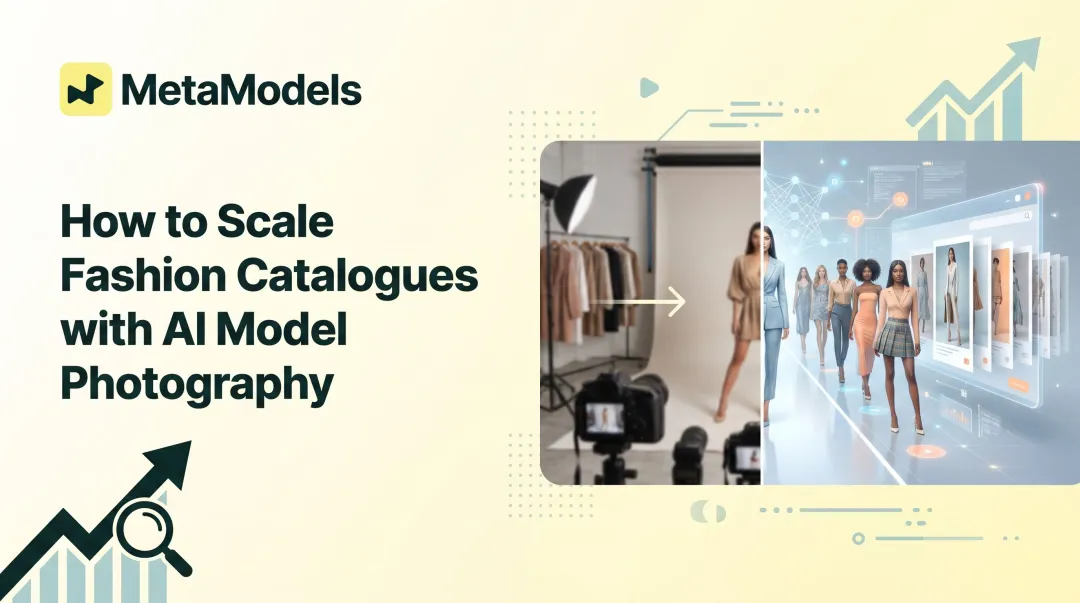
Fashion imagery drives e-commerce success—yet it remains one of the highest production costs in brand marketing. Traditional fashion photoshoots cost $80–$150 per image, with full-day shoots running $5,000–$25,000. In 2026, AI-generated model images are rapidly replacing that workflow.
Zalando cut production costs by 90% and reduced turnaround from 6–8 weeks to 3–4 days using AI model imagery — and they're not alone.
Getting to that level of output isn't automatic. Quality depends on how well you control the inputs, the platform, and the process. This guide covers exactly what it takes to generate professional-grade fashion model images — and where most brands go wrong.
Key Takeaways
- AI fashion model generation places your garment onto a curated AI model using real-time draping technology — outputs are ready-to-use at up to 4K resolution
- Input quality determines output quality — blurry packshots or cluttered backgrounds produce unusable results, so start with clean, high-res product shots
- Platform choice matters: look for human-reviewed outputs, diverse model libraries, and end-to-end workflow support
- AI slashes per-image costs from $80–$150 to $1–$5, making it viable for e-commerce listings, social media, and ad testing at any catalog size
- Platforms like MetaModels.ai handle the full workflow — no model booking, no studio fees, no usage royalties
How to Generate High-Resolution Fashion Model Images
Step 1: Prepare Your Garment Images (Packshots)
The AI needs a clean, well-lit, high-resolution image of the garment—ideally a flat lay or packshot on a neutral background—as the base input. While specific minimum resolution standards vary by platform, most professional AI fashion platforms require at least 1000px on the longest side to produce professional-grade outputs.
Conditions that disqualify an image from producing good results:
- Heavy shadows or uneven lighting across the garment
- Wrinkles or creases in the fabric that obscure texture
- Cluttered backgrounds or insufficient contrast between garment and background
- Low-resolution images with pixelation or blur
- Colour casts or inconsistent white balance
The AI draping algorithm doesn't fix these flaws—it amplifies them. A wrinkled packshot becomes a wrinkled model image; poor lighting produces unrealistic shadows in the final composite.
Step 2: Choose and Configure Your AI Model
Select an AI model based on body type, skin tone and ethnicity, pose style, and demographic alignment with your target customer. MetaModels.ai offers a model library covering diverse ethnicities, demographics, and body types, with custom model creation options and the ability to lock in a specific model identity—same face, body type, and skin tone—across batch-generated images for catalogue consistency.
Critical matching requirement:
Model pose and orientation should complement the garment type. Standing poses work best for outerwear and dresses, while seated poses suit bottoms and loungewear. Mismatched poses are a common source of poor output—forcing a blazer onto a seated model creates unnatural draping and distorted proportions.
Step 3: Configure Resolution and Output Parameters
Walk through the key output settings before generation:
Target resolution:
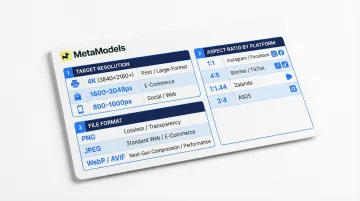
- Up to 4K (3840x2160px) for print advertising and large-format displays
- 1600–2048px for e-commerce product pages and zoom functionality
- 800–1000px for social media and web use
Aspect ratio (platform-specific):
- 1:1 square for Instagram and Facebook feeds
- 4:5 portrait for Instagram Stories and TikTok
- 1:1.44 upright for Zalando listings
- 3:4 portrait for ASOS product pages
Output file format:
- PNG for transparency and maximum quality (larger file size)
- JPEG for general web use and faster loading
- WebP/AVIF for modern e-commerce sites with superior compression
Critical constraint: Higher resolution settings require higher-quality inputs. Attempting 4K output from a low-resolution packshot will produce artifacts, blurring, and synthetic texture errors. The input image imposes a "resolution ceiling" that no AI can overcome.
Step 4: Run the Generation and Review for Garment Accuracy
After generation completes, review the output specifically for garment accuracy. Check that these details are preserved:
- Stitching lines and seam placement
- Print patterns and graphic alignment
- Fabric texture and weave detail
- Fit and silhouette matching the garment's actual proportions
- Colour accuracy matching the original packshot
What to look for in a reject:
- Limb distortion or anatomically incorrect poses
- Fabric misalignment or garment features that appear stretched
- Colour shift or lighting inconsistency between garment and model
- Garment features partially obscured or altered by the draping AI
- Unnatural wrinkles or fabric folds that don't match the garment's structure
Catching these errors before they reach a product page is the difference between a catalogue that converts and one that erodes trust. MetaModels.ai addresses this with a human-review workflow—fashion specialists check colour accuracy, shape, and proportions on every output before delivery.
What You Need Before Getting Started
Preparation directly determines whether the final image is campaign-ready or requires costly re-generation.
Platform and Technical Requirements
Minimum input specifications (research-based standards):
- Resolution floor: 1000px minimum on the longest side (1600px+ optimal)
- File formats accepted: PNG, JPG, and WebP (up to 4K resolution)
- Background: Neutral white or light grey (#F1F1F1) with clean edges
- Lighting: Even, diffused lighting without harsh shadows
- Account setup: Most platforms use subscription or pay-per-image models — check for API requirements and upload limits before committing to large-scale production
Input Materials
Asset checklist before you begin:
- Clean high-resolution packshot or flat-lay (see resolution floor above)
- Brand colour reference (if maintaining brand consistency across outputs)
- Specific model brief: age range, body type, ethnicity, and demographic alignment
- Intended output destination (web, print, social) which determines the resolution target
- Background preferences (white, neutral grey, or custom brand environment)
Compliance and Usage Readiness
Once your assets are ready, confirm the platform's commercial usage license before deploying outputs in advertising and resale contexts. AI-generated images built from your own garment inputs do not carry model royalty concerns, but platform terms vary.
Key legal considerations in 2026:
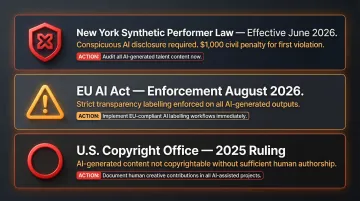
New York's Synthetic Performer Law (effective June 2026) mandates conspicuous disclosure for AI-generated humans in ads, with $1,000 civil penalties for first violations. The EU AI Act enforces strict transparency labelling by August 2026. Additionally, the U.S. Copyright Office's 2025 guidance states that AI-generated content cannot be copyrighted unless a human author has determined sufficient expressive elements.
If licensing ambiguity is a concern, MetaModels.ai addresses it directly — the platform includes unlimited commercial usage rights with no licensing fees or royalties, covering paid advertising, marketplace listings, and resale contexts.
Key Parameters That Affect Resolution and Image Quality
Generating a technically "high-resolution" image is not the same as generating a high-quality image. Resolution is one variable among several — and if any of the following four parameters are misconfigured, the final output will fail professional standards regardless of pixel count.
Input Image Resolution
The AI upsamples and drapes based on texture data in the packshot. When that source data is thin, the algorithm has nothing to reconstruct realistic fabric weave, embroidery, or print patterns from — so it invents them, producing synthetic artifacts.
Professional-grade outputs become unreliable below 1000px on the longest side. Fine details like linen weave, embroidered logos, and subtle prints degrade or disappear entirely at lower resolutions.
Model-Garment Fit Matching
When a garment's proportions don't match the selected model's body type, the draping algorithm compensates with distortion. A size M blazer on a plus-size model produces stretched shoulders and unnatural fabric tension — immediately visible to any shopper.
This is especially damaging for structured garments, where silhouette accuracy is the whole point:
- Tailored blazers and suit jackets
- Fitted trousers and pencil skirts
- Bodycon and structured dresses
Selecting a model whose body type aligns with the garment's intended size is the single fastest way to improve output realism.
Lighting Consistency
The packshot's ambient lighting direction and colour temperature carry through into the composite. A mismatch between packshot lighting and the AI background creates shadows that fall in the wrong direction and highlights that don't match the scene — making the image look assembled rather than photographed.
A 2025 Stylitics study found that 71% of shoppers could not distinguish high-quality AI images from real photos, but trust eroded immediately when AI hallucinated details like wrong-coloured buttons or unnatural fabric wrinkles. Lighting inconsistency is one of the fastest routes to that trust breakdown.
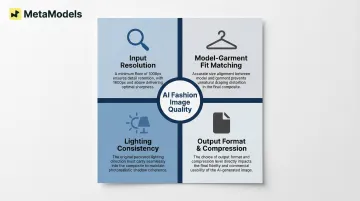
Output Format and Compression Settings
Generating at 4K but exporting in a heavily compressed JPEG destroys the resolution advantage before the image reaches a single customer. WebP images are on average 25–35% smaller than JPEG at visually similar compression levels, making format choice a real trade-off between file size and image fidelity.
Recommended export settings by use case:
- E-commerce product pages: JPEG at 85-90% quality or WebP for modern platforms
- Digital ads: PNG for transparency or high-quality JPEG (90%+)
- Print lookbooks: PNG or TIFF at 300 PPI minimum
Common Mistakes When Generating AI Fashion Model Images
Most quality issues trace back to four repeated errors:
Poor packshot quality: AI draping tools amplify flaws — they don't correct them. A wrinkled, under-lit packshot produces a wrinkled, under-lit final image. Fix lighting and fabric presentation before uploading.
Mismatched pose and garment type: Static standing poses suit outerwear and dresses; dynamic angled poses work for activewear; seated poses fit loungewear and bottoms. Wrong pose selection leads to anatomically incorrect draping and garment distortion.
Skipping the accuracy review step: Publishing without checking for fabric or print errors risks customer returns, brand credibility damage, and platform policy violations. 59% of consumers actively want clear labelling such as "Virtual Model", viewing disclosure as a sign of brand honesty.
Setting output resolution beyond what the input supports: You can't extract 4K detail from a 1000px packshot. Identify the resolution ceiling imposed by your input quality before setting output parameters.
When AI Fashion Model Images Make Sense (and When They Don't)
AI-generated model imagery fits best in high-volume workflows: e-commerce catalogues, seasonal lookbook refreshes, social media content at scale, and ad creative testing.
Jordache cut production costs by 90% — shrinking a 1,500-photo shoot from $14,400 to roughly $1,500 (about $1 per photo) and compressing turnaround from 14–30 days to under 24 hours.
Where AI excels:
- E-commerce product listing pages requiring consistent on-model imagery
- Social media content at scale (Instagram, Facebook, TikTok)
- A/B testing ad creatives with multiple model variations
- Seasonal catalogue refreshes without re-shooting entire collections
Where traditional photography still wins:
- Hero campaign imagery requiring full creative direction and brand storytelling
- Luxury brand editorials where photographic craft is part of brand identity
- Movement or video content that static AI generation can't produce
- Campaigns requiring genuine human emotion and interaction
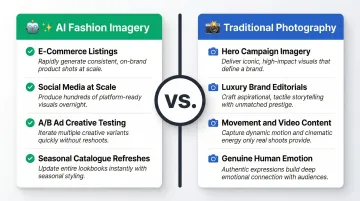
For most mid-to-large fashion e-commerce brands in 2026, the answer isn't one or the other. AI handles the volume work — product listings, variants, seasonal refreshes — while traditional shoots anchor hero campaigns and editorial content.
Frequently Asked Questions
How long does it take to generate a high-resolution AI fashion model image?
Generation time depends on platform and resolution settings. Most platforms produce results in seconds to minutes for standard outputs, with batch processing available for catalogue-scale production. MetaModels.ai offers faster automated processing for Pro-tier subscribers handling larger batch volumes.
Can AI-generated fashion model images be used commercially without paying royalties?
Most AI fashion model platforms, including MetaModels.ai, provide royalty-free commercial usage rights for generated images. However, confirm the platform's specific commercial license terms before use in paid advertising, particularly given new disclosure laws in New York and the EU.
What resolution do AI fashion model images need to be for professional e-commerce use?
Amazon requires a minimum of 1000px on the longest side to enable zoom functionality (1600px+ optimal), while Shopify recommends 2048x2048px for square product images. 4K is necessary for print lookbooks and large-format advertising but unnecessary for standard web use.
How do I ensure garment details like fabric texture and stitching appear accurately in AI-generated images?
Start with high-resolution input images (1600px+ minimum), choose platforms with human-review workflows like MetaModels.ai, and always review outputs before publishing. Check stitching lines, print patterns, fabric texture, and colour accuracy against the original packshot.
Can I maintain a consistent model identity across an entire product catalogue?
Yes. Platforms like MetaModels.ai allow you to lock in a specific AI model identity—same face, body type, and skin tone—across batch-generated images for catalogue consistency.
Conclusion
Generating high-resolution AI fashion model images in 2026 is achievable at scale, but quality outcomes depend entirely on input preparation, correct parameter configuration, and rigorous garment accuracy review. The most common failures come from under-prepared packshots, mismatched model selection, and skipping review steps — not from limitations in the technology itself.
Brands that approach AI model image generation as a disciplined workflow see consistent, publishable results at a fraction of traditional photoshoot costs. Brands that apply the steps covered in this guide — clean packshots, calibrated parameters, and human review — are the ones scaling content without sacrificing accuracy.
MetaModels.ai supports that process through human-reviewed AI imagery, a diverse model library spanning ethnicity and body type, and custom brand identity options. Each output goes through quality checks before delivery, so garment details hold up at 4K resolution across every channel.