](https://file-host.link/website/metamodels-jdwky2/assets/blog-images/36fd2383-262e-416a-8b6a-bd8e3250b51d/1777630943275864_ccd1966df419477fa76f68d7b9b1dc31/360.webp)
This article walks through the exact steps required to automate model photos for product photography, the critical variables that determine garment accuracy and realism, and the scenarios where this approach delivers the strongest return on investment.
Key Takeaways
- Automating model photos means uploading a packshot and using an AI platform to place it on a virtual model — no studio time or model booking required.
- Input image quality, model-to-garment fit matching, and fabric draping accuracy determine how realistic the output looks.
- This works best for recurring catalog updates, e-commerce listings, and social content—not for hero editorial campaigns requiring custom creative direction.
- Human review remains essential before images go live to catch garment accuracy issues.
- MetaModels.ai is built specifically for this workflow, converting packshots to on-model imagery with real-time fabric draping at scale.
How to Automate Model Photos for Product Photography
The automation workflow breaks into four stages. Each one affects whether the final image is ready to publish or needs rework — so it's worth understanding what each step demands.
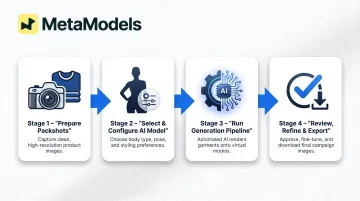
Step 1: Prepare Your Source Product Images (Packshots)
A packshot in this context is a clean, well-lit photograph of a garment displayed on a flat surface or ghost mannequin against a neutral or single-color background. Consistent lighting and a clean background produce better AI outputs than lifestyle photos or images with visible creases.
Minimum resolution and lighting standards:
To satisfy both AI generation quality and the strictest e-commerce platform requirements (ASOS requires 1,500 x 1,900px), source packshots should be captured at a minimum of 1,800 x 2,400 pixels at 300 DPI. Lighting should be even and diffused across the garment without harsh shadows. The garment should occupy approximately 80% of the frame.
Which garment types work best:
Structured garments produce the most realistic draping results:
- Basic T-shirts, knitwear, structured tops, shirts, jackets, and blazers render with the highest accuracy
- Loose-fitted garments like skirts and flowing dresses introduce moderate draping challenges
- Sheer fabrics, very dark solids, metallics, and heavily patterned textiles require additional review
Front-facing flat lay or ghost mannequin shots give the AI enough surface data to reconstruct fabric behavior accurately.
Pre-processing steps that improve results:
- Remove wrinkles in editing before uploading
- Ensure the full garment is visible within the frame
- Avoid extreme folds that obscure fit or garment structure
- Use white or light grey backgrounds (not patterned or cluttered)
Step 2: Select and Configure Your AI Model
AI platforms typically allow you to configure model attributes including body type, height/build, gender presentation, skin tone, and ethnicity. The configuration choices you make here directly affect how convincingly the garment fits — and whether the imagery reflects your actual customer.
Model attribute considerations:
- Match model build to the garment's intended size range — mismatches produce unrealistic stretching or excess fabric pooling
- Select ethnicity, age range, and body type that reflect your target audience and brand positioning
- Front-facing neutral poses work best for catalog shots where garment readability is critical; editorial poses suit lookbook content but introduce some accuracy risk
MetaModels.ai offers a library of AI models across diverse demographics, plus custom model creation — so brands can lock in a consistent model identity rather than reconfiguring for each shoot.
Step 3: Run the Automated Generation Pipeline
Inside a typical automated pipeline, the AI maps the garment from the packshot onto the selected model using fabric draping simulation, then renders lighting, shadow, and fit to match the model's pose and body proportions.
Real-time fabric draping vs. flat compositing:
True fabric draping uses physics-based or machine-learning methods to simulate how fabric behaves on a body — accounting for gravity, movement constraints, and garment-body collisions. A 2024 computational review identifies three main approaches: physics-based particle models (high realism, slow to process), machine learning combined with Linear Blend Skinning (faster but less accurate on loose garments), and Graph Neural Networks (faster and better at handling complex garment geometry).
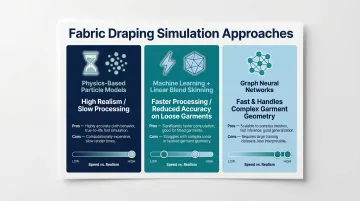
Flat compositing simply overlays a garment image onto a stock model photo without simulating fabric physics, producing unnatural stiffness and missing realistic wrinkles or folds.
Batch processing capability:
Brands with large catalogs can submit multiple SKUs simultaneously. AI platforms claim processing speeds of approximately 15 seconds per image, reducing turnaround from days to hours. For fashion brands managing 450+ styles per season across 2–4 annual collections, that speed difference is the difference between a two-day sprint and a two-week shoot schedule.
Step 4: Review, Refine, and Export
Human review is non-negotiable. AI can misread transparent fabrics, very dark materials, or heavily patterned textiles.
What to check during review:
- Collar alignment and neckline accuracy
- Sleeve drape and armhole placement
- Hemline accuracy and garment length
- Fabric texture representation
- Label or hardware visibility and color accuracy
- Overall garment proportions relative to model body
The refinement loop:
Flag images that fail garment accuracy checks, adjust source input or model configuration, and regenerate. Building a feedback pattern improves batch quality over time and reduces rejection rates.
Export settings:
Use 4K resolution for editorial and standard square crop for marketplace listings. JPEG works for most platforms; background should be white for marketplace compliance and gradient or lifestyle for social and lookbook use.
Platform-specific size requirements:
| Platform | Minimum Resolution | Notes |
|---|---|---|
| ASOS | 1,500 x 1,900px at 300 DPI | Standard product image requirement |
| Amazon | 1,600px on longest side | Required for zoom functionality |
| Zalando | 1,800 x 2,600px | Designer brand tier requirement |
What You Need Before Getting Started
Preparation directly determines how much rework happens downstream. Poor input quality is the most common reason AI-generated images need multiple regeneration cycles before they're usable.
Platform and Access Requirements
Use a dedicated fashion AI model tool—not a generic image generator. Required capabilities include:
- Garment-aware generation (not just generic photorealistic rendering)
- Model library with configurable attributes (body type, ethnicity, pose options)
- Batch processing for catalog-scale work
- Real-time fabric draping that simulates how garments actually fall and fold
General-purpose tools like Midjourney or DALL-E are not designed for on-model fashion accuracy. They lack the garment-specific controls necessary for commercial product photography.
Input Image Standards
A suitable packshot requires:
- Consistent lighting across the garment without harsh shadows
- Neutral background (white or light grey, not patterned)
- Minimum resolution: 1,800 x 2,400px at 300 DPI
- Proper framing: Garment displayed without heavy distortion or folding
Transparent or sheer fabrics, metallics, very dark solids, and heavily textured knits present the most rendering challenges — these garment types benefit most from higher-quality source shots and a human review pass before publishing.
Key Parameters That Affect Your Results
Even with a capable platform and clean source images, specific configuration choices determine whether outputs are production-ready or require heavy rework.
Input Image Quality
This is the single highest-leverage variable. The AI can only reconstruct garment details it can see—low contrast, motion blur, or partial framing directly degrade draping and fit accuracy.
Poor input quality forces more regeneration cycles, increasing both time and cost per usable image. Independent platform testing found that most AI fashion generators rated only "fair" for garment accuracy, with common issues including fabric distortion and lighting mismatches—problems that compound when input quality is inadequate.
Model-to-Garment Fit Matching
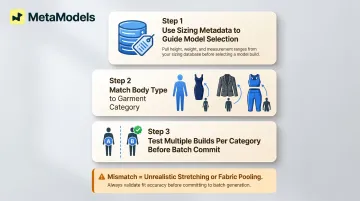
Choosing a model build that doesn't match the garment's intended size range creates unrealistic stretching or excess fabric pooling. To align model selection:
- Use sizing metadata from your product data to guide model selection
- Match body type to garment category: fitted categories like bodycon dresses, tailored blazers, or activewear require precision
- Test multiple model builds during initial validation to identify best matches for different garment categories
Pose Complexity and Garment Readability
Expressive poses drive engagement, but dynamic or angled positions give the AI less flat surface area to reconstruct garment details accurately. In practice:
- Use neutral front-facing poses for catalog imagery where product accuracy matters most
- Reserve lifestyle poses for secondary or social content where visual appeal is the priority
- Avoid extreme angles or complex body positions for garments with intricate details
Background and Lighting Context
The output background choice affects perceived quality. A transparent or white background isolates the model for marketplace use. A generated lifestyle scene adds context for social and lookbook content. Each option requires different resolution and color calibration settings.
Generated lighting needs to match the original garment color — mismatches are one of the most common causes of rework. Watch for these two failure modes:
- Light backgrounds cause edge-blending issues on light-colored garments
- Dark scenes reduce visible detail on dark textiles
Common Mistakes When Automating Model Photos
Skipping Source Image Quality Checks
Teams often underestimate how much source image quality affects output. Running an entire catalog batch with poor packshots wastes generation budget and produces a high rejection rate. Before batch processing, run every image through a quick checklist:
- Resolution meets platform minimums
- Lighting is consistent across the batch
- Background is clean with no color cast
- Garment is properly framed without cropping
Selecting Model Attributes Based on Aesthetics Rather Than Garment Fit
Choosing model configurations that look appealing but don't suit the garment's structure causes draping inaccuracies that damage product credibility. Match model selection to garment category: slim-cut styles need models proportioned for that silhouette; oversized or relaxed fits need different body configurations entirely. When in doubt, test two model profiles against the same SKU before committing to a batch.
Treating AI Output as Final Without Garment Accuracy Review
Publishing AI-generated model images without review risks misrepresented fit, garment distortion, or incorrect color rendering. A survey of 411 shoppers found that 30% would expect to return a product if they knew a virtual model was used, and 37% would be more careful about sizing. Accuracy failures drive up return rates and complaints — wiping out the cost savings automation was meant to deliver.
Running Full-Catalog Batches Before Validating with a Test Set
Start with 10–20 SKUs across diverse garment types to catch platform-specific failure patterns before committing to a full-catalog run. Test these categories separately, as each tends to surface different failure modes:
- Structured garments (blazers, tailored pieces)
- Fitted garments (bodycon, stretch fabrics)
- Challenging categories (sheer fabrics, dark solids, complex patterns)
Identifying which categories need tighter source image quality — or manual review — at the test stage saves significant rework downstream.
When to Automate Model Photos (and When It Falls Short)
Automated model photography isn't universally the right solution. Understanding where it delivers strong ROI versus where it underperforms saves budget and prevents brand damage.
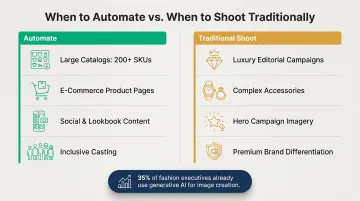
Best-fit scenarios:
- Large or frequently updated catalogs: Ideal for seasonal launches, fast fashion cycles, and brands producing 200+ SKUs per season
- E-commerce product pages: Consistent model presentation across hundreds of SKUs for marketplaces, DTC storefronts, and fashion aggregators
- Social media and lookbook content at scale: Instagram, Facebook, Pinterest, TikTok ad creative
- Inclusive casting at no extra cost: Represent diverse ethnicities, body types, and demographics without repeat casting fees
Industry adoption reflects this shift. More than 35% of fashion executives report already using generative AI for functions including image creation, and Zalando reported that 70% of its late-2024 editorial images were AI-generated.
That said, automation isn't always the right call.
When to stick with traditional shoots:
- Luxury and editorial campaigns where authentic storytelling defines the brand
- Complex accessories that require active model interaction — handbag straps, jewelry clasps, watches, scarves
- Hero campaigns where one image needs to be exceptional, not just consistent
- Premium brands where photography style itself is a core differentiator
Frequently Asked Questions
Can AI-generated model photos replace traditional model photoshoots entirely?
AI model photos are a strong replacement for catalog, e-commerce, and social content at scale. Traditional shoots remain more appropriate for hero editorial campaigns and luxury brand storytelling where bespoke creative direction and real human expression are central to the brand image.
What types of garments work best with AI model photo automation?
Structured garments like blazers, denim, knitwear, and fitted dresses tend to produce the most accurate draping results. Sheer, transparent, or very dark fabrics present more rendering challenges and may require higher-quality source images or human review before publishing.
How do I ensure garment accuracy in AI-generated model images?
Garment accuracy depends on clean source packshots (minimum 1,800 x 2,400px, neutral background, even lighting), correct model-to-garment fit selection, and human review before publishing. Check collar alignment, sleeve drape, hemline accuracy, and fabric texture before going live.
Do AI model photos meet major e-commerce platform image requirements?
AI-generated images can meet platform specs for resolution, background, and framing. Accuracy standards apply regardless of how images are produced: Amazon requires disclosure for photorealistic AI-generated people and mandates 100% accurate product representation.
How long does it take to automate model photos for a full product catalog?
A catalog of 100–200 SKUs can typically be processed in hours rather than days using batch generation. The bulk of human time is spent on quality review rather than generation itself, with most platforms claiming approximately 15 seconds per image generation time.
What image resolution do I need to start automating model photos?
Source packshots should be at least 1,800 x 2,400 pixels at 300 DPI, which satisfies both AI generation quality thresholds and strict platform requirements like ASOS (1,500 x 1,900px). Output resolution is capped by input quality; MetaModels.ai supports up to 4K output when source images meet that minimum.