
Introduction
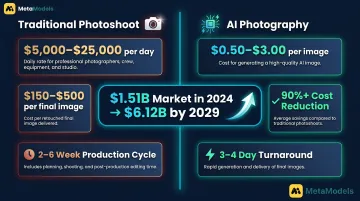
A fashion brand with 500 SKUs launching a new season needs imagery fast — but a traditional photoshoot can't keep up with the volume or the budget. The AI-generated fashion photography market reached $1.51 billion in 2024 and is projected to hit $6.12 billion by 2029, reflecting rapid structural adoption across the industry. Traditional fashion photoshoots typically cost $5,000–$25,000 per day session, yielding $150–$500 per final image, while AI platforms produce comparable imagery at $0.50–$3.00 per image — a 90% or greater cost reduction.
Zalando reached 70% AI-generated editorial content by Q4 2024 and cut production costs by 90% — but only after systematically controlling input quality, platform configuration, model consistency, and QC discipline. That kind of result is achievable. It's not automatic.
What follows is a practical breakdown of how to build a scalable AI model photography workflow — including where most teams lose time and money before they get it right.
Key Takeaways
- AI converts packshots or flatlays into on-model images at scale, eliminating model bookings and long production cycles
- Clean, evenly lit product images on neutral backgrounds produce dramatically better outputs than poorly sourced assets
- Consistent model identity, lighting, and crop ratios are what separate a polished catalogue from a disjointed one
- Human QC after generation is non-negotiable — garment fit, fabric drape, and limb artifacts all need a final check
- Best for high-SKU e-commerce and colorway variants; less reliable on complex layered garments or hero campaigns
How to Scale Fashion Catalogues with AI Model Photography
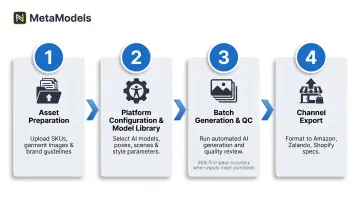
Step 1: Prepare and Organize Your Product Image Assets
Audit existing assets by input type—packshots, flatlays, ghost mannequin images—and separate high-quality inputs from those needing enhancement. Do not treat AI as a correction layer for poor source material. Poor image quality costs online retailers billions in lost sales annually, and AI generation amplifies what's in the source image rather than correcting it.
Minimum quality standards for source assets:
- Even, shadow-free lighting across the full garment body
- Complete visibility of hem, collar, and sleeves
- Neutral or white background
- Sufficient resolution for 4K output requirements (at least 1,600px on the longest side)
- No heavy wrinkles or mid-fold creasing (smooth major wrinkles while maintaining natural fabric texture)
Organise files by SKU, colourway, and garment category before batch upload. Consistent naming conventions prevent version-control failures and make QC audits trackable at volume.
H&M maintains a 47-page photography style guide to standardise input quality. That level of documentation is what separates scalable programmes from endless regeneration loops.
Step 2: Configure Your Platform, Model Library, and Style Parameters
Select a platform that supports batch processing, persistent model storage, API access for high-SKU programmes, and output resolution aligned to your channel requirements. Not every AI photography tool is built for volume, so evaluate these capabilities before committing.
Build a model library before running any generation:
- Define a diversity matrix across body type, ethnicity, and age that reflects your brand's target audience
- Use persistent model configurations so the same model identity appears consistently across every SKU in a collection
- Platforms like MetaModels.ai offer a curated library of diverse AI models alongside custom model creation options
Shopify's internal analysis of 50,000+ merchants found stores with consistent product photography achieve 23% higher conversion rates. Persistent model configurations are what deliver this consistency at scale.
Lock style parameters as a reusable template before the first batch:
- Standardise lighting setup
- Fix background type (white seamless, neutral, or custom brand backgrounds)
- Lock pose category
- Set crop ratio
No visual variables should drift across the collection. Save these as versioned templates to prevent guesswork on every batch.
Step 3: Run Batch Generation and Capture Variations
Upload organised asset sets and initiate generation using saved style templates. Generate 3–4 output variations per SKU to create selection options and backup assets without re-prompting individually.
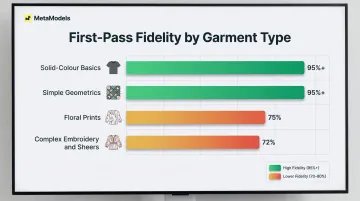
For packshot-to-model workflows—a high-volume pipeline for brands with large packshot libraries—verify that the platform's fabric draping engine renders realistic garment behaviour. This is where inaccurate drape creates the most regeneration waste. Research shows AI platforms achieve 95%+ fidelity for solid-colour garments but only 70–80% for florals and complex patterns, representing a 15–25% fidelity drop for complex designs.
Save all generation parameters, seeds, and configuration records at this stage so any batch can be reproduced or modified for future seasonal refreshes without starting from scratch.
Step 4: Review, Quality-Check, and Export for Channels
Apply a structured human QC layer to every batch. WeShop reports an 80% first-pass accuracy rate, with 2 iterations typically needed to produce a publishable image. Human review is not optional — it's part of the pipeline.
Check each image for:
- Garment alignment: shoulder drop, hem level, sleeve pitch
- Fabric drape accuracy
- Limb and hand artifacts (fingers, elbows, proportions)
- Skin tone consistency
Automated quality scores catch pixel-level issues but miss contextual garment failures. Sort outputs into three buckets: publish-ready, retouch-required, and regenerate.
Track the regeneration rate by SKU category as a workflow health metric. A rising rerun rate almost always signals an upstream input problem, not a generation problem.
Export in channel-specific formats:
- Confirm background specification, file format, crop ratio, and resolution for each destination (marketplace PDP, social, lookbook)
- Amazon requires minimum 1,000px longest side (1,600px for zoom) with pure white RGB 255,255,255 background
- Zalando best practice is 1,801 x 2,600px with grey R241 G241 B241 background for model views
- Shopify recommends 2,048 x 2,048px with pure white background and requires AI disclosure in product descriptions as of 2026
Bake these specs into export automation to prevent rejected uploads.
When This Approach Fits—and When It Doesn't
Ideal applications:
- High-SKU e-commerce catalogues needing consistent on-model imagery across hundreds of products
- Colorway and variant coverage where shooting every option traditionally is cost-prohibitive
- Seasonal content refreshes and social media volume where rapid turnaround is time-sensitive
On-model imagery increases conversion rates by up to 33% compared to lower-quality visuals, making AI-generated on-model coverage a measurable revenue driver for high-SKU catalogues.
Poor fit:
- Garments with highly complex construction—multilayer sheers, heavily beaded pieces, intricate surface embroidery—that consistently exceed AI draping accuracy
- One-off hero campaign imagery where physical model performance and unique creative direction are the deliverable
- Cases where strict legal requirements around model likeness provenance make proprietary AI model generation necessary
Independent testing found AI "failed to accurately replicate the cut, the drape, and the detailing of garments" in complex categories, confirming that garments with complex construction require traditional shoots or human-reviewed AI output.
What most brands do instead:
Ghost mannequin and traditional studio shoots remain the benchmark for complex garments and flagship campaign work. For everything else, most brands operating at scale use roughly an 80/20 split — AI for catalogue volume, traditional shoots for hero and editorial content.
What You Need Before You Start
Equipment and Platform Requirements
Minimum platform capabilities for catalogue-scale production:
- Batch export functionality
- API access or direct integration with your e-commerce stack
- Persistent model storage
- Output resolution of at least 2K (4K preferred for zoom-enabled marketplaces)
Confirm these specifications before signing up. Not every AI photography tool is built for volume. MetaModels.ai, for example, delivers content in up to 4K resolution across all subscription plans and supports marketplace-specific compliance for Amazon, Myntra, Ajio, and Flipkart.
Input Standards and Asset Readiness
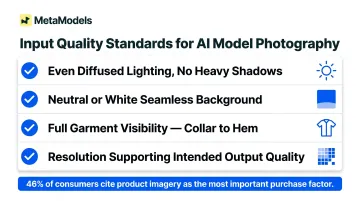
Source images require:
- Even, diffused lighting with no heavy shadows across the garment body
- Neutral or white seamless backgrounds
- Full garment visibility from collar to hem
- Resolution supporting the intended output quality
Inputs that do not meet this standard should be re-shot or enhanced before entering a batch queue, not after. 46% of consumers cite product imagery as the most important factor in purchase decisions, ranking it above descriptions, ratings, and reviews. That means weak source images don't just affect aesthetics — they affect sales.
Team Readiness and Process Infrastructure
Strong inputs get you halfway there. The other half is internal process. Teams need a defined style guide documenting:
- Approved model demographics
- Lighting specs
- Background types
- Crop ratios
- QC pass/fail criteria
Without this, approvals become subjective calls on every batch — and that friction compounds fast at catalogue scale.
Key Parameters That Shape Output Quality at Scale
Generation quality at volume is determined by a handful of controllable variables. Brands that define these upfront achieve high first-pass publish rates; those that skip them end up fixing problems after the fact — erasing the time savings entirely.
Input Image Quality
Generation engines amplify what's already in the source image — underexposure, mid-fold creasing, and inconsistent backgrounds carry through to the output rather than getting corrected. This is the most preventable source of regeneration waste across a batch.
WeShop reports an 80% first-pass accuracy rate when input standards are met, with roughly 2 iterations needed to reach a publishable image. Poor source assets require re-photographing rather than re-generating, which multiplies costs and timelines.
Model Persistence and Diversity Configuration
Using an inconsistent or default model selection across a collection produces a visually disjointed product grid that undermines brand identity and triggers additional retouching. Locked persistent models keep the same face, body type, and proportions consistent across every SKU.
This also pays forward: the same model library can be reused across seasonal refreshes without rebuilding character settings from scratch. MetaModels.ai offers custom model creation matched to brand identity, alongside a curated library covering diverse ethnicities, demographics, and body types.
Lighting and Background Standardization
Without locked lighting parameters, shadow direction, fill ratio, and background tone shift batch to batch. Inconsistent lighting is one of the most visible quality failures on a product grid — and one of the most damaging to purchase confidence on PDP pages.
Standardized lighting templates applied as a generation preset — and verified at QC — directly cut post-generation correction time and reduce rework across channels. Baymard Institute found 18% of users abandon carts specifically because of poor visual presentation.
Garment Type Complexity
Sheer fabrics, heavy knitwear, embroidered surfaces, and sequined pieces stress-test draping engines and generate higher error rates than standard woven garments. Batching them with the same parameters as simpler styles inflates regeneration costs and extends timelines.
Categorizing SKUs by construction complexity before processing lets brands route challenging pieces to adjusted parameters, specialized retouching, or a separate pipeline — preventing a handful of difficult garments from stalling an entire batch run. Solid colors and simple geometrics achieve 95%+ fidelity, while florals and abstract prints drop to 70–80%.
Common Mistakes and How to Fix Them
Most catalogue scaling failures are not platform problems—they are predictable process failures that appear at specific stages. Identifying the likely cause early saves regeneration cost and prevents launch delays.
Skipping Input Standardization and Batching Mixed-Quality Assets
Teams often assume AI generation will smooth out source image inconsistencies—particularly when migrating large legacy flatlay libraries originally shot for flat display rather than model compositing. Run a sample of the 10–20 most problematic assets through the platform before committing the full batch. Use this test to define a formal input quality gate — any file that fails the checklist gets rejected before upload, not after generation.
Returns driven by image mismatch erode margins by 15–30% depending on category.
Using Default or Drifting Model Settings Across a Collection
Teams new to AI photography workflows tend to prioritize speed over configuration — relying on platform defaults and skipping the step of building a locked model library before the first production batch. The result is visual inconsistency that compounds across a full seasonal run.
Fix this before production starts:
- Create and save at least three to five persistent model configurations
- Label each configuration clearly by use case (e.g., hero shots, category pages, social crops)
- Reapply the same saved settings to future seasonal batches to prevent drift
Treating AI Output as Publish-Ready Without Human Review
High platform-reported quality scores create false confidence, especially under deadline pressure. A strong batch pass rate does not mean every individual image is safe to publish.
At minimum, human review should cover:
- Shoulder alignment and sleeve placement
- Hand and finger edges
- Collar and hem accuracy
- Skin tone consistency across the batch
Set a clear regeneration threshold. When a defined percentage of images are flagged, pause the batch and investigate upstream inputs before continuing.
Ignoring Channel Export Requirements Until After Generation Is Complete
Production teams often plan generation parameters without first mapping destination-specific requirements. Format, aspect ratio, background specification, and resolution vary significantly across Shopify, Amazon, Zalando, and social platforms — and mismatches discovered after a full batch run mean regenerating work you've already paid for.
Document all channel export specs in the style guide before Step 1, then build them into export automation from the start.
Conclusion
Scaling fashion catalogues with AI model photography delivers consistent cost and speed advantages when inputs are standardized, model parameters are locked, and human QC is built into the workflow. Treat it as a production discipline — the results follow from the process.
Most catalogue failures at scale trace back to poor asset preparation or skipped parameter controls — not platform limitations. Fix inputs upstream rather than troubleshooting outputs after the fact.
Three principles to carry forward:
- Use AI model photography for high-SKU collections and seasonal refreshes where velocity matters
- Retain traditional or hybrid shoots for hero and bespoke campaign imagery
- Measure ROI by cost per publishable image and PDP conversion rates on AI-generated batches
Frequently Asked Questions
How much does AI model photography cost compared to traditional photoshoots?
Traditional fashion photoshoots cost $5,000–$25,000 per day session, yielding $150–$500 per final image. AI platforms produce imagery at $0.50–$3.00 per image, representing a 90%+ cost reduction that compounds significantly at high SKU volumes.
Can AI model photography accurately represent all garment types, including complex fabrics?
AI handles standard wovens and basic knits well but struggles with sheers, heavily beaded pieces, and multilayer construction. Solid colors achieve 95%+ fidelity while complex patterns drop to 70–80%. Complex garments benefit from adjusted parameters or supplementary manual retouching.
How do I keep model appearance consistent across hundreds of SKUs in a catalogue?
Use persistent model configurations, locked generation parameters, and a versioned model library. Platforms like MetaModels.ai let you save brand-specific AI models — same face, body type, and proportions — and reuse them across every seasonal batch.
Do I need professional product photos to start using AI model photography?
You need even lighting, neutral background, and full garment visibility at minimum. Professionally shot images produce better outputs, but clean packshots and well-prepared flatlays are a workable starting point.
How long does it take to scale a fashion catalogue using AI model photography?
Traditional shoot cycles run 2–6 weeks end-to-end. AI workflows compress this to 3–4 days at campaign scale or 80–120 SKUs per day per operator. Timeline depends heavily on input preparation and QC capacity.
Are AI-generated model images accepted by major e-commerce marketplaces like Amazon or Zalando?
Yes, provided images meet each platform's technical specifications (background, resolution, ratio). That said, Zalando explicitly rejects "low quality AI generation" and Shopify requires AI disclosure as of 2026 — confirm current platform guidelines before production begins.