This guide breaks down exactly what's required to build an AI-powered denim catalog, the step-by-step process, which variables most affect catalog quality, and the mistakes that cause brands to waste time and budget when using AI catalog tools.
Key Takeaways
- AI-powered denim catalogs convert packshot or flat-lay images into on-model, lifestyle-ready visuals — no photoshoot required
- Start with clean, high-resolution packshots and clear brand style guidelines for best results
- Catalog success depends on input image quality, model diversity, denim texture accuracy, and visual consistency across SKUs
- AI denim catalogs are well-suited for scaling large collections, A/B testing new styles, and building inclusive visual ranges
- Brands reduce catalog production time from 10–21 days to hours while cutting production costs
What You Need Before Building an AI-Powered Denim Catalog
Preparation directly determines output quality. With denim, texture and wash details are critical visual signals — buyers decide fast based on what they see. Salsify's 2026 Consumer Research found that 61% of shoppers state product images and videos are the biggest factor in purchase decisions, and 33% will abandon a purchase due to low-quality or missing images.
Input Assets and Quality Requirements
Minimum input standards for denim packshots:
- Resolution: Minimum 1000px on the short side (higher is better)
- Background: Neutral or white background
- Garment staging: Fully unfolded and wrinkle-free
- Coverage: Front and back shots for catalog completeness
- Detail visibility: Complex denim details — distressing, acid wash, raw hems, embroidery — must be clearly visible
The AI uses the input image to render fabric accurately on the model. If your packshot is blurry, poorly lit, or shot at an angle, the generated output inherits those flaws and cannot be corrected downstream.
Brand and Style Guidelines
Define catalog parameters before starting:
- Output format: E-commerce listing, lookbook, social ad
- Model demographics: Preferred body types for your target audience
- Background preferences: Studio white, lifestyle setting, or custom environment
- Pose direction: Standing, walking, seated (if supported by your platform)
These decisions shape how consistent your catalog looks at scale — and consistency has a measurable impact. According to Baymard Institute research, 56% of online shoppers' first action on a product page is to explore product images. Poor visual quality doesn't just hurt one listing; it damages perception of the entire brand. Locking in these parameters upfront means every image you generate reinforces the same visual identity.
How to Build an AI-Powered Denim Product Catalog
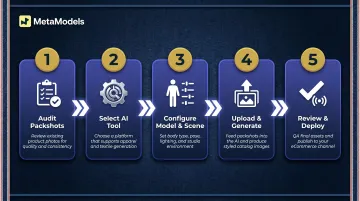
These five steps work whether you're producing a 10-SKU capsule collection or a 200-piece seasonal range. The workflow is the same — only the volume changes.
Step 1: Organize and Audit Your Denim Packshots
Sort your denim inventory by category (straight-leg, skinny, wide-leg, shorts, jackets) and ensure each item has a clean packshot. Flag any garments with insufficient image quality for re-shooting before proceeding, since poor inputs produce poor AI outputs.
Create a simple naming or tagging system for each SKU:
- Fit type
- Wash
- Gender
- Size range
This makes it easier to manage outputs and maintain consistency when generating dozens of catalog images.
Step 2: Select an AI Catalog Tool Built for Fashion
Not all AI image tools handle denim accurately. Generic tools often distort fabric texture, misrepresent wash gradients, or produce garment structures that look physically impossible. Choose a platform built specifically for fashion catalog production — one that understands garment drape and fabric behaviour at the detail level denim demands.
Key capabilities to look for:
- Real-time fabric draping technology
- Curated library of diverse AI models across ethnicities and body types
- Human review or quality verification of outputs
- Ready-to-publish 4K resolution images
Platforms like MetaModels.ai are purpose-built for this workflow, allowing brands to convert packshots to on-model catalog content without booking physical models or paying royalties.
Step 3: Configure Model and Scene Parameters
Select AI model profiles that match your brand's target customer demographic: body type, age range, ethnicity, and styling direction. For denim specifically, prioritize poses that show how the fabric drapes when standing, walking, or seated — fit behaviour matters greatly to buyers.
Set scene and background parameters:
- E-commerce catalogs: Clean studio backgrounds for listing consistency
- Lookbook or social content: Lifestyle or contextual backgrounds
Define this before generating at scale so all outputs maintain visual cohesion.
Step 4: Upload Denim SKUs and Generate Catalog Visuals
Upload each packshot to the platform and run the generation. Well-built AI fashion tools will map the denim texture, wash, and garment structure onto the selected model, preserving fabric detail and garment fit with precision.
Run a small test batch first — generate 3-5 images before committing to the full catalog — to verify that fabric drape, wash rendering, and garment fit look accurate and brand-appropriate before scaling.
Step 5: Review, Export, and Deploy
Review all generated images against your brand quality checklist:
- Check that denim details (stitching, distressing, wash gradients, pockets) are accurately represented
- Flag any images where the AI has misrendered texture or lost garment detail for regeneration
Once approved, export and organize for deployment:
- Export at the required format and resolution for each channel
- Label outputs by SKU and channel (product page, ads, lookbook, social)
- Confirm files are immediately deployable without additional sorting
Key Parameters That Affect Denim Catalog Quality
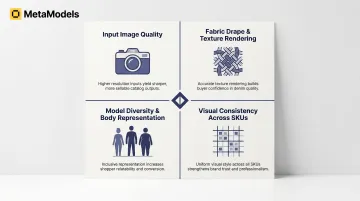
The same AI tool used by two different brands can produce dramatically different results. The quality difference almost always comes down to four controllable variables.
Input Image Quality
The AI reconstructs how denim looks on a body by learning from the packshot — so if the source image is blurry, poorly lit, or shot at an angle, the generated output inherits those flaws. There's no correcting them downstream.
Poorly staged packshots produce AI outputs where denim texture appears flat, washes lose their gradient character, and fine details like stitching or raw hems disappear entirely.
Fabric Drape and Texture Rendering Accuracy
Denim has stiffness, structure, and dimensional washes that generic AI generators consistently mishandle. Fashion-specific tools with real-time fabric draping technology produce images where denim looks structurally credible — waistbands sit correctly, legs fall naturally, and stretch fabrics conform to the model's shape without looking painted on. Customers can't accurately judge fit from a flat or distorted render, which directly affects purchase confidence.
Model Diversity and Body Representation
According to Nielsen Norman Group research, shoppers feel more confident purchasing when they see many different people wearing a product. Models of different sizes, ages, and body types increase purchase likelihood and drive repeat visits. Shoppers also use model height and size data to assess garment fit — for example, comparing a 5'4" user to a 5'9" model to gauge denim length.
Using the same model profile across all SKUs reduces catalog relevance. MetaModels.ai, for instance, provides a model library spanning different body types, ages, and ethnicities — so a single denim SKU can be shown on multiple profiles without additional shoots, improving both inclusivity and conversion.
Visual Consistency Across SKUs
A catalog where images vary in zoom level, lighting, or background style looks amateurish and erodes buyer trust. Consistency is the signal of a professional catalog.
Lock in your parameters — model poses, background style, lighting temperature — before generating at scale, and don't adjust them mid-run. Inconsistency across SKUs is one of the most common quality problems, and one of the most avoidable.
When Should You Use an AI-Powered Denim Catalog?
AI catalog generation isn't right for every situation. Knowing where it fits — and where it doesn't — saves you time, budget, and rework.
Ideal use cases:
- Brands launching new collections and needing catalog visuals before physical samples are available
- E-commerce businesses that need to scale content across large SKU counts without proportional cost increases
- Brands that want to test new washes or fits before investing in a full photoshoot
- Companies that need inclusive, multi-body-type imagery without booking multiple model sets
Where AI tools fall short (or need backup):
- Hero campaign imagery that requires editorial storytelling and human-directed art
- Lifestyle imagery requiring real-world locations
- Garments with intricate hand-crafted details where photographic accuracy is commercially critical — such as limited-edition artisan pieces
A hybrid approach works well here: use AI for the bulk of your catalog and reserve traditional photography for the select hero shots that define your brand story.
Common Mistakes When Building AI Denim Catalogs
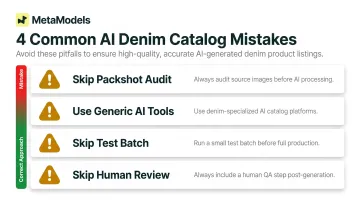
Most AI denim catalog projects don't fail because the technology is wrong — they fail because of avoidable process errors. These are the four most common ones:
- Audit packshots before uploading. Brands often load whatever images exist in their asset library, then blame the AI when outputs look off. Set a minimum image quality threshold before any generation begins.
- Use fashion-specific platforms, not general AI tools. General-purpose image generators distort denim details — fabric structure, wash gradients, and garment proportions. Platforms purpose-built for fashion catalog production handle these correctly.
- Run a test batch before generating at scale. Processing 200 images before reviewing the first 5 is a costly mistake. A small test batch surfaces misaligned parameters, poor texture rendering, or incorrect model fit early.
- Never skip the human review step. Even strong AI platforms occasionally misrender a detail. A systematic check against the original packshot before publishing catches rendering errors before customers do.
Frequently Asked Questions
Can AI accurately render denim-specific details like distressing, acid wash, and raw hems?
Fashion-specific AI tools with fabric draping technology can preserve these details from a high-quality packshot. Generic AI image tools often lose or hallucinate these fine details, producing inaccurate representations.
Do I need professional studio packshots to start building an AI denim catalog?
Professional studio packshots are strongly recommended, but high-quality flat-lay images on a clean white or neutral background with good lighting can also work. Clarity, resolution, and an unobstructed view of the garment are the key requirements.
How is an AI-generated denim catalog different from a traditional photoshoot catalog?
AI catalogs eliminate model booking, studio, and photographer costs and can be produced in hours rather than weeks. Traditional photoshoots offer editorial flexibility and require physical samples. Purpose-built fashion AI tools have closed that quality gap considerably.
Can I generate catalog images showing the same denim on multiple body types?
AI platforms with diverse model libraries allow brands to show the same SKU across different body types, ethnicities, and demographics — improving inclusivity and purchase confidence across a broader customer base.
Are AI-generated denim catalog images suitable for paid advertising?
High-resolution (4K) AI-generated images produced by fashion-specific platforms are generally suitable for paid social and digital advertising. Brands should review each platform's terms and the ad network's policies regarding AI-generated imagery before deploying them.
How many denim SKUs can I realistically catalog using AI in a single day?
Volume depends on the platform and input preparation. Well-structured workflows with clean packshots can push dozens to hundreds of SKUs through a single production run — far exceeding traditional photoshoot throughput.