
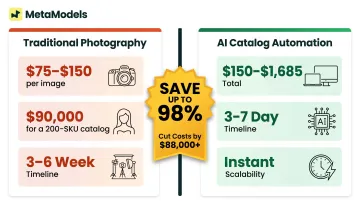
AI catalog automation flips this model entirely. The same 200-SKU catalog costs $150-$1,685 using AI tools, compresses production timelines from 3-6 weeks to 3-7 days, and eliminates model booking, studio fees, and photographer day rates entirely. This guide walks through the exact four-step process to automate fashion catalog production with AI, the quality checkpoints that separate professional output from returns-driving failures, and the specific scenarios where automation delivers compound advantages at scale.
Key Takeaways
- AI converts product packshots to on-model imagery without physical models, eliminating studio costs and scheduling delays
- Quality depends on input resolution (minimum 2,048px recommended), model selection consistency, and human review rigor
- Best suited for brands managing 100+ SKUs per season, frequent collection drops, or multi-channel content demands
- Skipped review checkpoints and low-resolution inputs are the two most common reasons AI catalog rollouts fail
How to Automate Fashion Catalog Production With AI
Output quality compounds across every stage of the AI catalog pipeline. A poorly lit packshot sets the quality ceiling for all imagery generated from it, and a missed review step lets garment inaccuracies reach your live catalog and drive returns. Each step below builds on the previous one — get the sequence right, and the efficiency gains follow.
Step 1: Prepare and Standardize Your Product Images
Production-ready packshot inputs require consistent backgrounds (white or neutral), adequate resolution, and accurate color rendering under neutral white light. These inputs directly determine the quality ceiling of all generated imagery—AI can't recover detail from blurry source files or correct distorted proportions.
Complete these image checks before uploading:
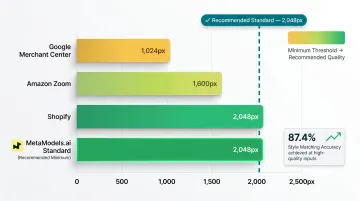
- Resolution minimums: Amazon requires 1,600px for zoom functionality; Shopify recommends 2,048x2,048px. Standardize at minimum 2,048px on the longest side to satisfy all major platforms.
- Consistent crop ratios: Garments should occupy similar frame positions across all SKUs to prevent model-garment fit mismatches later
- Packaging clutter removal: Eliminate hands, accessories, or hangers obstructing the garment
- True-to-color exposure: Shoot under neutral white light to prevent color casts that AI will replicate across the catalog
MetaModels.ai accepts packshots in flat-lay or ghost mannequin formats and preserves color, texture, print, and proportion details during draping. The platform's human review layer checks these details post-generation, but poor inputs create errors that manual correction can't fully resolve.
Step 2: Select and Configure Your AI Model Library
Model selection governs catalog consistency. Choose body types, skin tones, demographics, and pose categories that match your target audience and brand identity before generating the first image. MetaModels.ai provides a curated library of AI models spanning diverse ethnicities and body types, with custom model creation to match specific brand identities.
Lock these configuration inputs at the catalog level to prevent visual inconsistency:
- Lighting style: Soft studio lighting vs. natural daylight vs. high-contrast editorial
- Backdrop: Plain white, gradient grey, lifestyle scenes
- Pose category: Standing neutral, editorial angles, movement/action shots
- Framing: Full-body, three-quarter, cropped torso-up
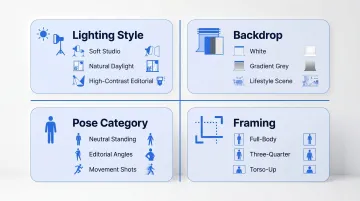
Locking these settings before batch generation ensures every SKU shares the same visual DNA. Brands that configure mid-catalog end up with mismatched images that look unprofessional even when individually well-rendered, which undercuts the efficiency gains automation is supposed to deliver.
Step 3: Generate AI Imagery With Fabric Draping and Scene Logic
The AI generation step maps your garment onto the selected model using fabric draping logic that simulates material behavior based on texture, weight, and silhouette. Modern diffusion-based systems significantly outperform older GAN-based models in draping realism, producing garment-accurate results without physical photoshoots.
What this step automates:
- Pattern placement across garment surfaces
- Shadow rendering based on fabric folds and model pose
- Pose consistency across all SKUs in the batch
What requires user control:
- Scene background selection (e-commerce white, lifestyle context, editorial scene)
- Styling context (product page, lookbook, social media, paid ads)
- Output resolution (standard web or up to 4K for print/premium channels)
Users can choose from curated background libraries or request custom scenes matched to brand vision. Output is delivered as ready-to-publish content in up to 4K resolution, formatted for e-commerce PDPs, social media platforms, and advertising channels.
Step 4: Review, Refine, and Export Catalog-Ready Assets
Human review is non-negotiable in professional AI catalog pipelines. AI can misrender intricate details like embroidery, sheer fabrics, or complex prints, and publishing those errors unchecked undermines customer trust and drives returns.
MetaModels.ai addresses this with a human review layer where fashion specialists verify garment accuracy before delivery. Every image is checked for color fidelity, shape and proportion accuracy, and correct rendering of fabric texture and print details.
This step matters for the bottom line: 22% of e-commerce returns stem from inaccurate product depiction, and clothing return rates reach 20–40%. The review layer is the quality gate that separates efficient automation from expensive mistakes.
Export configuration finalizes the catalog:
- Output formats: JPG for web efficiency, PNG for transparency needs, 4K resolution for print catalogs
- Aspect ratios per channel: Square (1:1) for Instagram, vertical (4:5) for mobile PDPs, landscape (16:9) for ads, custom ratios for marketplace compliance (Amazon, Shopify, platform-specific requirements)
- Naming conventions: Structured file naming (SKU-model-background-001.jpg) for catalog organization and digital asset management
When AI Catalog Automation Is the Right Fit
AI catalog automation works best at scale. For single-product launches or bespoke editorial shoots with specific art direction, traditional photography often remains the better choice.
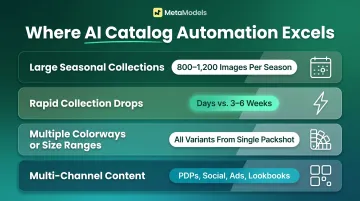
Automation clearly wins in these scenarios:
Large seasonal collections: Fashion brands typically release 5-6 collections per year, each needing 4-6 images per SKU — that's 800–1,200 images per season for a 200+ SKU catalog. AI handles these batches without costs scaling per image.
Rapid collection drops: Fast fashion retailers like Zara release hundreds of new items per week, but traditional photoshoots run on 3–6 week timelines. AI compresses turnaround to days.
Multiple colorways or size ranges: AI generates all variations from a single packshot, so brands avoid re-shooting the same garment for every color or size option.
Multi-channel content demands: Teams needing outputs for product pages, social media, paid ads, and lookbooks from a single shoot cycle cut duplicate production costs.
Results may fall short in these situations:
- Extremely intricate handcrafted garments where texture nuance is critical to the buying decision
- Brands with rigid editorial style requirements demanding specific human art direction that prediction-based AI can't replicate
- Use cases where AI model diversity options don't yet match a very specific target audience demographic
What You Need Before You Start
Preparation quality directly determines output quality. Poor inputs create rework that costs more time than the AI saves. 67% of fashion and apparel sellers now use AI-generated imagery, up from 31% in 2024—and the brands succeeding are those who treat AI as a production system requiring proper setup, not a magic fix for poor inputs.
Input Image Requirements
Acceptable packshot or product images at minimum:
- Minimum 1,024px resolution; ideally 2,048px on the longest side
- White or plain grey backgrounds — no shadows, clutter, or distracting elements
- Shot under neutral white light (5000K–6500K) to prevent color casts
- Consistent framing across all SKUs so garments occupy similar positions for uniform model fitting
Unacceptable inputs:
- Strong color casts from tungsten or fluorescent lighting
- Pattern-obscuring shadows that hide fabric detail
- Distorted proportions from wide-angle lenses or poor camera angles
- Low-resolution images under 512px (these fail platform minimums and produce flat, detail-poor renders)
Brand Configuration and Model Brief
Define these brand-level settings before generating the first image:
- Model demographics: Ethnicity, age range, body types matching your target customer
- Preferred pose categories: Neutral standing, editorial angles, action/movement shots
- Background/scene type: E-commerce white, lifestyle context, editorial environments
- Lighting tone: Soft studio vs. natural daylight vs. high-contrast dramatic
- Output aspect ratios: Platform-specific formats for each channel (1:1 Instagram, 4:5 mobile PDP, 16:9 ads)
Brands without a defined visual identity brief produce inconsistent outputs regardless of the tools they use. Lock down these settings before you generate anything.
Platform Access and Workflow Setup
Required infrastructure:
- Access to an AI fashion imagery platform with fabric draping and human review capabilities (such as MetaModels.ai, which supports custom model creation for ethnicity, body type, and age range)
- Method for batching uploads: Manual batch upload or product feed integration; enterprise users may require API access for programmatic processing
- Defined review-and-approval workflow: Structured checkpoint before images enter the publishing pipeline, ensuring garment accuracy verification occurs before assets go live
With these inputs and settings in place, you're ready to move into the generation and review phase.
Key Variables That Affect AI Catalog Output Quality
Even with the right tools, output quality varies based on several controllable parameters. Knowing which variables to configure correctly — and why they matter — is what separates consistent, publish-ready results from repeated re-renders.
Input Image Quality
AI can only render fabric texture, pattern detail, and garment structure as accurately as the source image allows. Low-resolution or poorly lit packshots produce flat, inaccurate garment renders that misrepresent the actual product.
Platform requirements make this non-negotiable: Google Merchant Center requires a minimum 1,024px for virtual try-on, while Amazon's zoom feature needs 1,600px. Images below these thresholds are rejected or produce substandard results. A physics-based clothing system achieved 0.38cm mean absolute error in body measurement and 87.4% style matching accuracy when fed high-quality inputs — accuracy is achievable when resolution and clarity meet system requirements.
Model-Garment Fit Logic
AI draping systems apply fabric behavior based on model proportions and garment category. Mismatches — such as applying structured tailored draping logic to flowing chiffon — produce unrealistic results because the physics simulation doesn't match the actual material properties.
Standard AI image-generation models treat grain lines, seam allowances, and dart placements as "invisible," causing visible distortions at seams, hems, and shoulder lines. If a blazer's lapel doesn't sit correctly or a dress hem appears distorted, buyers question whether the image reflects what they'll actually receive — and that doubt costs conversions.
Pose and Framing Consistency Settings
Consistent pose, crop height, and framing create the unified look that defines a professional catalog. Without locked settings across SKUs, images appear mismatched even when individually well-rendered.
That inconsistency adds post-production time back into the workflow — the exact overhead automation is supposed to eliminate. Brands end up manually cropping and realigning images that should have been generated consistently from the start.
Human Review Rigor
AI image generation is probabilistic. Complex fabric details — embroidery, sheer overlays, graphic prints, border placements — can misrender in ways that aren't obvious at a glance. Without a review layer, those errors reach the live catalog and mislead buyers.
The cost of skipping this step is well-documented:
- 43% of consumers returned a product in the past year because pre-purchase information was incorrect
- 68% would stop buying from a brand entirely after a bad product information experience
Human-verified AI output — where fashion specialists review color, shape, texture, and proportion accuracy before delivery — separates professional-grade pipelines from error-prone ones. This layer catches garment inaccuracies before they drive returns and damage brand trust.
Common Mistakes and How to Fix Them
Most AI catalog failures trace back to the same handful of process gaps. Here's where teams go wrong—and how to course-correct before it costs you a full regeneration round.
1. Skipping image standardization before upload
Teams often assume AI will compensate for inconsistent packshots. It won't. Before any batch upload, run a QA check on resolution minimums, background consistency, color accuracy, and framing uniformity. A checklist here saves hours of rerenders later.
2. Locking configurations mid-catalog
Adjusting model demographics, lighting, backdrop, or pose settings after the first batch is generated creates visual inconsistency across pages. Define and lock all style settings before generation begins—not after reviewing initial outputs.
3. Treating human review as optional
AI renders aren't deterministic—garment-specific details like texture, drape, and proportion require a trained eye to verify. Build a structured review checkpoint into the workflow from the start. MetaModels.ai includes human fashion specialist review as a standard step, checking every image for color, shape, and proportion accuracy before delivery.
4. No exception protocol for complex SKUs
Garments with highly complex prints, 3D embellishments, or transparent layers will consistently underperform in AI generation. Prompt-based AI tools produce 30–40% style drift across a catalog, requiring costly regenerations. Flag these SKUs early and route them to supplementary photography rather than forcing a substandard render through.
Conclusion
AI fashion catalog automation works best when inputs are standardized, brand configurations are locked before generation begins, and a human review layer is built into the pipeline. Automation accelerates production, but quality still requires intentional process design. Most failures trace back to poor input quality or skipped review steps, not limitations of the technology itself.
For fashion brands managing growing SKU volumes, frequent drops, or multi-channel content demands, AI catalog automation delivers more than cost savings—each new SKU benefits from templates, configurations, and brand rules already in place, so the per-image cost and production time drop as the catalog grows. One DTC women's apparel brand cut photography costs from $84,000 to $6,200 in the first year while maintaining consistent quality.
The brands getting the most out of AI are those who treat it as a production system — one that needs proper setup, clear brand rules, and a review layer — rather than a shortcut around good process.
Frequently Asked Questions
Can AI-generated catalog images fully replace traditional product photography?
AI handles most standard catalog use cases well, but highly editorial or detail-intensive shoots may still benefit from traditional photography. In practice, brands use AI for high-volume SKU coverage and reserve traditional shoots for hero imagery with specific art direction.
How long does it take to produce an AI fashion catalog compared to a traditional photoshoot?
Traditional photoshoot-to-catalog pipelines typically take 3-6 weeks per collection, while AI catalog automation reduces this to 3-7 days for comparable SKU volumes. Klarna reduced cycle times from 6 weeks to 7 days using AI, demonstrating the timeline compression achievable at enterprise scale.
Do AI-generated model images require model releases or legal clearances?
AI-generated models are synthetic and do not require model release agreements or royalty payments. That said, legal frameworks vary by jurisdiction—brands should consult local counsel regarding right of publicity and personality rights in their markets.
What image resolution and formats do AI fashion catalog tools typically output?
Professional AI catalog platforms output high-resolution images often up to 4K in standard formats such as JPG and PNG, suitable for e-commerce PDPs, print catalogs, social media, and paid advertising. MetaModels.ai delivers ready-to-publish content in up to 4K resolution.
Is AI catalog automation viable for small fashion brands and boutiques?
AI catalog automation is particularly accessible for small brands because it eliminates the fixed costs of model booking, studio rental, and photography crews. Small businesses using AI report up to 80% cost reduction in photography expenses, making professional-quality catalog production available without large capital investment.
How accurate is AI fabric draping compared to real garment photography?
Modern AI draping simulates fabric behavior based on material type and garment silhouette, though complex textures and structured tailoring may still vary from the physical garment. Diffusion-based models outperform older GAN-based systems in realism, but human review before publishing remains important for catching accuracy issues.