
Introduction
Every fashion shopper faces the same frustration: you can't touch the fabric or see how a dress actually falls on a real body. Online shopping strips away the tactile confidence of physical retail, leaving product images to substitute for the fitting room entirely. When images fail that job, shoppers abandon carts — or worse, buy and return.
This article answers a more specific question than "how many product images do I need?" The focus here is on how many of those images should feature a model, which types of model shots matter most, and why getting this balance right directly impacts both conversion rates and return rates.
The answer varies by product type but follows clear patterns supported by industry data. The final section covers how AI model imagery makes the optimal approach achievable at any scale.
Key Takeaways
- On-model images should represent the majority of your image set — typically 3 to 5 of the recommended 5 to 8 total images
- The most conversion-critical model shots: front hero, back view, alternate angle, and at least one detail-on-body shot
- 90% of shoppers view on-model images first on fashion product pages, and these images drive higher purchase intent than any other image type
- Shoppers are significantly more likely to buy when they see models who reflect their own body type, age, or ethnicity
- AI model platforms like MetaModels.ai let brands produce multiple model shots for every SKU across their full catalog, without traditional photoshoot costs
Why On-Model Images Drive Fashion Conversions
In physical retail, shoppers assess fit, drape, and proportion by seeing a garment on a body — observing how fabric moves, how a silhouette falls across the shoulders and hips, where the hem sits. On-model images replicate this same evaluation process online. They answer questions flat lays simply cannot: Does the waistband sit at the natural waist? How long is the sleeve on an actual arm?
Research from Veesual shows that 90% of shoppers look at on-model images first when they land on a fashion product page, and 70% say more images of garments worn on models is a decisive element encouraging purchase. The Baymard Institute found that 56% of shoppers' first action on a product page is to explore the product images, confirming that visual content is the primary decision driver.
The return impact is equally telling. Research shows 71% of consumers have returned products because the item didn't match the image — and fashion returns break down as 67% size/fit issues, 23% style/color dissatisfaction, and 10% quality problems. These are exactly the gaps on-model imagery closes that flat product shots cannot.
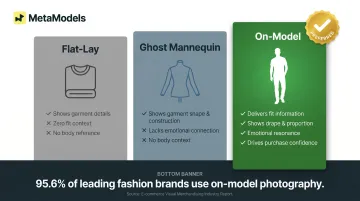
On-model vs. flat-lay vs. ghost mannequin:
- Flat-lay imagery shows garment details clearly but provides zero context for fit, drape, or proportion on a human body
- Ghost mannequin is cost-effective for showing garment shape and construction, but lacks the emotional connection and body-context information that drives purchase confidence
- On-model images deliver both practical fit information and emotional resonance, helping shoppers project themselves into the purchase
Shoppers respond negatively to cut-out images on white backgrounds compared to real human models — Baymard Institute's apparel UX research found mannequins and virtual models should be a last resort. The data backs this up: a Pixelphant audit cited by ElectroIQ found 95.6% of leading fashion brands use model photography, compared to just 57.2% for flat-lay or ghost mannequin — making model photography the clear default for leading fashion retailers.
The Optimal Number of Model Images Per Product
Most fashion product pages perform best with 5 to 8 total images, and on-model images should form the core of that set — typically 3 to 5 model shots depending on product category. Going below 3 model images leaves shoppers with unresolved questions about fit, drape, and proportion that directly increase cart abandonment and returns.
Recommended on-model image count by category:
- Tops, tees, basics: 3 model shots (front, back, detail close-up on body) is sufficient
- Dresses, jumpsuits, outerwear: 4 to 5 model shots (front, back, side or 3/4 angle, fabric detail, movement or sitting shot)
- Premium or high-ticket garments: 5+ model shots warranted to justify price point and reduce purchase hesitation
Shopify Enterprise recommends 4–7 core images for mobile UX and 8–12 purposeful images overall, cautioning against 20 near-identical images that create decision fatigue. The Baymard Institute advises no fewer than 3 to 5 images for every product, with variety prioritized on best-sellers for large catalogs.
Understanding Diminishing Returns
Adding more on-model images that repeat the same angle or provide no new information creates cognitive overload rather than confidence. Shopify's research confirms that "8–12 purposeful images beat 20 nearly identical ones" — deliberate variety consistently outperforms sheer volume.
The Image Stack Concept:
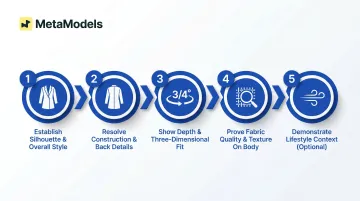
Each image in your stack should answer a distinct question. Structure the sequence so every shot has a defined job:
- Establish silhouette and overall style
- Resolve construction and back details
- Show depth and three-dimensional fit
- Prove fabric quality and texture on body
- (Optional) Demonstrate movement or lifestyle context
Follow this sequence and each image earns its place — no padding, no redundancy, no decision fatigue.
What Each Model Image Should Show: Building Your Model Shot Stack
Shot 1 — The Hero Front View
The hero front view is your product page's most important image. It shows the full garment on-body from the front, communicating silhouette, proportions, and overall style in a single glance. As the default thumbnail, it's what shoppers judge first — and it needs to answer "does this look right on a body?" before they'll consider anything else.
Critical elements:
- Full garment visible head-to-toe (or appropriate crop for category)
- Clean, unobstructed view of fit across shoulders, chest, waist, and hips
- Natural pose that shows garment as it would appear in real wear
Shot 2 — The Back View
Back views are among the most overlooked but highest-impact model shots. They resolve uncertainty around construction details shoppers specifically worry about: back neckline placement, zipper length, hem drop, and waistband fit.
Many brands skip it — and pay for that omission in returns. Shoppers who find unexpected back construction or length issues upon delivery rarely give second chances.
Key back-view details to capture:
- Neckline and closure placement (zipper, hook, button)
- Hem length as it falls at the rear
- Waistband or waist seam fit against the body
Shot 3 — The Alternate Angle or 3/4 View
A 45-degree or side angle communicates depth, volume, and how the garment sits on the body in three dimensions that a direct front shot cannot convey. This angle is especially important for:
- Structured garments (blazers, tailored jackets)
- Puffed or statement sleeves
- A-line or flared silhouettes
- Anything with silhouette detail that appears flat from the front
Shot 4 — The On-Body Detail Shot
Close-up detail shots — fabric texture, stitching, embellishment, pocket, or waistband — need to be captured on a live body, not flat. Context changes everything.
Seeing construction details in wear reveals what a flat close-up cannot:
- Whether the fabric wrinkles or holds its shape
- How embellishment catches light with body movement
- How the waistband actually sits against the torso
Shot 5 (Optional/Category-Dependent) — The Movement or Lifestyle Shot
For dresses, skirts, and flowy fabrics, movement is a genuine selling point. A shot of the garment in action — mid-walk, mid-turn, seated — demonstrates drape and flow in ways static poses can't.
This shot belongs after the structural images, not in place of them. Shoppers need fit fundamentals answered before lifestyle context adds anything meaningful.
How Model Diversity Multiplies Conversion Lift
Research shows purchase intent increases significantly when shoppers see models who reflect their own body type, age, or ethnicity. Dr. Ben Barry's research at Cambridge University, which surveyed 3,000 women across Canada, the US, and China, found that purchase intent increased when models matched a shopper's size, age, and race. While specific multipliers are widely cited in secondary sources, the core finding is clear: representation directly drives purchase confidence.
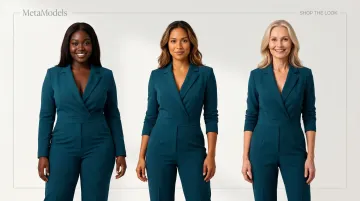
The practical implication: showing the same garment on multiple model types — different body sizes, heights, skin tones — per product page increases the number of shoppers who can project themselves into the purchase, directly widening your conversion funnel. This is separate from total image count — it's about model variety within your existing image slots.
Why diversity matters for returns:
When shoppers see a garment on a model who reflects their body type, they form more accurate expectations about fit. This reduces the "not as described" gap that drives the majority of fashion returns. A more diverse model mix doesn't just increase conversion — it improves the quality of conversions by reducing fit-driven returns.
For brands looking to act on this without multiplying photoshoot costs, MetaModels.ai lets you generate the same garment on multiple AI models — spanning different body types, skin tones, and age ranges — from a single packshot. Each variant is human-reviewed for garment accuracy, so scaling representation doesn't mean sacrificing visual quality.
Scaling Model Image Production Without Breaking Your Budget
Research points consistently to 3–5 on-model images per SKU as the conversion sweet spot. For brands with hundreds or thousands of SKUs, however, traditional photoshoot production makes that target economically out of reach.
Here's what traditional production costs in the US market:
- Agency models: $400–$1,200+ per day
- Photographer: $900–$2,500+ per day for e-commerce/catalog work
- Wardrobe stylist: $350–$800+ per day
- Hair/makeup artist: $350–$800+ per day
- Per-look pricing: $50–$150+ including basic retouching
For a mid-sized catalog of 500 SKUs at $75 per look, that totals $37,500. At 2,000 SKUs, it reaches $150,000 — and that's a single model shot per garment, with no diversity variants included.
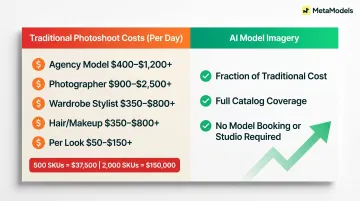
Those numbers explain why AI-generated model imagery has become a practical alternative. MetaModels.ai converts existing packshots into on-model images using AI, with fabric draping applied in real time and every output reviewed for garment accuracy. Brands can cover their full catalog without booking a single model or renting a studio.
Key advantages:
- Generate 3-5 on-model shots per SKU at a fraction of traditional costs
- Produce diverse model variants per SKU to serve different audience segments
- Test different model representations for A/B testing across ad campaigns
- Refresh seasonal imagery without coordinating new photoshoots
- Scale content across products, regions, and channels without operational bottlenecks
Output is sized for e-commerce, social media, ads, and lookbooks at up to 4K resolution. Subscription pricing covers unlimited commercial usage — no model royalties, no per-image licensing fees.
Frequently Asked Questions
What are the 20-60-20, 3/4, and 50/50 rules in photography?
These are compositional frameworks used in fashion photography. The 20-60-20 rule splits image types across context shots (20%), standard product shots (60%), and detail shots (20%). The 3/4 rule favors shooting models at a three-quarter angle for a flattering, dimensional look. The 50/50 rule balances on-model imagery with clean packshots.
How many product images does a fashion listing need to convert?
Most fashion product pages perform best with 5 to 8 images total, with the majority being on-model shots. Fewer than 5 images tend to leave conversion-critical questions unanswered; more than 8 repetitive images can increase decision fatigue without adding clarity.
Do on-model images reduce return rates for fashion e-commerce?
Yes — on-model images align shopper expectations with the delivered product by showing accurate fit, drape, and proportions. While exact reduction percentages are difficult to verify, 71% of consumers return products because items don't match images or descriptions, and 67% of fashion returns are due to size/fit issues — both areas where on-model imagery provides critical clarity.
Should you show clothing on multiple models for the same product?
Yes — showing the same garment on models of different body types, sizes, or ethnicities increases purchase intent across a wider audience. For brands with catalog-scale constraints, AI model platforms make multi-model representation per SKU achievable without additional photoshoot costs.
What types of model shots should a fashion product page include?
The core model shot stack includes:
- Front hero view
- Back view
- Alternate/3/4 angle
- At least one on-body detail shot
For complex garments or premium price points, add a movement or lifestyle shot.
Can AI-generated model images replace traditional photoshoots for e-commerce?
Yes — platforms like MetaModels.ai convert flat packshots into on-model content with accurate fabric draping and brand-consistent styling. Human-reviewed output ensures garment accuracy while eliminating model booking, studio costs, and licensing fees, making it practical to produce the full recommended shot stack across thousands of SKUs.