Introduction
Mannequin photography is practical and affordable, but it leaves conversions on the table. 56% of online shoppers look at product images before reading anything else on a product page — meaning your visuals are doing more selling than your copy ever will.
The problem? Shoppers respond far better to images featuring human models—yet traditional on-model photography costs $80-200 per image versus $0.50-2.00 for AI-generated equivalents, a 95-99% cost reduction.
AI now bridges this gap. You can convert existing mannequin or packshot photos into photorealistic on-model visuals without booking models, renting studios, or managing usage rights. That said, the switch isn't right for every situation. Timing, garment complexity, and brand positioning all affect how well AI output performs.
This guide covers:
- When replacing mannequins with AI models makes sense
- What inputs consistently deliver quality outputs
- The step-by-step conversion process
- Variables that determine accuracy
- Mistakes that undermine results
Key Takeaways
- Replacing a mannequin with an AI model means uploading a packshot and getting back a realistic human model wearing your garment
- Clean, well-lit, wrinkle-free packshots produce significantly better AI conversions than rushed photos
- You can control model diversity (skin tone, body type, ethnicity) and backgrounds without additional photoshoots
- This works best for catalog-scale e-commerce imagery; hero campaigns and luxury storytelling may still benefit from traditional shoots
- Platforms like MetaModels.ai offer human-reviewed AI outputs that catch garment accuracy errors
When Should You Replace a Mannequin with an AI Model?
AI model replacement isn't a universal solution. It delivers the most value in specific scenarios—understanding when to use it prevents wasted effort and poor results.
Ideal Use Cases
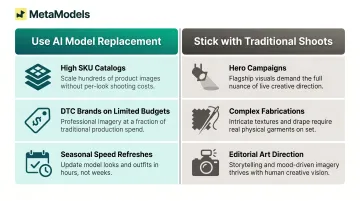
High SKU Count Catalogs
Brands managing hundreds or thousands of products need consistent on-model imagery across their entire range. At traditional costs of $4,800–$12,000 per 60-image shoot day, photographing a 1,000-SKU catalog with 3 images each would cost $240,000–$600,000. AI-generated equivalents cost $1,500–$6,000 for the same volume—before factoring in model usage rights renewals every 6–12 months.
DTC Brands Without Photoshoot Budgets
Small-to-mid direct-to-consumer brands launching on their own websites or through Instagram and WhatsApp commerce channels benefit from AI's low per-image pricing—as low as $0.24 per image—which unlocks on-model visuals for brands previously priced out of model photography.
Seasonal Refreshes Where Speed Matters
Traditional on-model production caps at 40–80 images per day for e-commerce and 15–40 for campaign-grade shoots. AI production throughput is effectively unlimited, allowing brands to refresh entire seasonal collections in days rather than weeks.
Testing Model Diversity Across Audience Segments
Research shows that trust in a virtual model is the strongest predictor of purchase intent (beta = 0.692, p < 0.001), and consumers prefer models matching their body type. AI lets brands generate diverse model representations at zero marginal cost—switching ethnicities, body types, and age ranges without rebooking talent.
When to Stick with Traditional Shoots
Three scenarios consistently favor traditional shoots:
- Hero campaigns: Luxury brands depend on human imperfection and emotional resonance. Gucci received mixed reviews for AI-generated imagery; Aerie publicly disavowed it. When brand identity hinges on human craft, AI falls short.
- Complex fabrications: Sheer fabrics (chiffon, lace, tulle), sequins, and fine embroidery increase hallucination risk. AI struggles with transparency, moiré patterns, and rigid hardware like zippers and buckles.
- Editorial art direction: Campaigns built around specific locations, cultural narratives, or artistic collaboration cannot be templated. AI produces outputs that look generic across brands.
What You Need Before Getting Started
The quality of your AI-converted images depends entirely on what you feed the system. Poor resolution, uneven lighting, or cluttered backgrounds force the AI to compensate — and it rarely compensates well.
Source Image Requirements
Meet these standards before shooting:
- Resolution: At least 2048x2048 px for 4K output. ASOS Marketplace requires 1500x1900 px at 300 DPI; Amazon's zoom needs 1,000 px on the longest side; GS1's high-res standard reaches 4800x4800 px. Shoot to the highest standard across your distribution channels.
- Lighting: Diffused, even lighting — no harsh shadows. High-key softbox lighting at 5500K daylight with CRI 95+ bulbs prevents color cast. AI amplifies muddy tones from low-CRI lighting and cannot relight garments with baked-in shadows.
- Background: White (RGB 255/255/255) or neutral grey, seamless. Cluttered backgrounds force the AI to work around the scene rather than analyze the garment.
- Garment condition: Steam and smooth everything before shooting. Wrinkles, lint, and fold artifacts carry through into the final output. Center the mannequin fully in frame with no clips or stands breaking the garment silhouette.
Platform and Workflow Readiness
Once your source images are ready, three decisions shape everything downstream:
- Use a fashion-specific AI platform: General tools like Midjourney or Stable Diffusion aren't trained for garment draping accuracy. Purpose-built platforms like MetaModels.ai use real-time fabric draping technology that preserves print alignment and seam detail that general generators distort.
- Define model attributes upfront: Decide on body type, skin tone, ethnicity, age range, and pose style before processing. MetaModels.ai offers a curated library of diverse AI models and custom model creation to match your brand identity.
- Set output specs in advance: Confirm your resolution target (4K for catalogs and print), background type (neutral studio, lifestyle, or custom), and destination platform (product pages, social media, lookbooks). Mismatched specs mean rework.
How to Replace Mannequin with AI Model: Step-by-Step
Interfaces differ across platforms, but the core workflow follows the same four-stage logic — regardless of which AI fashion tool you use.
Step 1: Prepare and Clean Your Mannequin Photo
- Remove mannequin stands or visible clips using background removal or inpainting if needed
- Ensure garment shape is intact and readable—AI relies on clear silhouette boundaries
- Check for wrinkles, lint, or folding artifacts and fix these before uploading; AI will replicate these flaws into the final model image
Step 2: Upload and Configure Model Parameters
Upload the prepared image to your chosen AI platform and select model attributes:
- Choose skin tone, body type, ethnicity, age range, and pose style — MetaModels.ai provides a curated library of diverse AI models plus custom model creation to match brand identity
- Background or scene preference—neutral studio, lifestyle setting, or reference image upload for custom backgrounds
- Styling options—some platforms allow pairing models with different styling items (tops, bottoms, shoes, bags)
Step 3: Generate and Apply Real-Time Fabric Draping
The AI analyzes garment structure and re-drapes fabric around a human body shape. This step determines print preservation, seam accuracy, and fabric texture fidelity.
AI platforms built specifically for fashion produce more accurate results than general-purpose image generators, which tend to hallucinate details like buttons, prints, or collars. The output should preserve:
- Color accuracy
- Shape and proportions
- Fabric texture and drape
- Print details and patterns
- Seam placement and garment construction
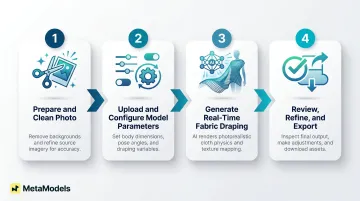
Step 4: Review, Refine, and Export
Quality Checklist Before Publishing:
- Garment details preserved (prints, logos, seams)
- Natural fabric draping with correct tension lines
- No artifacts on hands, edges, or background transitions
- Lighting consistent with the garment's original photo
Export Settings:
- Resolution: Up to 4K for catalog and print use
- File size: Optimize for web performance without sacrificing visual quality
- Naming/tagging: Apply consistent catalog management conventions
MetaModels.ai builds human review into this final stage — fashion specialists check each image for garment accuracy before delivery, so what reaches your catalog is ready to publish.
Key Parameters That Affect Output Quality
Two brands using the same AI tool can get dramatically different results. Output quality is a function of controllable input variables, not just the platform. Four factors determine how well your conversions turn out: lighting, garment complexity, pose selection, and output resolution.
Source Image Lighting Quality
Diffused, even lighting on the original mannequin shot directly impacts AI draping and skin-tone rendering. Harsh shadows or mixed color temperatures confuse the algorithm, producing unrealistic lighting on the generated model.
76% of shoppers rate image quality as "very important" when making purchase decisions. Lighting is the one input variable that can't be fixed in post-processing — it has to be right from the start.
Garment Complexity and Fabric Type
Simple garments — basic knits, wovens, and solid-color pieces — convert reliably. Standard silhouettes and structured styles give the AI clear geometry to work with.
Complex garments are a different story:
| Fabric/Feature | AI Challenge | Failure Mode |
|---|---|---|
| Fine repetitive patterns (houndstooth, pinstripes) | Moire effect / digital aliasing | AI hallucinates patterns into solid blocks or distorted waves |
| Sheer fabrics (chiffon, lace, tulle) | Transparency calculation | AI cannot accurately render skin or undergarments showing through |
| Silk vs. denim | Drape vs. stiffness distinction | Tension lines at armpit/crotch missed; clothes appear "painted on" |
| Hardware (zippers, buttons, buckles) | Rigid vs. soft geometry | Rendered asymmetrically or "melted" with distorted metallic geometry |
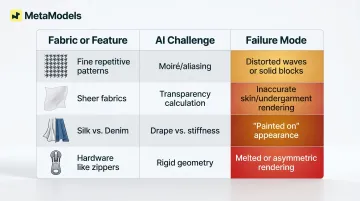
Recommendation: Test one complex garment before batch-processing an entire catalog. Flag high-risk items (sheers, all-over prints, embroidery, asymmetric cuts) for manual human review before publishing.
Model and Pose Selection
The chosen pose must logically match the garment's silhouette:
- Structured blazers need standing or formal poses
- Flowy dresses benefit from natural, slightly dynamic stances
- Activewear requires athletic poses showing movement
Mismatched poses create an awkward result even when the garment renders accurately. A-pose or T-pose inputs work best for garment transfer; contorted or high-fashion poses cause significant distortion.
Output Resolution and Intended Platform
Match resolution settings to the destination:
- Product detail pages: Higher resolution than social thumbnails
- Social media thumbnails: Lower resolution acceptable
- Catalog and print: 4K output required (MetaModels.ai delivers ready-to-post 4K content)
Default to the lowest resolution that meets your platform's display requirements — this keeps processing time and credit usage lean across large catalogs.
Common Mistakes to Avoid
Most failures are predictable — and avoidable. Brands that get catalog-ready results on the first pass share one thing: they avoid these four mistakes.
Fix the source photo first, not after
Skipping background cleanup, steaming, or clipping removal means the AI embeds those flaws into the model image. Prep before you generate.
Don't batch-process complex garments without a review tier
Sheer layers, busy patterns, and asymmetric cuts are high-risk SKUs that need human eyes before approval. Apply a tiered QA approach: auto-approve simple garments, manually review complex ones. MetaModels.ai builds this step in — human-reviewed AI images are part of the standard workflow for garment accuracy.
Lock in a style guide before batch processing
Switching model types, poses, or backgrounds across product categories creates a disjointed shopping experience. Define 2-3 standard model types and background treatments per collection before you run a single batch.
Always run a final human review before going live
AI tools can misrender a logo, alter a hem, or add phantom pockets — even on clean source images. A final human review pass before publishing catches what automation misses. The performance gains from AI imagery only hold when the outputs actually match the product.
Frequently Asked Questions
What can I use instead of a mannequin body?
AI model generation is the primary modern alternative: a packshot or flat-lay photo replaces the mannequin entirely, with AI dressing a realistic human model in the garment. Ghost mannequin editing and flat-lay styling are other options, though they lack the human appeal that drives conversion.
How can I use AI to model my clothes?
Photograph the garment on a mannequin or as a flat-lay, upload to an AI fashion model platform, select model attributes (ethnicity, body type, age range), and generate a realistic on-model imagewithout a physical model or studio. Platforms process images in minutes to hours depending on complexity.
What makes a good mannequin photo for AI conversion?
Neutral background, even diffused lighting at 5500K, fully steamed garment, and minimum resolution of 2048×2048 pixelsall directly determine the realism of the final AI output. Uneven lighting, for instance, causes the AI to misread fabric texture and shadow depth.
Will AI preserve my garment's print and fabric details accurately?
Purpose-built fashion AI tools preserve prints and structure more reliably than general generators, but complex patterns (all-over prints, sheers, embroidery) carry a higher risk of detail loss or distortion. Human review before publishing, such as the garment accuracy check offered by MetaModels.ai, is essential for complex garments.
Can AI models show different body types and skin tones?
Yes. Leading platforms offer diverse model libraries covering multiple ethnicities, body types, and age ranges. Custom model creation lets brands match specific audience representation needs, making diversity a practical advantage for conversion.
Do I own the rights to AI-generated fashion model images?
Commercial usage rights vary by platform. Most purpose-built fashion AI tools allow commercial e-commerce use with no royalties or licensing fees, but US copyright law currently provides no federal protection for purely AI-generated images. Always verify the platform's terms of service before publishing.