Introduction
Product imagery drives fashion e-commerce success—and failure. Global online apparel sales reached $576.67 billion in 2024, yet 22% of shoppers return items specifically because the product didn't match the image. That gap represents billions in lost revenue and eroded customer trust.
Those return rates point to a production problem as much as a product problem. The old assumption that professional fashion imagery requires booking models, renting studios, and coordinating expensive shoots no longer holds. New production methods let brands create compelling product imagery without traditional model photography.
Not all model-free approaches deliver equal results, though. A poorly lit flat lay and a polished AI-generated model image are not the same output — each serves different use cases, requires different preparation, and delivers vastly different results.
This guide covers when model-free imagery makes strategic sense, the three core production methods available, how to prepare for each approach, and the critical variables that determine whether your final images drive conversions or kill them.
Key Takeaways
- Model-free imagery suits high-volume SKU production, tight budgets, and digital-first channels
- Three methods cover the full range: flat lay photography, ghost mannequin photography, and AI model generation
- Garment prep and lighting quality set the ceiling — post-processing can't recover a poorly prepared shot
- AI model generation scales fastest and produces on-model context without physical shoots
- Most failures trace back to skipped garment prep, inconsistent visual treatment, or the wrong method for the use case
When Should You Create Clothing Product Images Without Models?
Model-free imagery fits specific brand contexts, channels, and business models — and works best when you understand where it performs and where it doesn't.
Where model-free methods excel:
- High-volume SKU catalogs where daily model shoots are logistically impossible
- Early-stage brands managing tight budgets before revenue justifies traditional photography
- Catalog basics and replenishment items where product clarity outweighs fit storytelling
- Digital-first brands prioritising speed to market over campaign-level production values
- Seasonal scaling when brands launch collections faster than studio schedules allow
Where model-free imagery underperforms:
- Hero campaign imagery requiring emotional storytelling and brand narrative
- Structured and fitted garments — formal wear, swimwear, and tailored pieces where customers evaluate fabric behaviour and drape on a body
- Fit-sensitive categories where shoppers need on-body context to feel confident buying — though AI model generation addresses this directly
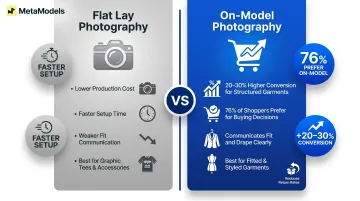
Research shows on-model photos convert 20-30% higher than flat lay for structured garments, with 76% of shoppers viewing on-model photos as most useful for buying decisions. That data points to a clear principle: match your production method to the garment type and the decision your customer needs to make.
For brands that need on-model conversion performance without the cost or lead time of physical shoots, AI model generation makes both achievable — producing human-reviewed, on-body imagery at catalog scale.
What You Need Before You Start
Poor source images and badly presented garments set a hard limit on what any editing workflow, AI tool, or post-processing step can fix. Getting this right upfront saves significant rework later.
Equipment and Setup Requirements
For flat lay and ghost mannequin methods:
- Camera or high-resolution smartphone (minimum 1,080px on shortest dimension)
- Tripod or overhead mounting rig for consistent framing
- Clean flat surface or professional sweep for background consistency
- Light source: natural window light as minimum, two-light softbox setup recommended for color accuracy and shadow control
For AI model generation workflows:
- Clean product packshot at minimum 1,000px on shortest dimension
- Neutral or white background with no distracting elements
- Even, diffused lighting with no harsh shadows obscuring detail
- Full garment visible in frame with clear design details (print, texture, seams, buttons)
Garment and Styling Preparation
Garment presentation directly determines what ends up in your final image — and it shows.
Before every shoot or upload:
- Steam or iron every item to remove wrinkles and creases
- Stuff or pad garments to give them natural shape
- Tuck tags, remove loose threads, and lint-roll all surfaces
- Check for stains, marks, or fabric damage visible in photographs
- Lay structured garments flat with intentional positioning (fan hems, fold sleeves naturally)
For AI generation workflows, this matters even more: the model output can only replicate what the source packshot actually shows. Obscured construction details or hidden textures won't be reconstructed — they'll be missing.
How to Create Clothing Brand Product Images Without Models
Flat Lay Photography
Flat lay photography places the garment on a clean surface and photographs it from directly overhead. It's the fastest, lowest-cost method—but also the least effective for communicating fit.
Setup process:
- Use a white or neutral backdrop (seamless paper, fabric sweep, or clean floor surface)
- Mount camera on tripod overhead or use mounting arm for consistent 90-degree angle
- Use diffused natural light from large windows, or position softbox lights at 45-degree angles to eliminate shadows
- Style garments intentionally: fold sleeves to suggest arm position, fan hems to show silhouette, arrange collars and buttons naturally
Best applications:
- Graphic tees where print quality and design clarity matter most
- Accessories (hats, scarves, belts, bags)
- Folded knitwear and layering pieces
- Social media grids requiring visual consistency
Limitations:
Flat lay cannot communicate fit, drape, or how fabric moves on a body. For fitted or structured pieces, flat lay weakens conversion because buyers can't visualise how the garment will look when worn.
Post-processing:
- Adjust exposure to ensure background reads as pure white
- Correct white balance for accurate colour representation
- Light retouching to remove dust, lint, or fabric imperfections
- Maintain consistent framing, angle, and lighting across all SKUs
Ghost Mannequin Photography
Ghost mannequin (invisible mannequin) photography captures garments on a physical mannequin, then removes the mannequin in post-production to create a floating 3D garment that appears naturally worn.
Production process:
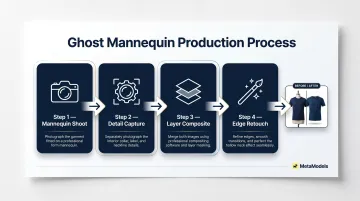
- Photograph garment on mannequin (front, back, and any detail angles needed)
- Remove garment and photograph the inside label or collar area separately
- Composite the two images in editing software (Photoshop or specialised services) to fill neck and arm openings
- Retouch edges, shadows, and transitions for seamless result
Best applications:
- Structured jackets, blazers, and outerwear where 3D form communicates construction quality
- Shirts and button-ups where collar, placket, and shoulder detail matter
- Knitwear requiring shape demonstration
- Catalog grids where consistency drives browsing—used extensively by ASOS, Zara, and H&M
Limitations:
Ghost mannequin requires post-production compositing, either in-house or outsourced. Studio time typically runs 30–60 minutes per garment, with post-production adding 20–40 minutes per image — making it time-intensive and expensive at high SKU volumes.
Critical variables:
- Mannequin size and body type must match intended garment fit
- Surface finish (matte vs shiny) affects how light interacts with fabric
- Consistent lighting setup across all products prevents catalog fragmentation
AI Model Generation
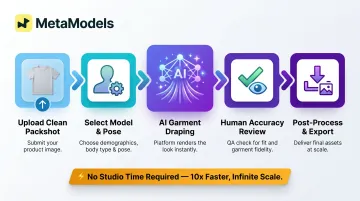
AI model generation converts product packshots (flat lay, hanger shot, or ghost mannequin image) into photorealistic on-model imagery without physical models, photographers, or studio time.
How it works:
- Upload a clean, well-lit packshot
- Select or configure an AI model (demographics, body type, pose)
- The platform drapes the garment onto the model, preserving colour, print, texture, and construction
- Review output for garment accuracy
- Apply post-processing (background adjustment, resolution upscaling) and export
Platforms like MetaModels.ai handle this entire workflow automatically — with a curated library of AI models across diverse ethnicities and body types, and human review of each output to verify garment accuracy before delivery.
Source packshot quality requirements:
- Full garment visible in frame
- Neutral or white background with no distracting props
- Even, diffused lighting with no harsh shadows
- Minimum resolution of 1,000px on shortest dimension
- Clear visibility of print, texture, seams, and design details
Best applications:
- T-shirts, hoodies, dresses, outerwear, knitwear at standard e-commerce display sizes
- Any garment category requiring on-body context at scale
- Brands managing multiple seasonal collections simultaneously
- Digital-first brands prioritising speed to market
Current limitations:
Extreme close-up texture shots for heavyweight textiles, or garments with complex structural drape, may still benefit from traditional photography. For most e-commerce contexts, though, 71% of shoppers cannot distinguish AI-generated apparel images from real photography at standard display sizes.
Scalability advantage:
Unlike flat lay or ghost mannequin workflows requiring new physical shoots for every colourway and style update, AI generation produces full catalogue on-model imagery from existing packshots without rescheduling studio time. For high-SKU brands managing multiple seasons, that removal of the studio bottleneck is where the cost and speed gains compound most sharply.
That adoption is already happening at scale. The AI fashion photography market reached $1.51 billion in 2024 and is projected to hit $6.12 billion by 2029, with H&M and Zalando among the brands actively using AI-generated imagery in production workflows.
Key Variables That Affect Your Final Image Quality
Regardless of method, a set of controllable variables determines whether model-free product images drive purchases or create buyer doubt.
Lighting Consistency
Inconsistent lighting is the fastest way to make a catalog look unprofessional. Catalogs maintaining consistent lighting, angles, and editing styles generate 23% higher average order values.
Maintain consistency by:
- Using all natural or all artificial light (never mixed)
- Diffusing light sources to avoid harsh shadows that obscure detail
- Establishing a fixed light setup that can be reproduced for every shoot
- For AI workflows, starting with well-lit, consistently staged packshots — output quality is only as good as the source image
Garment Accuracy and Detail Fidelity
Buyers use product images to evaluate fit, construction, and design details. Any image that obscures, distorts, or misrepresents these details increases return rates — 22% of shoppers have returned products due to color differences between image and physical product.
For flat lay and ghost mannequin, show multiple angles and zoomed detail shots of key features (stitching, print, buttons, texture), ensure color accuracy through proper white balance, and photograph construction details that communicate quality.
For AI generation, verify that output accurately represents garment color, print, and construction. MetaModels.ai includes human review of AI outputs as a quality control step in high-SKU production, catching errors before images go live.
Background Choice and Consistency
Background choice affects perceived brand positioning and marketplace compliance. The two most common approaches serve different channels:
- Pure white (RGB 255, 255, 255) — meets Amazon and most marketplace technical requirements; the default for e-commerce listings
- Lifestyle or studio-gradient — suits social media, ads, and lookbooks where context adds brand value
Whichever you choose, consistency across the full catalog matters more than the specific background. Products presented against consistent white backgrounds generate 18% higher trust scores compared to inconsistent backgrounds.
Resolution and Aspect Ratio
Final image resolution should meet the requirements of the intended output channel:
| Platform | Minimum Resolution | Recommended Resolution | Background Requirement | |----------|-------------------|------------------------|------------------------|\n| Amazon | 1,000px (longest side) | 1,600px+ for zoom | Pure white (#FFFFFF) for main image | | Shopify | 1,024 x 1,024 | 2,048 x 2,048 | Theme-dependent | | Instagram | 320px width | 1,080px width | N/A | | Zalando | 762 x 1,100 | 1,801 x 2,600 | #FFFFFF packshot, #F1F1F1 model view |
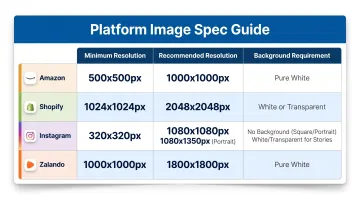
AI generation platforms capable of 4K output allow brands to produce imagery that meets both e-commerce listing standards and print-quality requirements from the same generation workflow.
Common Mistakes When Creating Model-Free Clothing Images
Skipping Garment Preparation
Wrinkled, lint-covered, or poorly shaped garments are the most common reason model-free images look unprofessional. No method compensates for a garment that wasn't properly presented before shooting or uploading.
Always steam, lint-roll, and style garments before photographing or submitting to AI platforms.
Inconsistent Visual Treatment Across SKUs
Mixing methods, backgrounds, lighting styles, or model aesthetics across a catalog creates a fragmented visual identity that undermines brand trust. Pick a consistent visual standard and apply it across every product. That means:
- Same background and lighting setup for all SKUs
- Consistent model reference or styling approach
- Uniform framing and angle choices throughout the catalog
Sellers providing five or more product angles experience conversion rate increases averaging 30% — but only when those images maintain visual consistency.
Using AI-Generated Images Without Reviewing Garment Accuracy
AI clothing transfer is not perfect. Unreviewed outputs can contain errors in color, print placement, or garment construction detail. Publishing an image where the print is distorted or the neckline is wrong creates returns and customer complaints.
Always review AI outputs against the source packshot before publishing. Platforms offering human review as part of the workflow (like MetaModels.ai) provide an additional quality gate that reduces the risk of accuracy errors reaching customers.
Frequently Asked Questions
What are the three types of product photography?
The three main types are flat lay (garment photographed on a surface from overhead), ghost mannequin (garment on an invisible mannequin showing 3D form), and on-model or lifestyle photography. AI model generation has emerged as a fourth category — producing on-model results without physical models or shoots.
Can AI-generated model images replace real models for clothing e-commerce?
For standard e-commerce sizes — product listings, social media, and digital ads — AI model images are production-ready and hard to distinguish from real photography for most garment types. Hero campaign imagery and extreme close-up texture shots still benefit from traditional photography, but for high-volume catalog production, AI generation is a practical alternative.
What is ghost mannequin photography and when should I use it?
Ghost mannequin photography removes the mannequin in post-production, leaving a floating 3D garment. It works best for structured pieces — jackets, shirts, knitwear — where visible shape and construction matter to the buyer. It's a strong option for brands building professional product imagery on a lean budget.
What kind of source image do I need for AI clothing generation?
The ideal source is a clean packshot: full garment visible, neutral or white background, even diffused lighting with no harsh shadows, and a minimum resolution of 1,000px on the shortest dimension. Make sure print and design details are clearly visible for accurate transfer.
Does removing models from product photography hurt conversion rates?
Flat lay and ghost mannequin alone tend to underperform on-model imagery for fitted or styled garments. AI model generation keeps the on-body context buyers rely on — fit, drape, and styling — so switching from flat photography typically holds or improves conversion rates.