
Introduction
Traditional on-model photoshoots cost $5,000–$25,000 per day once you factor in the photographer, model fees, studio rental, and post-production. For brands managing 100+ SKUs per season—or rolling out frequent colorway updates—that math doesn't work.
Research shows 76% of shoppers say on-model photos are the most helpful format for purchase decisions. Yet most brands can't afford to shoot every product that way.
AI-generated imagery makes on-model content viable at scale. Brands can convert packshots into styled model photography without booking a single shoot—and keep that output consistent across an entire catalog.
But quality varies dramatically. Publish-ready AI imagery requires the right inputs, the right tools, and a disciplined review process. This guide covers what actually works—and where brands most often go wrong.
Key Takeaways
- Start with sharp, well-lit packshots on neutral backgrounds—AI cannot fix blurry or poorly staged inputs
- Model selection, prompt specificity, and resolution settings directly control output quality
- Always run human QA before publishing—AI can misrender patterns, stitching, and fit
- Highest ROI for large SKU catalogs, colorway variants, and limited photography budgets
- AI complements traditional photography for lifestyle and hero shots—rarely a full replacement
How to Create AI-Generated Images for E-Commerce Brands
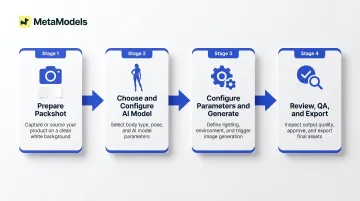
Here's how the process works end-to-end, from raw packshot to export-ready image.
Step 1: Prepare Your Source Packshot
Shoot or source a clean product photo on a white or light neutral background with accurate, well-diffused lighting. Wrinkles, shadows, or cluttered backgrounds in the input degrade AI output quality. The platform extracts garment texture, color, pattern, and structural details from this source image—if the input is ambiguous, the output will be distorted.
Confirm the image shows all key product details clearly:
- Patterns, labels, and textures
- Closures (zippers, buttons, snaps)
- Proportions and silhouette
- Fabric finish and drape
These are the details the AI will attempt to reproduce on the model. Missing or unclear elements in the packshot will result in inaccurate rendering.
Step 2: Choose and Configure Your AI Model
Select a model that matches your target customer demographic in terms of body type, skin tone, age range, and fit expectation. A peer-reviewed 2024 University of Bath study found that size-inclusive model photos help customers assess fit and reduce returns—the #1 cost driver in fashion e-commerce—without negatively affecting purchase decisions.
Diverse model selection directly supports inclusive representation and reduces return rates by helping shoppers visualize realistic fit. Platforms like MetaModels.ai offer curated libraries with diverse ethnicity, demographics, and body types, as well as custom model creation matched to brand identity.
Set pose, framing, and background context based on where the image will be used:
- PDP images: Neutral or clean studio backgrounds
- Lifestyle or campaign images: Contextual scenes (urban settings, outdoor environments, styled interiors)
Step 3: Configure Generation Parameters and Generate
If your platform requires a text prompt, be specific. Vague prompts produce generic results. A prompt like "white background, soft studio lighting, straight-on pose, casual knitwear" will outperform "model wearing sweater" in both consistency and brand alignment.
Set resolution to match intended use:
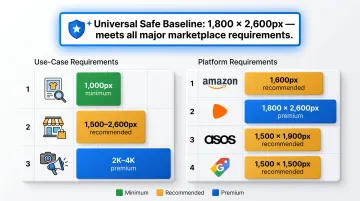
- Web PDPs: Minimum 1,000px on the longest side
- Ads and lookbooks: 2K–4K output
- Marketplace listings: Check platform-specific requirements (Zalando requires 1,800 x 2,600px; Amazon recommends 1,600px for zoom functionality)
Confirm whether the platform charges per resolution tier before generating at scale. MetaModels.ai, for instance, delivers up to 4K resolution across all subscription tiers at a fixed per-image cost—worth comparing against tiered-pricing alternatives before committing to volume generation.
Step 4: Review, QA, and Export
Zoom into all critical details before approving any image:
- Fabric texture and print fidelity
- Button placement and stitching
- Logo rendering and text accuracy
- Garment proportions and fit
Define reject criteria upfront (e.g., blurred text, distorted seams, inaccurate color). MetaModels.ai builds human fashion specialist review into every delivery—verifying garment accuracy, color precision, and proportions before images reach you.
Export in the correct format and resolution for the destination channel. Retain the source packshot and generation parameters for reproducibility and catalog consistency across future SKUs.
What You Need Before You Start
Preparation quality directly determines output quality. Most failed AI image generations trace back to poor source inputs or missing brand parameters, not the AI platform itself.
Equipment and Input Requirements
Minimum input: A sharp, well-exposed packshot at 800px or higher, saved as JPEG or PNG. However, leading platforms recommend higher baselines for best results:
- Amazon: 1,600px longest side for zoom functionality
- Zalando: 1,800 x 2,600px (highest marketplace floor)
- ASOS: 1,500 x 1,900px portrait orientation
- Google Shopping: 1,500 x 1,500px recommended
For cross-platform compatibility, target at least 1,800 x 2,600px at upload to avoid resolution bottlenecks.
Brand and Workflow Readiness
Before generating at scale, define three things:
- Model selection criteria — which AI model types align with your brand identity
- Approved backgrounds and environments — style guardrails that keep outputs consistent
- Visual style guidelines — color palette, lighting tone, and composition rules
Without these guardrails, teams produce inconsistent outputs that require extensive rework.
Also clarify commercial license terms before publishing to marketplaces or paid ads. Platforms vary significantly — some restrict usage to specific channels or require royalty payments per image. MetaModels.ai, for example, includes unlimited commercial usage rights with no royalty obligations, covering Amazon, ASOS, Myntra, and paid advertising channels.
Key Parameters That Affect Your AI Image Quality
AI image generation has specific, controllable variables — and understanding them is what separates publish-ready results from unusable outputs.
Input Image Quality
The AI extracts garment texture, color, pattern, and structural details directly from your source photo. Any ambiguity or artifact in the input gets amplified in the output — blurry, poorly lit, or wrinkled packshots produce distorted fabric rendering, inaccurate color, and failed logo reproduction on the model.
One retailer (Milaner) reported a 157% conversion rate increase after switching from flat-lay to AI-generated on-model imagery — but only when input quality was high.
Model-Garment Fit Compatibility
Different garment types — sheer fabrics, oversized silhouettes, structured outerwear — behave differently on AI models depending on how the platform handles fabric draping simulation.
Choosing a pose or body type that doesn't suit the garment's intended silhouette causes unrealistic fit rendering. Platforms using physics-based draping technology (like MetaModels.ai's real-time fabric draping) preserve garment details more accurately than texture-mapping approaches, particularly for stretch fabrics and compression fits.
Prompt Specificity and Context
Platforms that accept text prompts use them to determine lighting, backdrop, styling context, and mood. Under-specified prompts default to generic outputs that won't align with your brand aesthetic.
A prompt like "white background, soft studio lighting, straight-on pose, casual knitwear" will consistently outperform "model wearing sweater." Always specify:
- Garment type and fabric character
- Styling context (editorial, PDP, lookbook)
- Lighting mood and backdrop
- Brand-specific visual guidelines
Resolution and Output Format Settings
AI platforms typically generate at a base resolution and upscale on demand. Whether fine details like stitching survive at full size depends on the quality of the upscaler — and whether human review catches degradation before delivery.
Publishing at the wrong resolution for the placement erodes shopper trust fast. Match output specs to placement:
- PDP images: 1,000px minimum
- Marketplace listings: 1,500–2,600px
- Ads and lookbooks: 2K–4K output
When AI Image Generation Is (And Isn't) the Right Fit
AI-generated imagery is not universally the right method. Context, catalog type, and output use case determine whether it outperforms traditional photography or creates risk.
Best Use Cases
High-volume SKU catalogs where photographing every item on-model is cost-prohibitive. Traditional shoots cost $5,000–$25,000 per day; MetaModels.ai generates images starting at under $0.25 per image.
Colorway variants that are visually identical except for color. One packshot can generate unlimited variations—different models, poses, backgrounds, and lighting setups—without reshoots.
Brands refreshing seasonal lifestyle content without full reshoots. AI enables rapid content updates across social media, ads, and lookbooks.
DTC brands with limited photography budgets looking to match the visual standard of larger competitors. AI levels the playing field by eliminating model fees, studio costs, and logistics expenses.
Less Suitable Use Cases
That said, some use cases still favor traditional photography — particularly where tactile accuracy or structural complexity is non-negotiable.
Hero PDP images for luxury or premium brands where fine detail accuracy and tactile suggestion are critical. Mango faced "false advertising" backlash in November 2024 after rolling out AI models, with shoppers arguing AI-generated garments provided no "realistic frame of reference" for fit.
First-time product launches where fit accuracy must be validated against a real garment sample before AI rendering. Confirm the physical sample first, then use AI for scale.
Products with complex structural details — such as 3D embroidery or multi-layer constructions — that require human review at a frequency the workflow can't sustain. Traditional photography works better for hero shots here; AI handles secondary angles and colorway variants.
Common Mistakes That Kill AI Image Quality
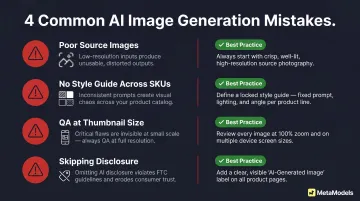
- Poor source images: Starting from poorly lit, low-resolution, or wrinkled packshots and expecting the AI to compensate. The platform can't reconstruct details that aren't visible in the input.
- No style guide across SKUs: Using different models, poses, and backdrops for each product creates a catalog that looks visually incoherent — and that incoherence directly undermines brand trust.
- QA at thumbnail size: Approving images without zooming into critical details like zippers, buttons, text logos, and fabric grain. Rendering errors that are invisible at small sizes trigger returns at full scale.
- Skipping disclosure: Failing to label AI-generated or virtual model images on listings and PDPs carries real risk. Research shows 59% of shoppers want brands to disclose AI use, and regulators are paying attention. The FTC sent warning letters to seven fashion brands in February 2025 over undisclosed AI content; the EU AI Act mandates labeling by August 2026, with fines up to €15M or 3% of global turnover.
Frequently Asked Questions
Which luxury brands use AI?
Mango rolled out AI-generated PDP imagery at scale in 2024, though it faced backlash over transparency. Balmain, Calvin Klein, Prada, and Givenchy have used virtual models in editorial campaigns. H&M piloted "digital twins" based on real human models with explicit disclaimers. Luxury adoption is growing, but brands apply stricter quality controls and human oversight before publishing.
Can AI-generated images be used on Amazon and other marketplaces?
Most major marketplaces allow AI-generated product images provided they accurately represent the product and meet resolution standards. Platform rules vary: Amazon requires a "professional photograph of the actual product," Zalando rejects poor-quality AI generation, and Etsy mandates AI disclosure in listing descriptions. Check each platform's current policy, as rules are actively evolving.
How do I ensure garment details like patterns and textures are preserved in AI images?
Start with a sharp, high-resolution packshot — this is the primary safeguard. Choose platforms with fabric draping technology (such as MetaModels.ai's real-time draping) and human-review QA workflows rather than fully automated generation. Fashion specialists verify garment accuracy, color, and proportions before delivery, reducing the risk of detail loss.
Do I need to disclose that my product images are AI-generated?
Disclosure expectations are growing, and regulations are catching up. The FTC treats AI origin as a "material fact" requiring disclosure when it could affect purchasing decisions; the EU AI Act mandates labeling by August 2026. Research shows 59% of shoppers respond positively or neutrally to AI disclosure when image quality is high, so transparent "virtual model" labeling protects brand trust rather than undermining it.
How many images can I generate from a single packshot?
A single packshot can generate unlimited variations — different models, poses, backgrounds, and lighting setups. Volume capacity depends on the platform's credit model; MetaModels.ai offers 20–300 image credits per month across subscription tiers, with enterprise solutions for larger volumes.
Is AI fashion model photography cheaper than traditional photoshoots?
Traditional on-model shoots cost $5,000–$25,000 per day, factoring in photographer, model, studio, hair/makeup, and post-production fees. Around 15–25% of shoots require reshoots, adding $3,000–$8,000 per partial day. AI platforms eliminate these costs entirely, with per-image pricing starting around $1–$5 — an advantage that scales sharply with catalog size.