But sourcing AI-generated apparel images isn't as simple as uploading a photo and clicking "generate." Output quality varies dramatically based on source image preparation, platform choice, and how well you configure model and scene settings. Poor execution produces fabric distortion, inaccurate garment fit, and off-brand visuals that damage credibility and increase return rates.
Key Takeaways
- Start with clean product packshots, pick a fashion-specific AI platform, and always review output before publishing
- AI generation works best for e-commerce product pages, social ads, lookbooks, and high-volume seasonal campaigns
- Output quality hinges on image resolution, prompt specificity, and using a platform built for fashion—not a general-purpose generator
- Human review before publishing is critical—garment detail errors damage brand credibility
- Most failures trace back to low-quality inputs and vague prompts
How to Source AI-Generated Campaign Images for Apparel
Step 1: Prepare Your Product Images
AI generation is only as good as the input. Source images should be clean, well-lit packshots or flat lays showing the full garment clearly on a plain or neutral background. Poorly lit, wrinkled, or partially cropped garment photos cause the AI to misinterpret fabric texture, colour, and structure—leading to outputs that don't represent the actual product.
Technical requirements for optimal results:
- Minimum resolution: 1080px or higher on the longest side (Amazon requires 1,000px, Walmart requires 1,500px for zoom functionality)
- Lighting: Consistent, even lighting without harsh shadows that obscure garment details
- Background: Plain white or neutral backgrounds that don't compete with the garment
- Multiple angles: Front, back, and detail shots give the AI enough garment information to render accurately
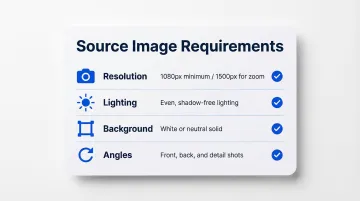
High-resolution inputs allow AI systems to interpret fabric weight, colour accuracy, texture detail, and construction elements like seams and hems. Low-quality inputs are the leading cause of garment distortion in AI outputs.
Step 2: Define Your Campaign Brief
Before generating anything, establish the creative direction. Without a brief, you'll burn through credits iterating on images that don't serve the campaign.
Your brief should specify:
- Target demographic: Age range, body type, ethnicity that reflects your customer base
- Campaign mood: Editorial, lifestyle, UGC-style, or clean studio aesthetic
- Platform format: Square (1:1) for social, portrait for e-commerce, landscape for ads
- Brand constraints: Colour palette, aesthetic tone, styling preferences
This brief directly shapes your prompts and model selection in the steps that follow.
Step 3: Choose a Fashion-Specific AI Platform
General-purpose AI image generators handle prompts broadly but often distort fabric drape, logos, garment fit, and fine texture detail. Fashion-specific platforms are trained on apparel data and understand how garments interact with bodies.
What to look for in a platform:
- Curated AI model libraries with diverse body types, ages, and demographics
- Real-time or AI-simulated garment draping that renders how fabric actually falls on a body
- Output resolution suitable for campaign use (4K or print-ready)
- Human review or quality control options to catch garment inaccuracies before delivery
- Commercial licensing rights that cover your intended use (ads, e-commerce, print)
MetaModels.ai, for example, offers a curated library of AI models spanning diverse ethnicities, body types, and demographics, combined with real-time fabric draping technology and human-reviewed outputs to ensure garment accuracy across large product catalogues.
Step 4: Configure, Generate, and Review
Generation stage:
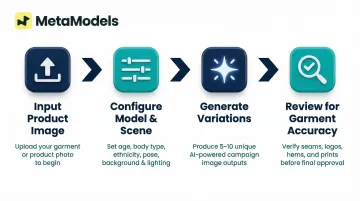
- Input the product image (your prepared packshot)
- Select AI model attributes — age, body type, ethnicity, and pose — that match your campaign brief
- Specify background/scene context: Choose from curated backgrounds or create custom scenes
- Write a detailed configuration: Include model description, setting, lighting style, and shot type
Review stage (critical):
Generated images must be reviewed specifically for garment accuracy. Check that seams, logos, prints, necklines, and hem lines are rendered correctly. Distorted details on published campaign images erode consumer trust and can misrepresent the product—71% of shoppers have returned items due to incorrect product content.
Generate multiple variations (typically 5–10) and select the strongest outputs before further editing or exporting.
What You Need Before Getting Started
Preparation directly determines output quality and process efficiency. Skipping this stage leads to poor results and wasted generation budget.
Product Image Requirements
The minimum acceptable standard for source product images:
- Clean background (white or neutral solid colour)
- Even lighting across the entire garment
- Complete garment visible (no cropping at critical points)
- Multiple angles if possible (front, back, detail shots)
Research on Virtual Try-On networks demonstrates that high-resolution inputs (1024×768 or higher) are necessary to prevent noticeable artifacts in misaligned areas between warped clothes and the human body. Source image quality correlates directly with AI output accuracy.
Platform and Licensing Readiness
Before choosing a platform, confirm it meets your commercial and creative requirements:
- Supports commercial licensing for all generated content
- Allows custom model creation or brand-specific training
- Offers a consistent model aesthetic across campaigns (not just one-off generations)
Licensing ownership is a separate issue. The U.S. Copyright Office states that copyright protection requires human authorship—works generated entirely by AI without human involvement are not eligible for copyright. Most commercial AI fashion platforms grant brands full commercial usage rights, but review the terms of service to confirm coverage for your intended use.
Creative Brief and Brand Guidelines
A documented creative brief keeps outputs on-brand from the first generation and cuts iteration time. It should cover:
- Model demographics (age range, body type, ethnicity representation)
- Visual style (editorial, lifestyle, e-commerce white-background)
- Campaign format (single images, carousel, video)
- Platform specs (aspect ratios, resolution requirements per channel)
Key Factors That Affect Image Quality and Consistency
Two teams using the same AI tool can produce vastly different results. What separates professional-quality campaign images from generic ones is control over a few specific variables.
Source Image Quality
This is the single most important input variable. High-resolution, well-lit, clean garment photos allow the AI to accurately interpret fabric weight, colour, texture, and construction details. Low-quality inputs are the leading cause of garment distortion in AI outputs.
Prompt Specificity
Vague prompts produce generic, unusable images. Effective prompts for apparel campaign generation should include:
- Model description: Age, build, ethnicity
- Garment context: How it should fit, any key features to highlight
- Scene setting: Studio, outdoor, lifestyle environment
- Lighting style: Natural, studio, editorial
- Shot framing: Full body, three-quarter, close-up detail
Compare the difference in output:
Too vague: "Woman wearing dress"
Effective: "Woman, mid-30s, athletic build, South Asian ethnicity, wearing the dress in a natural standing pose; clean studio background with soft natural lighting; full-body shot showing how the dress falls at the knee"
AI Model Selection and Diversity
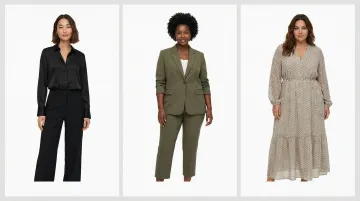
Model selection matters for campaign effectiveness. Showing the product on models that reflect the brand's target audience demographics drives higher conversion and relatability.
A 2024 peer-reviewed study identified the "Dissimilarity-Risk Deterrence Effect," showing that thin models dissuade consumers with larger clothing sizes from purchasing due to perceived body-size dissimilarity and heightened fit-risk perception. The study proved that showing models of the consumer's own size mitigates this effect and enhances online purchase decisions.
Garment Draping Technology
Fashion-specific AI platforms use advanced fabric simulation (versus general image generation) to render how a garment actually falls on a body. This determines sleeve position, waist fit, hem placement, and how fabric moves across different poses. Platforms without dedicated garment draping produce flat, pasted-on results that undermine the realism of the final image.
Human Review and Quality Control
Even the best AI platforms make errors. A final human review pass checking for garment accuracy—logos intact, print patterns consistent, no fabric artifacts—is required before campaign images go live. Platforms such as MetaModels.ai build human review directly into their workflow to catch garment inaccuracies before delivery.
When AI Campaign Imagery Works Best — And When It Doesn't
AI-generated campaign imagery works exceptionally well in some contexts — and falls short in others. Knowing the difference helps brands use it where it actually delivers results.
Ideal Use Cases
AI generation delivers the strongest ROI for:
- E-commerce product pages showing the garment on diverse models
- Social media ad creatives that require high-volume A/B testing
- Seasonal lookbooks for catalog and email campaigns
- Diverse market localization (showing the same garment on models representing different demographics without reshooting)
- High-volume SKU launches where traditional photoshoots would be cost-prohibitive
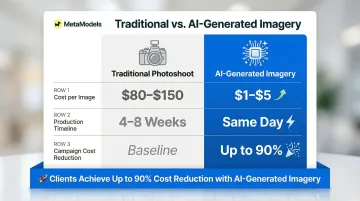
Cost and timeline comparison:
| Metric | Traditional Photoshoot | AI-Generated Imagery |
|---|---|---|
| Cost per image | $80–$150 | $1–$5 |
| Production timeline | 4–8 weeks | Same day |
| Campaign cost reduction | Baseline | Up to 90% |
Zalando cut fashion content costs by 90% by deploying AI-generated imagery at scale, compressing campaign timelines from 6–8 weeks to 3–4 days.
Cases Where AI May Underperform
Traditional photography or hybrid approaches may deliver stronger results for:
- Hero campaign imagery for flagship brand moments that depend on authentic storytelling
- Highly textured luxury fabrics — heavy brocades, intricate embroidery — where tactile nuance matters
- Campaigns built around human movement, where spontaneity and physicality are central to the creative
For these scenarios, a hybrid approach often works best: AI handles the volume work (product pages, ad variants, secondary assets) while traditional shoots are reserved for the moments that genuinely require them.
Common Mistakes to Avoid When Sourcing AI Apparel Campaign Images
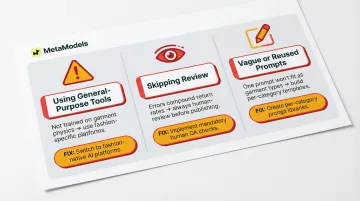
Using General-Purpose AI Tools Instead of Fashion-Specific Platforms
Generic tools are not trained on garment construction, fabric physics, or body-garment interaction. This leads to distorted fits, warped logos, and unconvincing fabric drape that undermines campaign credibility. General-purpose AI generators prioritize visual plausibility over physical truth, often hallucinating fit and introducing a "slimming bias" that misrepresents the actual garment on real body types.
Skipping the Review Step and Publishing AI Outputs Directly
Publishing AI outputs without review is one of the fastest ways to erode customer trust. Common errors that only surface on close inspection include:
- Misaligned or phantom seams that don't match the physical garment
- Incorrect print scaling or logo placement
- Anatomically awkward poses that make sizing hard to read
Fit and sizing issues already drive 53% to 67% of apparel returns. Inaccurate campaign images compound this directly — customers buy based on what they see.
Under-Specifying Prompts or Reusing the Same Prompt Across Different Garment Types
A prompt optimised for a fitted blazer will not produce good results for a flowy maxi dress. Each garment category requires prompts that account for its specific fit, silhouette, and styling characteristics. Build a separate prompt template for each garment category — knitwear, tailoring, and fluid fabrics each behave differently and need different descriptive cues to render convincingly.
Frequently Asked Questions
Can I use AI-generated images for my clothing brand?
Yes, AI-generated images can be used commercially for clothing brands. Usage rights depend on the platform's licensing terms—fashion-specific AI platforms typically grant full commercial rights to generated outputs.
How do I source AI-generated images for apparel campaigns?
Prepare clean product packshots, choose a fashion-specific AI platform, configure model and scene settings, generate multiple variations, and review outputs for garment accuracy before publishing.
Do I own the rights to AI-generated apparel campaign images?
Ownership varies by platform. Most commercial AI fashion platforms grant brands full rights to generated images, but review the terms of service to confirm coverage for your intended use — ads, e-commerce, or print.
How do I ensure AI-generated images accurately show my garments?
Start with high-quality source images (1080px minimum) and choose a platform with dedicated garment draping technology. Always run a human review of outputs to check for fabric distortion, logo accuracy, and correct fit before publishing.
What image resolution or quality is needed for AI fashion campaign generation?
Source images at 1080px minimum; 2K or higher is recommended for print and high-resolution e-commerce. Social media content can work at lower output resolution, but confirm your platform's output specs match your intended channel.
Can AI-generated images fully replace traditional model photoshoots for apparel?
AI-generated imagery can replace the majority of product and campaign imagery needs—especially at scale—but traditional photography still has a place for flagship brand moments and campaigns requiring authentic human storytelling or motion. Most brands benefit from a hybrid approach.