Introduction
Fashion brands and e-commerce teams invest in AI-generated visuals only to encounter a frustrating reality: outputs that look generic, suffer from color drift, or create inconsistent visual narratives across campaigns. When a navy product renders as royal blue, when model demographics shift between catalog pages, or when background styles fragment across a collection, brands face a damaging perception problem—customers read inconsistency as unprofessionalism, regardless of how sophisticated the underlying AI technology may be.
Adjusting AI visuals to match brand guidelines is achievable — but it requires more than well-written prompts. Even advanced platforms default to "average" outputs trained on broad datasets rather than your specific brand identity. This guide walks through the structured workflow that fixes that: from input preparation and parameter configuration to quality control built for fashion and e-commerce imagery.
Key Takeaways
- Translate brand guidelines into AI-readable inputs (hex codes, reference images, demographic specs) before generating anything
- Prompts alone rarely deliver consistency — structured inputs and model configuration are what lock in color, typography, and visual style
- Garment draping, model demographics, and background treatment each need their own quality checks
- A repeatable workflow with defined checklists keeps visuals consistent as you scale across large product catalogs
How to Adjust AI-Generated Visuals to Match Brand Guidelines
Step 1: Translate Your Brand Guidelines into AI-Ready Specifications
Brand guides written for human designers use subjective language—"clean," "premium," "energetic"—that AI cannot interpret accurately. Each brand rule must be rewritten as a measurable, concrete instruction.
Build a Brand-to-AI Reference Sheet containing:
- Primary and secondary colors with exact HEX/RGB values (not "navy blue" but
#002A32) - Approved font families with weights (e.g., "Helvetica Neue Bold, 700 weight")
- Model demographic parameters: age range (e.g., 25-35), skin tone ranges, body type specifications
- Background style rules: studio white, lifestyle setting, editorial environment
- Fashion-specific garment descriptors: fabric texture language (e.g., "structured twill," "fluid silk charmeuse"), draping style expectations
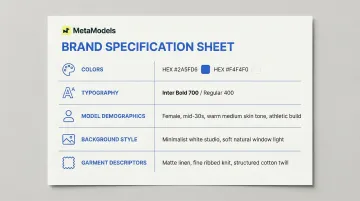
This reference sheet becomes the shared foundation so outputs stay consistent regardless of who's generating them.
Step 2: Prepare Your Brand Asset Inputs
Visual reference files outperform text descriptions for critical brand elements. Prepare these core assets before generation:
Essential Brand Inputs:
- Color swatch sheet exported from your brand palette
- Clean logo file in high-resolution format
- 3-5 sample brand images representing desired visual style
- Model profile configuration matching your brand's target audience
Research shows that 76% of AI generation errors can be eliminated by using structured inputs rather than unstructured text prompting.
For fashion imagery specifically, model selection functions as a brand input. Platforms like MetaModels.ai provide curated AI model libraries with custom model creation options, allowing brands to build a "signature model" that consistently represents their aesthetic across all product images without physical shoots or royalty costs.
Step 3: Generate Using Structured Brand Prompts
The "brand prefix block" approach replaces single descriptive prompts with a reusable opening block that front-loads brand context before content-specific instructions.
Brand Prefix Block Structure:
[Brand Name] | Colors: #002A32, #F5F5DC, #8B4513 | Model: Female, 28-32, athletic build, medium skin tone | Background: Minimal studio, soft natural lighting | Style: Contemporary casual
Then add content-specific instruction:
Product: Linen blazer, sand colorway, relaxed fit
Iterative Refinement Process:
- Start with one iconic product to test the brand prefix
- Evaluate outputs against your Brand-to-AI Reference Sheet
- Check garment draping accuracy and fabric texture rendering
- Scale to full catalog only after validation
For fashion specifically, AI tools vary significantly in how they render fabric on figures. Testing on a single SKU first catches rendering inconsistencies before they spread across your catalog.
Step 4: Run a Brand Alignment Quality Check Before Publishing
Even well-structured inputs can produce drift. A pre-publish checklist keeps off-brand assets from reaching customers.
Five Critical Check Points:
- Color palette match against HEX reference
- Model demographic consistency across catalog
- Garment/product accuracy (fabric behavior, construction details)
- Background and lighting style adherence
- Logo placement and sizing
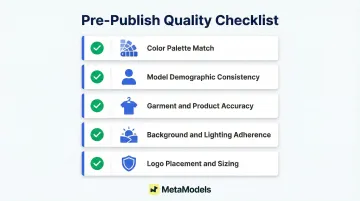
Human review adds accuracy that automated generation alone cannot provide. 71% of shoppers have returned items due to incorrect product content—spotting issues like incorrect fabric behavior, inconsistent skin tones, or subtle color shifts before publishing protects brand perception and reduces returns.
Maintain a prompt library documenting the exact combination of inputs, reference files, and brand prefix blocks that passed quality checks. Teams can then reproduce consistent results without rebuilding from scratch each time.
When Should You Adjust AI-Generated Visuals for Brand Alignment?
Not every AI image generation scenario requires the full brand alignment workflow. Low-stakes internal mockups or early concept drafts may not need it, but any image entering customer-facing channels does.
Brand alignment becomes non-negotiable in situations like:
- E-commerce product pages, social media ads, lookbooks, and email campaigns
- Launching new product lines where all images must feel cohesive
- Refreshing catalogs after brand identity updates
- Scaling content for multi-channel campaigns
- Multiple products or colorways shot for the same collection
- Different team members generating assets independently
- Converting packshot-only images into model-on-garment content at scale
The scale of that list reflects how quickly AI imagery touches every part of a brand's visual output. Zalando generated 70% of its editorial content via AI in Q4 2024, cutting production time from 6-8 weeks to just 3-4 days — but only because brand standards were embedded into their generation process from the start, not corrected after the fact.
What You Need Before Adjusting AI Visuals to Brand Guidelines
Getting AI visuals to match brand guidelines starts before you open any tool. Without the right reference files and a clear translation of your brand language into prompt-ready terms, every generation becomes a guessing game.
Brand Assets and Reference Files
- HEX/RGB color codes for all brand palette colors
- Logo file in clean, high-resolution format
- 3-5 sample brand images representing desired visual style
- For fashion: at least one reference image of desired model type or configured AI model profile
Brand-to-AI Translation Worksheet
This one-page internal document rewrites each vague brand guideline term as a concrete AI instruction. For example:
- "Premium aesthetic" → "Soft directional lighting, 45-degree angle, neutral gray background (#E5E5E5), minimal shadows"
- "Youthful energy" → "Model age 22-28, active posture, outdoor natural light, lifestyle background"
- "Luxe fabrication" → "Visible fabric texture detail, accurate drape physics, color depth with subtle gradients"
With this document in place, every team member prompts from the same reference — so one person's "clean and minimal" doesn't become another's "stark and clinical."
Key Parameters That Affect Brand Alignment in AI-Generated Visuals
Several specific variables have outsized impact on whether AI-generated visuals read as on-brand or generic. Understanding these helps teams prioritize what to control most tightly.
Color Palette Accuracy
Color is the most immediate brand signal. Off-brand colors undermine recognition even when every other element is correct — and AI models trained on broad datasets default to "average" color combinations unless given precise constraints.
Standard text-to-image models struggle to interpret numerical color codes like HEX values — subword tokenization breaks HEX strings into fragments with no color meaning. Using hex-coded color swatch images as visual references instead of color name descriptions in prompts produces more accurate palette matches, especially for brand-specific colors that lack standard names.
Model and Character Consistency
In fashion imagery, the AI-rendered model is a brand element. Inconsistencies in model demographics, body proportions, or skin tone across a catalog break visual coherence and can misrepresent the brand's target audience. 76% of shoppers state that model photos are the most useful format for making purchase decisions.
Establishing a "signature model" configuration — or selecting from a curated model library and locking that selection for a full collection — prevents the drift that occurs when model parameters are re-entered manually for each image. MetaModels.ai's model library supports custom demographic profiles, so the same model configuration carries through thousands of product shots without manual re-entry.
Background and Environment Style
Background style — studio white, lifestyle setting, editorial — communicates brand positioning. Mismatched backgrounds across a catalog create a fragmented look that signals inconsistency to viewers even when the product imagery itself is strong.
Defining a small set of approved background styles as part of a brand prefix block, and using reference images rather than written descriptions, keeps environment choices consistent across large image runs.
Garment and Product Accuracy
For fashion brands, how accurately fabric texture, draping, color, and construction details are rendered determines whether the AI image actually sells the product. Inaccurate garment representation creates customer expectation gaps — the average return rate for online apparel orders in the US is 24.4%.
Human review of AI-generated garment imagery before publishing catches the texture mismatches and draping errors that automated checks miss. Platforms that build this review step in — as MetaModels.ai does — reduce the manual QA burden without sacrificing accuracy on detail-heavy products.
Common Mistakes When Adjusting AI Visuals to Brand Guidelines
A few recurring errors account for most brand consistency failures in AI-generated imagery. Spotting them early saves significant rework down the line.
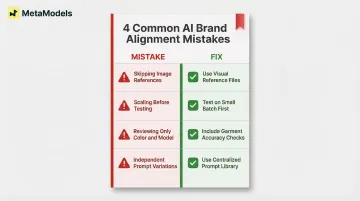
- Skipping image references in prompts. Text prompts alone force the AI to interpret your brand through its training data rather than your actual assets. Without reference images for color, typography, and model style, outputs consistently land on generic "average" — close, but not on-brand.
- Running the full catalog before testing inputs. Scaling a flawed prompt setup across hundreds of images multiplies every error. Test your brand prefix on a small batch first; fixing ten images takes a fraction of the time fixing five hundred does.
- Reviewing only color and model consistency. Fabric rendering errors and incorrect product details drive more customer complaints than mismatched brand colors do. Garment accuracy checks belong in every review pass — not as an afterthought.
- Letting team members manage their own prompt variations. Without a centralized prompt library, individual prompt drift is inevitable. When multiple creators iterate independently, visual inconsistency across campaigns follows quickly.
Frequently Asked Questions
Can AI-generated fashion visuals fully replace traditional photoshoots?
AI-generated visuals can replace traditional shoots for standard product catalog images, lookbooks, and e-commerce content — particularly on platforms with human review and custom model creation. Editorial campaigns with highly specific creative direction typically still need a hybrid approach.
How do I ensure my brand's exact color palette is represented in AI-generated images?
Use a color swatch sheet as a visual image reference alongside hex codes embedded in the prompt. AI models interpret descriptive color terms inconsistently, but visual reference files anchored to your exact palette produce far more accurate output.
What brand elements should always be included in an AI image prompt for fashion content?
Include four core elements: color palette with hex codes, model demographic specifications, background/environment style, and garment representation requirements covering texture, draping, and construction details.
How do I maintain visual consistency across a large product catalog using AI?
Consistency at scale requires a locked brand prefix block, a shared prompt library, consistent model selection, and a pre-publish quality checklist. These structural controls replace manual review of every individual asset.
What is the most common reason AI-generated fashion images go off-brand?
The most frequent cause is vague or incomplete brand inputs—when color names replace hex codes, when no model reference is provided, or when brand guidelines are written for human designers rather than translated into AI-readable specifications.
How many revision rounds are typically needed to get brand-aligned AI fashion imagery?
With a properly built Brand-to-AI Reference Sheet and tested brand prefix block, most teams achieve brand-aligned results within 2-3 iterations on a small test batch. Without that preparation, revision cycles can extend considerably and still produce inconsistent results.