Introduction
Black Friday is the most competitive week in fashion e-commerce. Ad costs surge, feeds flood with near-identical "50% OFF" banners, and the brands that win are the ones with fresher, faster, more compelling visuals. According to Adobe Analytics, U.S. online spending on Black Friday hit a record $11.8 billion in 2024, with Shopify merchants reporting $14.6 billion in Black Friday Cyber Monday sales—a 27% year-over-year increase.
That scale of competition means visual output has never mattered more — or been harder to produce fast enough. Traditional photoshoots take weeks to plan and execute, making last-minute creative pivots nearly impossible during a season that demands constant volume. When your team is stretched across social content, email, paid ads, and site banners, hero campaign photography is usually the first thing that gets cut.
This post covers practical AI fashion model photography tips — from preparing your product assets to generating diverse, platform-ready campaign content — so your visuals keep pace with your promotions, no model booking required.
Key Takeaways
- AI fashion model photography converts packshots into on-model campaign images in minutes—no studio, casting, or scheduling
- Input image quality—lighting, clean backgrounds, and garment condition—determines how good your AI outputs look
- Generate multiple variations per product: different demographics, poses, and seasonal backgrounds to cover every ad format
- Start generating content 3-4 weeks before Black Friday to leave room for review, iteration, and resizing
- Look for human-reviewed outputs and real-time fabric draping—these distinguish purpose-built fashion AI tools from general image generators
Why Black Friday Puts Extra Pressure on Fashion Imagery
Black Friday ad competition is uniquely intense for fashion because purchase decisions are highly visual. Shoppers scroll past plain product shots and respond to lifestyle context, aspirational styling, and social proof.
Apparel accounted for approximately 50% of Loop Returns merchants' Black Friday Cyber Monday sales, with apparel GMV growing 19% year-over-year. That growth makes the visual stakes exceptionally high.
Those pressures hit exactly when creative teams are most stretched. Ad costs spike at the same time production bandwidth shrinks — Meta CPM typically increases 41% in November versus the annual average, with Q4 CPMs running 35-45% higher than other quarters.
Higher ad costs only pay off if the creative performs. Brands that ran 2-3x more distinct creative assets year-over-year saw revenue increase 38% with ad spend up only 13% — their cost per acquisition dropped 14% and CPM fell 16%. Creative volume and variation win during Black Friday, but traditional production timelines can't keep pace.
Preparing Your Garments and Packshots for AI Model Photography
AI model photography generates outputs only as accurate as the garment photo you feed into it. Blurry, wrinkled, or poorly lit packshots produce inconsistent results — regardless of how advanced the generation tool is.
The Ideal Packshot Format
Shoot garments flat-lay or on a ghost mannequin against a clean white or neutral background. Follow these specifications:
- Background: Pure white (RGB 255,255,255) or neutral gray
- Lighting: Even, diffused light with no hard shadows that could alter perceived color or texture
- Resolution: Minimum 1080 px on the shortest side; ideally 2048 x 2048 px for maximum detail preservation
- File format: JPEG or PNG; keep file size under 10 MB for optimal processing
- Product fill: Garment should occupy at least 85% of the frame
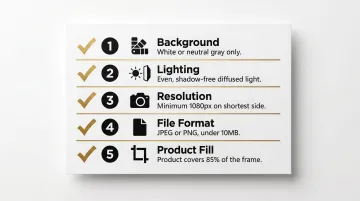
These standards align with Amazon's product image requirements and Shopify's recommended image sizes, ensuring your packshots work across multiple platforms.
Handling Challenging Garment Types
Before running AI generation:
- Steam or iron items to remove wrinkles that AI may replicate
- Ensure prints and logos face forward and are fully legible
- Photograph sheer or textured fabrics at higher resolution to preserve detail
- Capture multiple angles of each hero product—front, back, and detail close-ups
Shooting multiple angles gives you a complete set of on-model images from a single packshot session. For Black Friday, that variety matters — different angles perform differently across product pages, ads, and email campaigns, and having them ready before the sale starts removes a last-minute bottleneck.
MetaModels.ai's packshot-to-model conversion accepts standard e-commerce input formats and uses fabric draping technology to preserve print accuracy and garment structure, so brands with existing product photography can get started without reshooting.
AI Fashion Model Photography Tips for a High-Converting Black Friday Campaign
Tip 1: Select Poses That Signal Urgency and Occasion
Avoid generic standing poses for Black Friday content. Choose dynamic, forward-facing poses or action-oriented stances:
- Reaching for a gift
- Walking purposefully
- Layering outerwear
- Active movement (for sportswear)
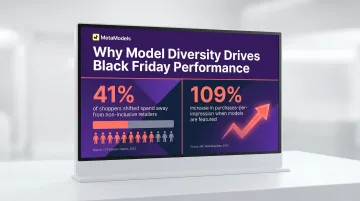
These outperform static catalog poses in paid social during high-competition periods. Model imagery improves performance by 33% on average, and for new products, purchases-per-impression roughly doubled (+109%) when models were featured in fashion ads.
Tip 2: Generate Seasonally Relevant Backgrounds
Swap plain studio backgrounds for contextually appropriate settings:
- Knitwear: Cozy indoor scene with warm lighting
- Outerwear: Urban street scene with festive decoration
- Accessories: Clean gifting context (wrapped boxes, holiday table)
Background context sharpens perceived relevance in a crowded feed. Lifestyle and contextual imagery consistently outperform plain packshots for engagement and conversion in social ads.
Tip 3: Create Multiple Model Variations Per Product
For each key Black Friday SKU, generate the same garment on models with different body types, ages, and ethnicities. This serves two purposes:
- Increases audience relatability across segments
- Gives your media buyer more creative variants to test for CTR optimization without additional shoot costs
Research shows that 41% of shoppers shifted at least 10% of their business away from a retailer that did not reflect the importance of inclusion and diversity. Diverse model representation is both the right call and the higher-performing one.
Tip 4: Produce Ad-Ready Variations With Different Color-and-Deal Overlays
For each product, generate two versions:
- Clean lifestyle image — neutral background, no text, suitable for organic channels
- Sale-ready version — same model image with layout space reserved for promotional overlays
Keeping the underlying model image consistent means one round of AI generation feeds both organic and paid channels.
Tip 5: Batch Your Catalog in Priority Order
Rank your Black Friday hero products, bundled sets, and clearance items before starting AI generation:
- Process hero SKUs first so you have time for review and re-generation if needed
- Move to supporting catalog items after core products are approved
- Avoid generating your entire range in one rush the day before launch
Rushing the full catalog increases the risk of quality issues slipping through. Prioritization gives you buffer time for iteration.
Tip 6: Use Consistent Model Identity Across Campaign Imagery
If your campaign features a recurring model character (same face, body type, styling), maintain that consistency across:
- Hero images
- Carousel ads
- Email headers
- Lookbook pages
Fragmented model identities across a single campaign undermine brand trust and visual cohesion, especially at high ad frequency during Black Friday week. Consistent brand presentation can increase revenue by up to 33% — a margin worth protecting when ad spend is at its peak.
Formatting and Scaling AI Content for Black Friday Ad Channels
Platform-Specific Output Requirements
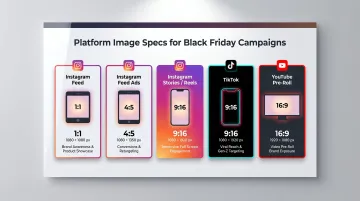
Generate in the highest available resolution and crop to platform specs during export, not during generation:
| Platform | Aspect Ratio | Minimum Resolution | Use Case |
|---|---|---|---|
| Instagram Feed | 1:1 (square) | 1080 x 1080 px | Feed posts, product PDPs |
| Instagram Feed Ads | 4:5 (vertical) | 1080 x 1350 px | Maximum vertical real estate |
| Instagram Stories/Reels | 9:16 (vertical) | 1080 x 1920 px | Full-screen immersive content |
| TikTok | 9:16 (vertical) | 720 x 1280 px minimum | Standard video ads |
| YouTube Pre-Roll | 16:9 (horizontal) | 1920 x 1080 px | Video advertising |
The Volume Math
A brand with 20 hero SKUs running across 3 ad channels with 2 audience segments needs a minimum of 120 distinct images (20 × 3 × 2). With AI model photography, that's a single day's output — not a multi-week production cycle.
Traditional fashion studio day rates range from £3,000-£15,000, with post-production adding £15-£30 per image. At those rates, 120 images costs £1,800-£3,600 in retouching alone — before crew, talent, studio, and logistics.
ASOS disclosed £12M+ in annual content production spend, which illustrates exactly what traditional workflows cost at scale.
Asset Organization
That volume of assets becomes unmanageable fast without a naming system. Set up a simple tagging convention before batch generation starts:
Format: [SKU-code]_[model-variant]_[background-type]_[format]
Example: DRS-2401_BodyType-A_Indoor-Cozy_1x1.jpg
This lets media buyers locate, sort, and deploy assets immediately — no cleanup sprint before launch.
Ensuring Quality, Accuracy, and Brand Consistency
The Quality Review Step Most Teams Skip
AI-generated images should be reviewed specifically for garment accuracy. Check that logos, prints, button placements, and fabric texture are rendered correctly before publishing. Inaccurate product representation increases return rates—56% of shoppers cite "does not match description" as a top return reason.
Human Review Adds Assurance
MetaModels.ai incorporates a human verification step into its AI image pipeline. Every image is reviewed by fashion specialists who check color, shape, and proportions before delivery. This is particularly valuable for Black Friday when image errors can go live at high ad frequency before anyone catches them.
Brand Consistency Controls
Once quality is confirmed, consistency across assets is what ties the campaign together. Lock in these three controls before scaling output:
- Use the same approved model personas across all SKUs
- Apply brand-aligned color palettes in every background
- Maintain consistent crop framing across paid, organic, and on-site imagery
This ensures your Black Friday assets read as one campaign, not a batch of separately generated images.
What to Do When an Output Misses the Mark
- Save the original input packshot
- Adjust the prompt — tweak the pose description, background, or model attributes
- Regenerate for that specific SKU only, not the full batch
This keeps iteration fast and protects your credit budget.
Frequently Asked Questions
How far in advance should fashion brands start creating Black Friday AI model content?
Start 3-4 weeks before Black Friday. This allows time for quality review, revision of any outputs that miss the mark, platform resizing, and handoff to media buyers. AI generation itself takes minutes per image—the buffer is about review and workflow, not production time.
What input image quality do I need for the best AI fashion model photography results?
Clean, well-lit flat-lay or ghost mannequin shots on a plain white or neutral background produce the best results. The most common issues—color shift, loss of print detail, inconsistent draping—typically trace back to input image quality rather than the AI tool itself.
Can AI fashion model photography realistically replace a Black Friday photoshoot?
For standard garment types (tops, dresses, outerwear, knitwear), AI-generated output is production-ready. Very complex items like multi-layer embroidery or heavily structured tailoring may still benefit from a dedicated traditional shoot for hero images.
How many image variations should I create per product for a Black Friday campaign?
Create a minimum of 3-4 variations per hero SKU: at least two model demographics, one lifestyle background, and one clean-background version. This covers both paid testing and organic content needs without over-generating.
What backgrounds and settings work best for Black Friday fashion model photography?
Use contextually seasonal settings (warm indoor scenes, gifting contexts, festive but not garish environments) for editorial and social content, paired with clean neutral backgrounds for product page and email use. Choose background based on the channel and audience, not uniformly.
How do I ensure prints and fabric textures look accurate in AI-generated model images?
Start with a high-resolution input image where the print or texture is fully visible and well-lit. Use a platform with garment-specific rendering—fabric draping technology preserves texture and print fidelity far better than standard image generation. Always quality-check printed garments before approving for publication.