
Introduction
A single seasonal photoshoot can cost tens of thousands of dollars — and fashion brands need at least four of them a year. Spring/Summer, Autumn/Winter, Resort, and Pre-Fall each demand fresh models, updated backdrops, and seasonally appropriate styling on a tight turnaround.
Traditional shoots can't keep up. Some brands now drop hundreds of new items weekly, and the window for seasonal content can close within days.
This guide delivers a practical framework for using AI seasonal fashion model imagery to plan, produce, and publish season-ready visuals across your entire catalogue. It covers:
- Generating photorealistic on-model content from packshots and flat lays
- Customising visual elements for each season's specific aesthetic
- Maintaining brand consistency across campaigns
- Avoiding common pitfalls that undermine quality or timing
Key Takeaways
- AI tools convert packshots into on-model seasonal imagery — no studio bookings, no model fees, delivered in hours
- Each season requires distinct visual adjustments — backgrounds, fabric simulation, model styling, color palettes — that AI platforms deliver on-demand
- Custom model creation and batch processing keep visuals consistent across an entire seasonal campaign
- Planning your AI content calendar 4-6 weeks ahead maximizes quality and cuts traditional production timelines by 75%
Why Traditional Seasonal Photoshoots Don't Scale
The Compounding Cost Problem
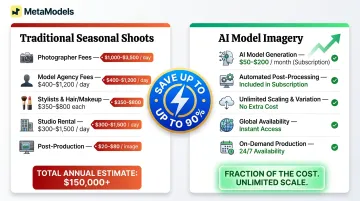
Every new season triggers the same expensive cycle. Fashion photoshoot costs range from $5,000 to $25,000 per production day, and that's before you account for every line item:
- Photographer fees: $1,000–$3,500/day for e-commerce work
- Model agency fees: $400–$1,200+ per model/day
- Wardrobe stylist and hair/makeup artists: $350–$800+ each
- Studio rental: $300–$1,500/day
- Post-production retouching: $20–$80 per image
For brands managing four main seasonal collections plus transitional drops, those numbers stack fast.
A brand photographing just 30% of its catalog across four seasons faces annual photography expenses exceeding $150,000 — and that assumes only modest per-season production. Reshoot costs alone run $3,000-$8,000 per partial day when colors don't match or styling misses the brief.
The Speed Mismatch
Cost is only part of the problem. Timing kills just as many campaigns.
Traditional photography timelines span 4-8 weeks from concept to live images, with roughly three weeks consumed by editing alone. Search volume for seasonal items like women's sweaters peaks sharply in September and drops steadily after. The holiday window is even tighter: 91% of consumers planned to celebrate winter holidays in 2025, but only 51% had finished shopping by early December.
When your spring/summer swimwear content arrives in April after an 8-week production cycle, you've already missed the February–March browsing and pre-order window where demand builds. That's revenue left on the table — not a production problem you can edit your way out of.
The Coverage Gap
Budget constraints force difficult choices. Brands managing 500 SKUs across four seasons typically shoot only 30% of products on-model, relying on flat lays or ghost mannequin images for the rest.
The products that would benefit most from on-model, seasonal styling — transitional layering pieces, gift-ready holiday items, new silhouettes — often end up with the weakest visuals. Traditional budgets simply can't stretch to cover entire collections.
How AI Seasonal Fashion Model Imagery Works
The Input-to-Output Workflow
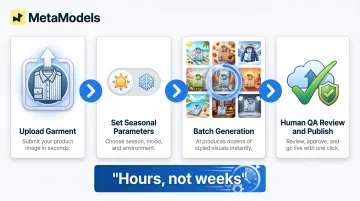
Brands upload a garment photo in any standard format: flat lay, ghost mannequin, or packshot. The AI analyzes fabric texture, drape characteristics, color accuracy, and garment construction, then generates a photorealistic model wearing the item in your specified seasonal context. The entire process occurs digitally, without booking models or studios.
Real-Time Fabric Draping Simulation
Seasonal authenticity depends on accurate fabric behavior. AI platforms simulate physical fabric properties by analyzing weight, weave pattern, and material composition from your product images. Each season has distinct requirements:
- Summer linens — flow and crinkle naturally under warm-weather styling
- Winter wools — hold structure and show visible fiber texture
- Spring cottons — drape with movement and lightness
- Fall knits — layer realistically without losing shape
However, AI systems still struggle with complex 3D fabric qualities including specialty textiles like velvet, silk, and cashmere. Systems trained predominantly on cotton and polyester may produce less accurate results for heavyweight structured outerwear or sheer materials. Human review catches these gaps before images go live.
Human Review for Garment Accuracy
Best-practice platforms include human-in-the-loop QA to verify garment details before publication. Fashion specialists check stitching accuracy, print fidelity, logo placement, colorway correctness, and seasonal appropriateness. This review step differentiates publication-ready imagery from purely automated outputs that may miss critical details.
MetaModels.ai's workflow includes mandatory human fashion specialist review for every generated image, checking garment accuracy before delivery — ensuring seasonal outputs meet professional standards for e-commerce product pages and marketing campaigns.
Model Customization and Seasonal Styling
Select or create AI models matching your target customer across ethnicity, body type, age, and styling preferences. From there, apply seasonal styling cues: light layering for autumn transitions, bare-skin summer looks, cozy accessorized winter sets.
Background environments reinforce the season just as much as the garment. Beach scenes for swimwear, autumnal parks for fall collections, and cozy interiors for winter deliver context that generic studio backgrounds can't replicate.
Batch Generation for Unified Campaigns
Process entire seasonal SKU sets simultaneously rather than one image at a time. Select consistent models, backgrounds, and lighting styles across your full collection to create unified visual campaigns. A 50-piece spring dress collection, for example, can go from packshots to a consistent sunny outdoor aesthetic in a single batch run — cutting days of back-and-forth with photographers into a single production pass.
Your Season-by-Season AI Model Content Guide
Generic "set and forget" AI settings won't capture the seasonal character that drives engagement. Each season requires intentional visual decisions that communicate the mood, context, and commercial opportunity of that specific moment in the fashion calendar.
Spring/Summer Visual Playbook
Key Visual Elements:
- Bright or pastel backgrounds with natural light
- Outdoor lifestyle scenes: parks, beaches, city streets in golden-hour light
- Light fabric behavior showing linen drape and cotton flow
- Airy poses reflecting warmth and movement
- Diverse skin tone representation
The Diversity Advantage:
Spring/summer launches — particularly swimwear, activewear, and lightweight dresses — benefit most from showing a range of body types and skin tones. 64% of consumers take action after seeing diverse advertising, with Hispanic consumers 85% more likely to purchase from brands showing their culture authentically.
Digital campaigns featuring inclusive imagery also see 15-20% higher click-through rates — a measurable return on representation.
AI tools make it cost-effective to generate this range without additional casting budgets. Generate the same swimsuit on five different body types and ethnicities for the cost of five image credits, replacing what would otherwise be five separate model bookings.
Fall/Winter Visual Playbook
Key Visual Elements:
- Moodier, richer color palettes: burgundy, forest green, navy, charcoal
- Textured fabric simulation for wool, cashmere, leather
- Indoor or autumnal-outdoor backdrops: cozy interiors, fallen-leaf settings, urban grey tones
- Layered styling showing how pieces work together
Technical Challenges:
Heavy outerwear, knitwear, and layered looks present higher complexity for AI rendering than single-layer summer garments. AI struggles with 3D qualities of heavyweight fabrics — wool requires visible fiber separation and fuzzy edges; leather demands smooth gradients and subtle surface imperfections. Structured coats tend to produce more reliable results than chunky hand-knit sweaters.
Budget extra QA time for winter-weight specialty fabrics. For the most complex textures, a hybrid workflow works well: let AI handle model positioning and backgrounds, then preserve photographed fabric detail for the garment itself.
Holiday and Transition Seasons
The Holiday Content Window:
Those fall/winter assets also set you up for the highest-stakes window in retail. 2025 holiday retail sales surpassed $1 trillion for the first time, growing 4.1% year-over-year — yet by early December, most shoppers had completed only half their purchasing. Speed-to-publish is critical in this compressed window.
AI generates gift-ready and celebratory imagery from existing product photos, skipping the need for a dedicated holiday shoot. A practical workflow:
- Upload your best-selling items in November
- Apply festive backdrops, elevated styling, and rich seasonal tones
- Publish gift guides the same week assets are ready
- Refresh creative mid-December to capture late-season shoppers

Transitional Season Opportunity:
Late summer/early fall and late winter/early spring represent real commercial opportunities that traditional budgets often skip. Pre-fall collections account for up to 60% of annual sales for major fashion houses, yet many brands reduce or eliminate transitional content due to production costs.
AI makes transitional imagery practical: generate early-fall layering content from the same garment photos used in your summer campaign by adjusting backgrounds from bright beach to muted urban settings, cooling the lighting temperature, adding a light layering piece, and shifting the overall palette toward fall tones.
Maintaining Brand Consistency Across Seasonal Campaigns
The Brand Consistency Challenge
Different seasons should feel visually distinct, but all seasonal content must remain recognizably on-brand. Same model identity, same tonal quality, same compositional style. Without intentional setup, AI outputs can look disjointed — spring campaign feels bright and youthful, winter campaign looks sophisticated and mature, and shoppers don't recognize them as the same brand.
Organizations maintaining consistent branding see average revenue increases of 33%.
Custom Model Creation Solution
Define and lock a specific AI model persona — appearance, demographic profile, style aesthetic — then reuse that same model identity across every seasonal campaign. Your brand develops a consistent "face" across spring lookbooks, holiday edits, and winter campaigns without paying recurring casting fees.
MetaModels.ai supports this through a curated library of AI models with diverse ethnicity, demographics, and body types, plus custom model creation that lets brands build and maintain a signature identity across all seasonal content.
Brand Style Rules for Seasonal Content
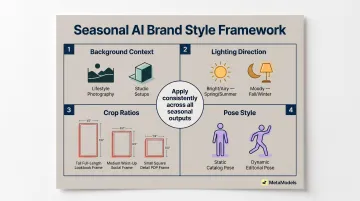
Establish an internal framework covering:
- Choose background context: outdoor lifestyle settings or controlled studio environments
- Define lighting direction: bright and airy for spring/summer, moody and dramatic for fall/winter
- Lock crop ratios per content type: full-length for lookbooks, waist-up for social, detail shots for PDPs
- Set pose style expectations: static and clean for catalog, dynamic for campaign editorial
Document these rules in a one-page brief. When multiple team members generate seasonal imagery, consistent application of these parameters ensures a consistent look and feel even as seasonal elements change.
End-to-End Production Management
When every image passes through the same review pipeline — rather than isolated generation batches — quality stays consistent across hundreds of SKUs. This matters most during large seasonal launches, where output volume makes manual spot-checking impractical.
MetaModels.ai handles this end-to-end, keeping quality aligned as brands scale across products, regions, and seasons.
Common Pitfalls to Avoid with AI Seasonal Fashion Imagery
Pitfall 1: Treating AI as "One Prompt Fits All"
Seasonal AI outputs require deliberate customization per campaign. A summer dress photographed against a grey studio background loses its seasonal appeal no matter how accurately the garment renders. The visual environment must reinforce the season, not just display the product.
Customize backgrounds, adjust fabric behavior parameters for seasonal weight, and modify model styling for each campaign. Spring requires different decisions than winter — not just different products, but different visual treatment of those products.
Pitfall 2: Skipping Quality Review for Garment Accuracy
Seasonal campaigns often feature hero products with distinctive details: embroidered holiday motifs, signature seasonal prints, textured knits. Color mismatches and texture misrepresentations account for 30% of online fashion returns, and processing returns costs $10-$30 each.
Without human-reviewed QA, those distinctive details get distorted or omitted — creating product pages that don't match what shoppers actually receive. A structured review step catches these discrepancies before they reach the listing.
Pitfall 3: Starting the Seasonal Content Cycle Too Late
AI's speed advantage is real — hours instead of weeks — but that speed only helps if you use the saved time well. Brands that begin spring/summer generation in mid-winter gain a quality buffer that rushed teams don't have. That lead time allows for:
- Reviewing initial outputs against brand standards
- Refining seasonal styling and backgrounds
- Requesting edits on complex or hero garments
- Scheduling releases to align with campaign calendars and paid media
Starting seasonal AI generation just days before launch eliminates the quality review buffer that separates professional campaigns from rushed executions.
Frequently Asked Questions
How far in advance should brands create AI seasonal fashion model imagery?
AI reduces production time from weeks to hours, but plan 4-6 weeks ahead of seasonal launches for quality review, batch processing of large catalogs, and multi-channel scheduling aligned with your campaign calendar and paid media.
Can AI generate consistent model appearances across an entire seasonal campaign?
AI platforms offer custom model creation where you define and save a specific model identity — appearance, demographics, and styling — reused across all seasonal content. This ensures every seasonal campaign features the same brand "face" without recurring casting fees.
What types of garments work best with AI seasonal model imagery?
Single-layer tops, dresses, and lightweight outerwear produce the most reliable AI results. Structured heavy knitwear, sheer fabrics, and complex layered looks may require closer QA attention to verify fabric texture accuracy, drape behavior, and detail preservation before publication.
How do I adapt AI model backgrounds and styling for different seasons?
Most AI platforms allow you to set background environment (outdoor/indoor, lifestyle/studio), lighting mood (bright/moody), and model styling cues (layering, accessories, pose) as parameters for each campaign. Adjust these settings seasonally: bright beach backgrounds for summer, cozy interiors for winter, autumnal outdoor settings for fall.
Is AI-generated seasonal fashion imagery suitable for e-commerce product pages?
When produced with garment-accurate platforms that include human QA steps, AI seasonal imagery meets the accuracy standards required for product detail pages. Platforms delivering up to 4K resolution with human fashion specialist review provide marketplace-ready content that e-commerce brands use widely today.
Can I create inclusive, diverse AI model content across all my seasonal campaigns?
AI model libraries with diverse ethnicities, body types, and demographics let you show seasonal products on a representative range of models without additional casting costs. Generate the same garment across multiple diverse models within your existing credit allocation, with each variation costing one credit regardless of model selection.