This guide is for fashion brands, e-commerce teams, designers, and marketing professionals who want to generate professional AI model photography without booking a studio, hiring models, or owning expensive equipment. Traditional fashion photography demands significant investment—studio rentals, professional model bookings, photographer fees, and post-production editing—creating bottlenecks that delay launches and limit content volume. McKinsey projects that generative AI could add $150 billion to $275 billion USD to operating profit in apparel, fashion, and luxury within three to five years, driven in part by faster go-to-market and productivity improvements.
This guide covers the complete framework for writing AI fashion model prompts—from layered prompt anatomy to model description, shot types, lighting, and troubleshooting common output failures. You'll learn the exact sequence, vocabulary, and technical references that separate professional results from amateur attempts.
Key Takeaways
- Effective AI fashion model prompts follow a 4-layer sequence: shot type and framing → model and garment description → environment and setting → camera plus lighting
- Specificity in garment description—fabric, fit, and cut—determines whether the AI renders the clothing accurately or defaults to a generic version
- Specifying model attributes (age, body type, skin tone, hair) overrides the AI's narrow default toward young, slim, homogenous figures
- Named film stock, focal length, and lighting direction eliminate the flat, over-processed "AI look" and push results toward photographic realism
- Campaign consistency requires a locked model descriptor and style block used identically across every prompt in the session
The Anatomy of an AI Fashion Model Prompt
A production-ready AI fashion prompt follows a defined sequence, not a random list of details. Skip any layer and the AI fills the gap with its default aesthetic, breaking photorealism. Each layer builds on the last: shot type sets framing, model and garment description establishes the subject, environment adds context, and camera settings force photographic rendering. Adobe Firefly's prompting guidance recommends specifying style, lighting, emotion, environment, and camera-like details for control.
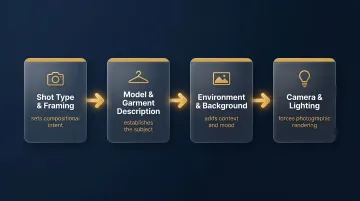
Layer 1: Shot Type and Framing
Opening every prompt with shot type sets the AI's compositional intent before anything else; without it, framing is unpredictable. Shot type dictates cropping boundaries and visual hierarchy, determining what the viewer sees first and how much environmental context is included.
Key shot types:
- Full body — Head to toe, establishes the complete outfit in environmental context; ideal for lookbooks and website banners
- Three-quarter — Mid-thigh up, the e-commerce and social media standard; balances garment visibility with close-up detail
- Close-up — Tight crop on fabric, stitching, lapel, or accessory detail; essential for premium product credibility
- Side profile — Highlights garment silhouette and drape; adds variety without a location change
- Back angle — Reveals outerwear detailing, drape, and back design that front shots miss
Always open your prompt with one of these shot types to lock framing before the AI begins rendering: "Full-body shot of..." or "Three-quarter portrait of..." or "Close-up detail shot of..."
Layer 2: Model and Garment Description
The model and garment block should follow the shot type declaration immediately. The model description covers physical attributes and pose; the garment description must specify fabric type, fit, color, and at least two distinguishing details.
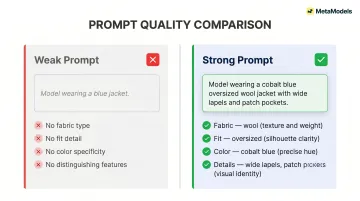
This is where most prompts fall short. Vague item labels ("blue jacket") produce generic results; multi-detail descriptions ("navy unstructured linen blazer with notch lapel and front patch pockets") produce usable ones.
Model description includes:
- Gender and specific age (e.g., "28-year-old woman" rather than "young adult")
- Body type using precise vocabulary (slim, curvy, muscular, petite, tall, voluptuous)
- Skin tone and ethnicity for accuracy
- Key facial features (face shape, eye color)
- Hair color and style
Garment description requires:
- Fabric type (wool, linen, cotton, silk, technical mesh)
- Fit and silhouette (oversized, tailored, slim-fit, relaxed)
- Specific color (cobalt blue, off-white, charcoal grey)
- At least two distinguishing features (lapel style, pocket placement, button count, stitching detail)
Example contrast:
- ❌ Weak: "Model wearing a blue jacket"
- ✅ Strong: "28-year-old woman with shoulder-length dark hair wearing an oversized cobalt blue wool overcoat with wide lapels and front patch pockets"
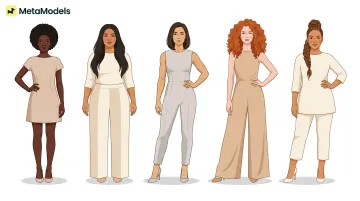
Platforms like MetaModels.ai offer a pre-curated library of AI models covering diverse ethnicities, body types, and age demographics — so representation is built in rather than manually specified every time.
Layer 3: Environment and Background
The background determines whether the image reads as a clean e-commerce shot or an editorial campaign. A "white seamless background" produces sterile product clarity; a "weathered stone terrace overlooking a grey-blue sea" delivers aspirational context. Specifying environmental textures (aged stucco, marble, concrete) adds depth that location names alone do not.
Background vocabulary examples:
E-commerce clean:
- "White seamless studio background"
- "Neutral beige gradient backdrop"
- "Soft grey paper sweep"
Editorial luxury:
- "Polished white marble interior with tall arched windows"
- "Weathered limestone terrace overlooking the Mediterranean"
- "Raw concrete gallery space with diffused natural light"
Urban streetwear:
- "Graffiti-covered brick wall in an industrial district"
- "Rooftop with city skyline at dusk"
- "Empty subway platform with tiled walls"
Nature/lifestyle:
- "Beach with soft sand and calm blue water"
- "Tall grass field in late afternoon"
- "Forest path with dappled sunlight through trees"
Naming textures within the environment produces more grounded, realistic images than location names alone. "Weathered stone terrace" is more specific and visually actionable than "Italian coast."
Layer 4: Camera, Film Stock, and Lighting
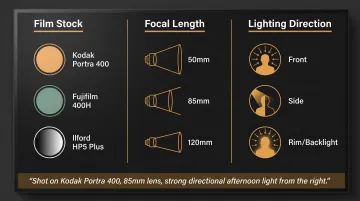
This final layer separates photorealistic output from digitally rendered output. Specifying a film stock (e.g., Kodak Portra 400), focal length (e.g., 85mm lens), and lighting direction (e.g., "strong directional afternoon light from the right") forces the AI to mimic the grain, color science, and depth of field of real photography rather than defaulting to a hyper-smooth digital look.
Camera and film stock examples:
- Kodak Portra 400 — Described by Kodak as delivering "spectacular skin tones and exceptional color saturation over a wide range of lighting conditions"; widely used for portrait and fashion
- Fujifilm 400H — Cooler, greener tones compared to Portra; now discontinued but still referenced for its distinct color palette
- Ilford HP5 Plus — ISO 400, fine grain, medium contrast black-and-white film; ideal for editorial and documentary aesthetics
Focal length effects:
- 50mm — Natural perspective, full environmental context; requires strong composition
- 85mm — Classic portrait length with shallow depth of field and strong subject isolation
- 120mm macro — Increasing compression and background separation; excellent for close-up fabric and accessory detail
Lighting direction:
- Front light — Even, product-safe illumination with minimal shadows
- Side light — Dramatic shadows that define shape and texture
- Rim/backlight — Cinematic depth, separates garment from background
Combining all three photographic references in one phrase delivers the most precise instruction: "Shot on Kodak Portra 400, 85mm lens, strong directional afternoon light from the right, rim lit from behind."
Describing Your AI Fashion Model
Model description is where most AI fashion prompts are under-specified. A vague prompt produces a narrow AI default (typically a young, slim, smooth-skinned figure), which limits brand representation and reduces output realism. An exploratory study on ChatGPT-4o with DALL-E 3 found extreme demographic defaults when no description was given: Judges were 100% White male (20/20), Pastors 100% White male (20/20), Poets 95% White and 80% male.
The goal is to describe your model as precisely as a casting brief.
Physical Attributes
Which attribute categories should you include?
- Gender — Male, female, non-binary, gender-neutral presentation
- Specific age — "28" rather than "young adult"; "45" rather than "middle-aged"
- Body type — Slim, curvy, muscular, petite, tall, voluptuous, athletic
- Skin tone and ethnicity — South Asian, Black, East Asian, Latina, Middle Eastern, White; specific descriptors increase accuracy
- Key facial features — Round face, angular jawline, almond eyes, wide-set eyes
Specificity prevents the AI from defaulting to a generic beauty standard and is a deliberate brand inclusivity decision. A 2019 Adobe global survey found that 61% of Americans consider diversity in advertising important, and 38% are more likely to trust brands that show it.
If specifying every physical attribute feels like heavy lifting, platforms like MetaModels.ai offer a pre-built library of diverse AI models across ethnicity, body type, and age, so representation is built into your starting point.
Facial and Hair Details
Facial and hair details prevent same-face repetition across a campaign.
Key categories to specify:
- Hair color and style — "Short dark twists pulled back," "wavy shoulder-length auburn bob," "slicked-back platinum blonde"
- Skin texture descriptors — Freckles, moles, natural pore visibility, subtle skin imperfections
- Eye shape and color — Almond eyes, round eyes, hazel, deep brown, grey-blue
Adding one or two distinguishing details increases output variation and realism. A model described as "28-year-old Black woman with short natural curls and freckles across her nose" produces a more distinctive, memorable output than "young woman."
Pose and Expression
The right pose and expression depends entirely on where the image will be used.
E-commerce: Clean standing poses (weight-shift stance, hand-on-hip) with a neutral direct gaze.
- Example: "Standing upright with weight on left leg, right hand in pocket, neutral expression looking directly at camera"
Editorial: Narrative poses (over-the-shoulder look, back arch, dynamic walking) with intense or stoic expressions.
- Example: "Walking toward camera with confident stride, strong eye contact, subtle smile, hair blown by wind"
Lifestyle: Candid poses (laughing, coffee in hand, casual stroll) with relaxed or smiling expressions.
- Example: "Sitting on a bench with legs crossed, laughing naturally, holding a coffee cup, relaxed posture"
Shot Types, Scene Setting, and Lighting
Essential Shot Types
Every fashion brand needs five shot types for a complete visual library:
1. Wide/Full Body Establishes outfit in environmental context. Ideal for website banners and lookbooks.
- Prompt framing: "Full-body shot, head to toe, standing in..."
2. Three-Quarter Mid-thigh up; the e-commerce and social media standard.
- Prompt framing: "Three-quarter portrait shot, mid-thigh up, centered framing..."
3. Close-Up Tight crop on fabric, stitching, lapel, or accessory detail; essential for premium product credibility.
- Prompt framing: "Close-up detail shot focusing on lapel stitching and button detail..."
4. Side Profile Highlights garment silhouette and drape; adds variety without a location change.
- Prompt framing: "Full-body shot from the side, profile view..."
5. Back Angle Reveals outerwear detailing, drape, and back design that front shots miss.
- Prompt framing: "Full-body shot from the backside, showing rear garment detail..."
Backgrounds and Environment
Match background choice to brand aesthetic:
Plain studio — Seamless beige, white, or grey for clean e-commerce. Amazon requires a pure white background (RGB 255,255,255) for main product images, with clothing images at least 1600 px in height.
Urban environments — Graffiti walls, city crosswalks, rooftops for streetwear.
Luxury settings — Stone terraces, ballrooms, architectural interiors for editorial.
Nature — Beaches, tall grass fields, forest paths for lifestyle.
Naming textures within the environment (weathered stone, polished marble, aged stucco, raw concrete) produces more grounded, realistic images than location names alone. "Weathered stone terrace" gives the AI more to work with than "Mediterranean villa."
Multi-shot "session" approach: Generating a cohesive lookbook requires treating multiple prompts as a single session with locked environmental and aesthetic descriptors. If the hero shot uses a Mediterranean stone terrace, all supporting shots should reference the same location and time of day to maintain visual continuity across the campaign.
Lighting Direction and Quality
Three variables control light in a prompt:
1. Direction
- Front — Even, product-safe
- Side — Dramatic shadows, shape definition
- Rim/backlight — Cinematic depth, garment separation from background
2. Quality
- Soft diffused — Studio, window light, overcast sky
- Hard directional — Strong shadows, texture emphasis
3. Source
- Golden hour, studio softbox, natural morning light, neon
Combining all three in one lighting phrase gives the AI the most precise instruction: "Strong directional afternoon light from the right, rim lit from behind."
Camera and Film Stock
Focal length effects on fashion imagery:
- 50mm — Full environmental wide shots, natural perspective
- 85mm — Three-quarter portrait shots with natural compression and shallow depth of field
- 120mm macro — Close-up fabric and accessory detail
Pairing focal length with a named analog film stock is the most consistent fix for the AI's default digital gloss:
- Kodak Portra 400 — Warm, muted tones; spectacular skin tones and exceptional color saturation
- Fujifilm 400H — Cooler, greener tones (now discontinued)
- Ilford HP5 Plus — Fine grain black-and-white with medium contrast
Aesthetic Style Keywords
Recognized visual aesthetic keywords signal an entire visual language to the AI:
- "Vogue editorial" — Dramatic lighting, high contrast, narrative composition
- "Old money" — Timeless, mid-century East Coast preppy codes; muted, sun-bleached tones and coastal settings
- "Dark academia" — Rich textures, warm shadows, architectural interiors, gothic libraries, pleated skirts
- "Gorpcore" — Utilitarian outdoor layering with muted nature backdrops; technical gear styled for everyday wear
Style keywords work best when combined with technical camera and lighting descriptors, not used as a substitute for them.
Common Prompting Mistakes and How to Fix Them
Vague Garment Descriptions
Problem: The AI renders a generic version of the garment—wrong fit, wrong fabric, wrong proportions—because the prompt only named the item category without structural detail.
Fix: Replace item labels with multi-detail descriptions specifying fabric, fit, color, and at least two distinguishing features.
Before: "Blue jacket"
After: "Oversized cobalt blue wool overcoat with wide lapels, front patch pockets, and dropped shoulders"
Inconsistent Model Attributes Across Shots
Problem: A campaign generates images where the model appears visually different in every shot—different face, hair color, skin tone, and build—making the collection look incoherent.
Fix: Create a "locked model descriptor block"—a standardized string covering gender, age, body type, skin tone, hair, and one or two facial details—and copy it identically into every prompt in the campaign.
Locked model descriptor example: "28-year-old South Asian woman with shoulder-length wavy black hair, warm medium skin tone, almond-shaped dark brown eyes, athletic build"
Use seed locking or character reference features where the platform supports them. Working with a platform that provides a pre-built consistent AI model—rather than generating one from scratch each time—keeps every shot visually coherent without extra setup.
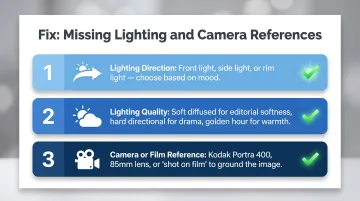
Missing Lighting and Camera References
Problem: Every generated image has the same flat, over-processed "AI look" regardless of scene or setting—caused by the AI falling back to its default digital rendering when you provide no photographic references.
Fix: Add a minimum of three photographic references to every prompt:
- Lighting direction — front light, side light, or rim light depending on the mood you want
- Lighting quality — soft diffused for editorial softness, hard directional for drama, golden hour for warmth
- Camera or film reference — Kodak Portra 400, 85mm lens, or "shot on film" to ground the image in a photographic aesthetic
Pro Tips for Brand-Consistent AI Fashion Campaigns
Lock your style block first: Build a reusable string of camera, film stock, lighting, and color grading descriptors — then paste it identically into every prompt across the campaign.
Example locked style block: "Shot on Kodak Portra 400, 85mm lens, muted filmic color grading, directional afternoon light"
Without this, even technically strong images will feel mismatched across a lookbook.
Once your style block is locked, use angle modifiers to multiply output without reshooting. Prepend "full-body shot FROM THE SIDE of..." or "full-body shot FROM THE BACKSIDE of..." to your base prompt while keeping every other descriptor identical. This generates front, side, and back views that read as a single cohesive photoshoot.
Plan for a garment accuracy review. Even detailed prompts miss the mark — sleeve length, collar construction, and fabric drape are the most common AI failure points. MetaModels.ai addresses this directly with human-reviewed image verification for garment accuracy, which reduces manual QA time for teams producing content at e-commerce scale.
Frequently Asked Questions
What makes an AI fashion model prompt effective?
Effective prompts specify all four layers—shot type, model and garment attributes, environment, and camera plus lighting—in sequence. Omitting any layer causes the AI to fill the gap with a generic default, reducing both realism and brand relevance. A well-formed prompt functions like a creative brief; a vague one leaves too much to chance.
How do I keep the AI model looking consistent across multiple campaign images?
Consistency requires an identical model descriptor block in every prompt—covering gender, age, body type, skin tone, and key facial features. Seed locking and character reference tools add another layer where supported. Platforms with pre-built model libraries simplify this further by letting you select the same model across all image generations.
Can I use my own garment designs in AI fashion model photography?
Yes. Upload your packshot or flat-lay garment image, select an AI model, and the platform drapes your design onto the model while preserving color, shape, and texture. The prompt then handles the scene, lighting, and overall aesthetic.
How do I avoid the "AI look" in my fashion model images?
Naming a specific film stock, focal length, and lighting direction in every prompt is the most reliable fix. These three elements force the AI to mimic real photographic properties—grain, color science, depth of field—rather than defaulting to a hyper-polished digital finish.
Do I need photography knowledge to write good AI fashion model prompts?
The prompt formulas in this guide are built for non-photographers to copy and adapt without prior technical knowledge. That said, learning a small vocabulary—85mm, Kodak Portra 400, side light, three-quarter shot—noticeably improves output quality and gives you more creative control.
What is the difference between an e-commerce prompt and an editorial fashion prompt?
E-commerce prompts prioritize clean backgrounds, neutral lighting, and full garment visibility for product clarity. Editorial prompts add environmental context, dramatic or cinematic lighting, narrative poses, and analog film references to create aspirational imagery suited to lookbooks, campaigns, and social content. The practical difference: e-commerce images convert browsers, while editorial images build brand identity.