Introduction
Traditional model photoshoots are expensive and slow to execute. For fashion brands managing hundreds of SKUs, the economics rarely add up.
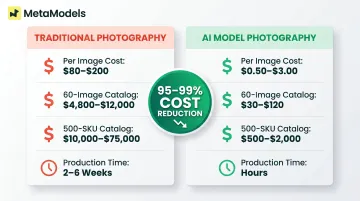
A standard on-model e-commerce shoot costs $80–$200 per image once you factor in photographer fees, model rates, studio rental, styling, and post-production. For a 100-SKU catalog with three images per garment, that's $24,000–$60,000 before reshoot contingencies, sample shipping, or rush fees that commonly add another 15–25%.
Speed is just as much of a problem. Traditional catalog shoots for 100+ SKUs take 2–6 weeks including post-production — by the time imagery goes live, trends may have already shifted. On top of that, you're constrained by model availability, photographer schedules, and studio bookings, all of which limit how fast you can scale visual content production.
This guide covers what AI model apparel photography is, how it works, what determines output quality, and what brands need to evaluate before adopting it. You'll learn the technical considerations that separate production-ready AI imagery from experimental tools, the legal and ethical factors you can't ignore, and how to assess whether your catalog is ready for AI-generated model photography.
TLDR:
- AI model photography costs $0.50–$3.00 per image versus $80–$200 for traditional shoots
- Brands can process 100+ SKUs in hours rather than weeks
- Accurate garment rendering (fabric, print, silhouette) remains the hardest technical challenge
- Human review workflows are what separate production-ready platforms from tools requiring heavy post-processing
- Compliance varies by region: the EU requires AI transparency disclosures; New York mandates consent for digital replicas
What Is AI Model Apparel Photography?
AI model apparel photography uses machine learning to generate photorealistic images of virtual models wearing actual garments, without any physical studio, model booking, or shoot day. Unlike general AI image generators that synthesize clothing from text prompts, this approach is product-specific: it preserves your actual garment's fabric texture, print, and silhouette from a source photo.
Four Core Use Cases:
| Use Case | What It Does | Key Benefit |
|---|---|---|
| On-Model Generation | Places garments from packshots onto virtual models | Eliminates model booking and studio costs entirely |
| Background Generation | Replaces or builds lifestyle scenes behind the model | One garment shown in studio, outdoor, or branded environments |
| Image Enhancement | Upscales to 4K, corrects lighting and color balance | Zoom-ready PDPs without a reshoot |
| Batch Catalog Processing | Processes full seasonal catalogs overnight | Reduces weeks of production to hours, with consistent model styling across SKUs |
Why On-Model Imagery Matters for Conversion
Shoppers convert at higher rates when clothing appears on a model rather than a flat-lay or mannequin. According to Baymard Institute UX research, 90% of apparel sites fail to help users properly assess appearance, size, or fit. Test participants described mannequin imagery as "boring" and "off-putting," and 21% of sites provide no human model images at all.
67% of online buyers rank product image quality as the most important factor in their purchase decision, above product descriptions. High-resolution images drive a 33% higher conversion rate compared to low-quality visuals. In fashion, 95.6% of brands use on-model photography. It's a baseline expectation, not a competitive edge.
Why Fashion Brands Are Switching to AI Model Photography
Cost Reduction: The Real Numbers
Traditional on-model photography costs break down as follows per shoot day:
- Photographer: $1,000-$3,500
- Model fees: $500-$3,000+
- Studio rental: $300-$2,000
- Hair and makeup: $400-$1,500
- Wardrobe stylist: $500-$2,000
- Retouching: $25-$150 per image
Total day rate for standard e-commerce shoots: $3,000-$8,000, producing 40-80 images. This works out to $80-$200 per garment image when all costs are included.
AI-generated imagery costs $0.50-$3.00 per image: a 95-99% cost reduction. For a 60-image on-model catalog, traditional photography costs $4,800-$12,000 versus $30-$120 for AI-generated alternatives. For a 500-SKU catalog, the difference is even more dramatic: $10,000-$75,000 traditionally versus $500-$2,000 with AI tools.
Speed and Scalability
Traditional catalog production for 100 SKUs requires multiple shoot days plus 2-6 weeks of post-production. AI tools generate images in seconds—platforms like WearView process images in approximately 30 seconds each, while enhancement tools like Claid deliver results in 2-3 seconds per image.
The advantage grows with catalog size. Where a traditional shoot requires blocking multiple days and coordinating schedules across photographer, models, and studio, AI processing runs overnight. Brands can upload a CSV of 300 SKUs configured with model, pose, and background settings and receive production-ready 4K images by morning.
The timeline compression enables near real-time trend response. Instead of planning campaigns months ahead to accommodate shoot scheduling, brands can generate new seasonal imagery within days of identifying trending styles.
Inclusivity and Representation
Traditional shoots are constrained by the models available, affordable, and logistically reachable. AI model libraries now offer diverse ethnicity, body types, ages, and demographics—allowing brands to show products on models that actually reflect their customer base.
The business case is well documented. A UN Women/Unstereotype Alliance study of 392 brands across 58 countries found inclusive advertising positively impacts both short-term sales and long-term brand equity.
63% of consumers say diverse representation in advertising is important, and 47% are more likely to buy from brands that feature it.
AI enables scalable demographic diversity without proportional cost increase. You can show the same garment on models representing different ethnicities, body types, and age ranges without booking multiple models or running separate shoots.
Consistency Across Catalog and Channels
With traditional photography, maintaining consistent lighting, model styling, and background treatment across an entire season's catalog is nearly impossible when shoots happen on different days with different photographers. AI solves this: brands can lock in the same virtual model identity, lighting preset, and background template across hundreds of SKUs.
Platforms like MetaModels.ai allow brands to create custom AI models that match their brand identity and reuse them across all products with no royalty obligations. This produces the unified, professional catalog aesthetic that's difficult to achieve with traditional methods.
Creative Flexibility Without Extra Cost
Traditional photography locks you into the images produced on shoot day. Want the same garment in three different backgrounds for PDP, social ads, and lookbook? That requires three separate setups—or three separate shoots.
AI enables multi-scene generation from a single product photo. Upload one clean packshot and generate the garment in studio white for your PDP, a lifestyle outdoor scene for Instagram ads, and an editorial setting for your lookbook. Each variation costs the same flat per-image rate—no reshooting, no extra setup fees.
How AI Model Apparel Photography Works: A Step-by-Step Overview
Step 1: Prepare Your Product Images
Input photo quality is the single biggest controllable factor in output quality. Clean, well-lit source images produce dramatically better results than poor packshots. No AI platform can recover a badly photographed garment.
Required input specifications:
- Background: Plain, neutral backgrounds (white, light grey)—no cluttered or textured backdrops
- Lighting: Even, diffused lighting with no harsh shadows or hotspots
- Garment condition: Wrinkle-free, properly steamed or ironed
- Angles: Front and back views where possible; side angles for structured pieces
- Resolution: Minimum 1500px on the longest side; higher is better
Items with wrinkles, poor lighting, or busy backgrounds will produce mediocre AI results regardless of the platform you use. This is the quality ceiling—everything downstream depends on this input.
Some platforms offer flat-lay cleanup tools that prepare imperfect source images before generation, but starting with clean packshots eliminates an entire processing step.
Step 2: Select or Create Your AI Model
Brands have two options: choose from a pre-built model library or create custom AI models.
Pre-built libraries let you filter by:
- Ethnicity and skin tone
- Body type and size
- Age range
- Gender presentation
Custom model creation allows brands to build AI models trained to represent their specific brand identity. Catalog cohesion is the payoff—using the same custom AI model across hundreds of SKUs creates a unified look that mirrors the consistency traditional brands achieve by booking the same model for entire seasonal campaigns.
MetaModels.ai offers custom model creation with no ongoing royalty obligations, so you can reuse your brand model across all SKUs without per-use fees.
Step 3: Configure the Scene, Pose, and Settings
Explicit, detailed configuration produces consistent and predictable results. Vague or default settings do the opposite.
Key decisions at this stage:
Camera angle:
- Full body (head to toe)
- Three-quarter (waist up)
- Close-up (garment detail focus)
Background type:
- Studio white or neutral
- Lifestyle scene (outdoor, urban, home setting)
- Editorial environment (textured wall, branded backdrop)
Pose:
- Static standing pose
- Walking or movement pose
- Seated or action pose
Brands that build "house style" templates—standardized camera angle, background, and pose configurations—produce the most consistent catalog imagery. Think of it as a digital shot list: define it once, apply it to every SKU.
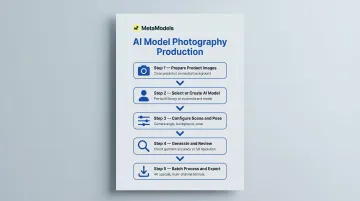
Step 4: Generate and Review for Garment Accuracy
Once generation completes, review output at full resolution before publishing. Skipping this step risks listing images with inaccurate product representations.
Common failure points to check:
- Verify fabric texture reads correctly (cotton vs. silk vs. denim each have distinct visual signatures)
- Confirm text, logos, and print patterns are legible and correctly aligned
- Check necklines, seams, and structural details against the actual garment
- Assess drape and fit—does the garment hang realistically on the model?
- Compare color against the source photo, accounting for lighting shifts
Platforms that include human review—MetaModels.ai has fashion specialists check every image for garment accuracy—deliver output ready for immediate use. Without that review layer, expect post-processing time to catch and correct AI errors before images go live.
Step 5: Batch Process, Upscale, and Export
For large catalogs, batch processing is the difference between a useful tool and a production workflow.
Batch workflow:
- Submit configured product sets via CSV upload
- Process overnight (typical for 100-300 SKU batches)
- Receive output organized by SKU or product ID
Final output steps:
- Upscale to 4K for zoom-capable product detail pages
- Generate video clips from stills for social media reels and ads (platforms like MetaModels.ai offer AI-generated fashion videos with models in motion)
- Export in channel-specific formats: aspect ratios and resolutions optimized for Amazon, Instagram, TikTok, or your DTC site
When the export step is built into the platform, your team skips the reformatting queue entirely—images go straight from generation to publishing.
What Determines the Quality of AI Apparel Photos
Input Quality Is the Ceiling
No AI model can recover a bad source photo. Wrinkled garments, poor lighting, and cluttered backgrounds produce mediocre results regardless of the tool. This variable is entirely within your control before generation begins.
Clean packshots on neutral backgrounds with even lighting are the foundation. Brands that invest in quality product photography upfront consistently get better AI output.
Garment Fidelity: The Hardest Problem in AI Apparel
The core technical challenge is garment fidelity: how accurately the AI reproduces the actual fabric, color, stitching, print, and silhouette from the source image. Some AI models alter the garment rather than faithfully reproducing it, leading to inaccuracies that disqualify images from commercial use.
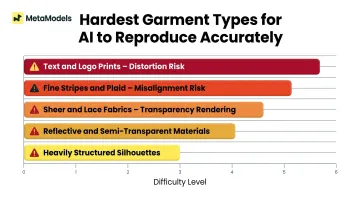
According to industry analysis, AI tools struggle most with:
- Complex patterns (fine stripes, plaid, geometric prints)
- Text or logo prints (often distorted or illegible)
- Lace, sheer fabrics, and reflective surfaces
- Transparent or semi-transparent materials
- Heavily structured silhouettes
Brands should test challenging SKUs first (items with logos, text prints, fine patterns, or sheer fabrics) before committing to a platform. These edge cases reveal limitations that won't surface when testing simple solid-color garments.
How the Underlying Engine Affects Output
Different AI engines produce different results in photorealism, lighting quality, skin tone rendering, and fabric accuracy. Some excel at swimwear or lingerie; others handle structured menswear better. There is no single "best" engine across all product categories.
Before committing to a platform, submit the same five challenging SKUs across tools and compare output quality, garment accuracy, and how much post-processing each requires. That test reveals more than any feature list will.
Prompt Specificity Drives Consistency
Explicit scene and setting instructions (camera angle, background, lighting direction, pose) produce far more consistent results than default or vague prompts.
Brands that document standardized prompt templates for their catalog see better consistency. For example:
Generic prompt: "Female model wearing dress"
Specific prompt: "Full-body frontal view, female model age 25-30, studio white background, soft diffused lighting from front-left, standing pose with arms at sides, neutral expression"
The specific prompt removes ambiguity, producing repeatable results across hundreds of SKUs.
What to Look for in an AI Model Photography Platform
Garment Accuracy and Human Review
The most important capability is whether the platform preserves your actual garment details rather than generating an approximation. Check whether the output is production-ready or requires heavy post-processing before it can go live.
That distinction matters in practice. Platforms like MetaModels.ai include human fashion specialist review of every AI-generated image before delivery — reviewers check color accuracy, shape, proportions, embellishment details, and texture representation to ensure images are commercially viable from the start.
Ask potential platforms:
- Is there a human review workflow?
- What specific garment details are checked?
- What happens when an image fails review?
- Are corrections included, or do they require additional fees?
Model Diversity and Custom Model Creation
Evaluate the available AI model library:
- Range of ethnicities and skin tones
- Body type variety (not just one "standard" body)
- Age range representation
- Gender presentation options
Also check whether the platform supports custom model creation — building an AI model that matches your specific brand identity and reuses consistently across all SKUs, with no royalty obligations and no risk of another brand running the same face.
Scalability and Batch Processing
For catalogs larger than a few dozen SKUs, a tool that only handles individual images won't survive contact with a real production schedule.
Look for these capabilities before committing:
- CSV-based batch uploads with product ID, model selection, background, and pose configuration
- Overnight processing capability for 100-300+ SKU batches
- Output resolution up to 4K for high-zoom product detail pages
- Multi-channel export formats (Instagram, Amazon, TikTok aspect ratios)
Without batch processing, configuring each SKU individually becomes the bottleneck — not the AI itself.
Legal and Ethical Considerations Brands Can't Ignore
Model Rights and Usage Licenses
The critical legal question for AI model imagery: Who owns the output, and do you have unlimited commercial rights to use it?
Traditional model photography requires ongoing royalty agreements and usage license renewals. Each time you want to use an image in a new channel or extend usage beyond the original contract term, you negotiate and pay additional fees.
AI platforms vary significantly on ownership terms. Before committing, review these specifics in any platform's terms of service:
What to check in platform terms of service:
- Do you own the generated images outright, or does the platform retain rights?
- Are there channel restrictions (e.g., can you use images in paid advertising)?
- Are there geographic restrictions (e.g., can you use images internationally)?
- Are there time-based limitations (e.g., do licenses expire)?
- Do you need to credit the platform or display "AI-generated" disclosures?
MetaModels.ai, for reference, provides full commercial usage rights with no royalty obligations — images can be used across e-commerce, social media, paid ads, and lookbooks in any market.
Ethical and Regulatory Considerations
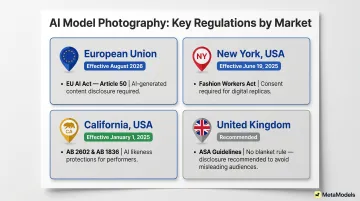
Ownership rights are only part of the picture. Governments are moving quickly to regulate how AI-generated imagery can be used, and the rules differ significantly by market:
European Union: Article 50 of the EU AI Act mandates transparency for AI-generated content. Brands using AI model imagery must inform users when they are viewing AI-generated images—effective August 2026.
United States (New York): The New York Fashion Workers Act (effective June 19, 2025) requires consent for digital replicas of models' likenesses. If your AI models are based on real people, you need documented consent.
United States (California): California enacted AB 2602 and AB 1836 (effective January 1, 2025), providing AI likeness protections for performers and models.
United Kingdom: The UK ASA has no blanket disclosure requirement, but prohibits misleading use. Disclosure is recommended when the audience would be misled if AI use isn't disclosed—particularly for cosmetic products where AI might show unrealistic results.
Ethical considerations beyond compliance:
Compliance aside, AI model diversity raises a harder question: are you using AI to genuinely reflect your customer base, or to project an image of inclusivity that doesn't exist internally? The Fashion Law flagged this directly following Levi's AI model announcement — brands risk deceiving stakeholders "into believing that a company engages in fair and equitable hiring practices and is diverse and inclusive when they are not."
Also ask platform providers directly how they source and license the real images used to train their models. Not all platforms disclose this, but any reputable provider should be able to answer it.
Frequently Asked Questions
How much does AI model apparel photography cost compared to traditional photoshoots?
Traditional on-model e-commerce photography costs $80-$200 per image when including photographer fees, model rates, studio rental, styling, and post-production. AI-generated imagery costs $0.50-$3.00 per image, representing a 95-99% cost reduction. For a 100-SKU catalog, traditional costs run $8,000-$20,000 versus $50-$300 for AI alternatives.
Can AI model photography fully replace traditional photoshoots for fashion brands?
AI outperforms traditional methods on cost and speed for high-volume catalog work — e-commerce PDPs, marketplace listings, and social media content. Traditional photography still leads for high-end editorial campaigns where creative direction and authentic human expression matter most. Most brands use both: AI for scalable catalog production, traditional for hero campaigns and brand storytelling.
How accurate is AI at reproducing fabric textures, prints, and garment fit?
Garment fidelity varies significantly by platform and underlying AI model. Clean, high-quality input photos improve accuracy substantially, but even the best platforms struggle with complex prints, text/logos, fine stripes, sheer fabrics, and heavily structured silhouettes. Test a sample of challenging SKUs before committing to a platform, and always review output at full resolution before publishing.
Do brands own the rights to AI-generated model images?
Ownership depends entirely on the platform's terms of service. The best platforms offer full commercial usage rights with no royalties or licensing fees — unlimited use across all channels and markets. Others impose channel restrictions, geographic limitations, or require ongoing licensing payments. Always confirm perpetual, royalty-free rights before publishing to revenue-generating channels.
What types of garments are hardest to shoot with AI model photography?
The most challenging categories are items with text or logo prints (often distorted), fine stripes or plaid patterns (frequently misaligned), sheer or lace fabrics (transparency rendering issues), and heavily structured silhouettes (tailored blazers, structured dresses). Test these categories first and review output at full resolution to verify garment accuracy before deploying at scale.
How do I maintain a consistent look across a large AI-generated catalog?
Three practices keep large catalogs visually cohesive:
- Reuse the same AI model identity across all SKUs — platforms with custom model creation let you build a brand-specific virtual model
- Create standardized prompt templates that lock in consistent scene and lighting settings across products
- Choose a platform supporting persistent model profiles and batch configuration, so identical settings apply to hundreds of SKUs via CSV upload