Introduction
Traditional fashion photography hits brands with a painful triple burden: a single professional shoot costs $10,000–$30,000, requires 10–21 days turnaround, and demands constant model booking fees. AI model dressing solves all three by placing specific garments onto AI-generated models without a physical shoot.
Yet outcomes vary wildly. Upload a wrinkled flat-lay photo and you'll get distorted fabric. Skip the prompt and watch your oversized hoodie turn into a fitted tee. The difference between unusable output and catalog-ready imagery comes down to input quality, garment complexity, model selection, and generation settings.
What follows is the exact workflow to get that right — what to prepare before you start, the variables that determine garment accuracy, and when AI model dressing fits your workflow versus traditional or hybrid approaches.
Key Takeaways
- Use a clean garment input image (ghost mannequin or flat-lay on plain background) at minimum 1,000px resolution
- Select an AI model matching your target audience, then upload your garment
- Write a prompt specifying scene, lighting, pose, and fit — for example, "oversized fit" versus "bodycon"
- Generate 3-4 variations per request and review for fabric drape, color accuracy, and detail preservation
- Ideal for e-commerce catalogs and social content at scale — hero campaigns benefit from a final human quality check
How to Dress AI Models in Specific Clothes: Step by Step
Step 1: Prepare Your Garment Photo
Your garment image is the foundation of everything that follows. The AI uses this photo as its primary reference for color, shape, texture, and drape—poor source images produce poor results, no matter how strong the platform.
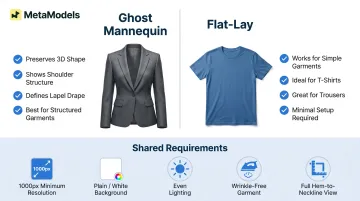
Use a ghost mannequin shot, flat-lay, or cutout image on a plain or transparent background. Avoid busy backgrounds, wrinkles, shadows, or partial garment views. The garment must be fully visible from hem to neckline.
Minimum quality requirements:
- Resolution: 1000px minimum (2048 x 2048 recommended for hero images)
- Format: PNG for highest quality; JPEG acceptable
- Background: Plain white, neutral, or transparent
- Lighting: Even, well-lit, no harsh shadows
- Garment condition: Wrinkle-free, properly shaped
Ghost mannequin shots outperform flat-lays for structured garments because they preserve 3D shape information. A blazer photographed on a mannequin shows shoulder structure and lapel drape that a flat-lay cannot capture. For simple t-shirts or trousers, flat-lays work reliably.
Step 2: Select or Configure Your AI Model
Most platforms offer a curated library of AI models filtered by ethnicity, age, body type, and sometimes pose. Match the model to your target audience and brand identity.
Filter options typically include:
- Ethnicity and skin tone, with diverse regional representation
- Age range: young adult, mid-20s, or mature
- Body type: slim, athletic, curvy, or plus-size
- Gender presentation
Some platforms allow custom model creation. You may upload reference photos or use text prompts to define appearance—check whether your platform requires consent documentation for real-person uploads. Custom models ensure brand consistency across campaigns.
Step 3: Upload the Garment and Define the Outfit
Upload your garment image to the platform. Some systems require manual placement—adjusting scale, position, and orientation on a canvas—while others autofit to the model automatically.
Many platforms offer outfit completion features: pair a top with bottoms, add shoes, or specify accessories. Keep uploads focused:
- Add complementary pieces one at a time
- Use the prompt field to describe accessories rather than uploading them separately
- Uploading too many items at once reduces garment accuracy
Step 4: Write a Prompt to Guide the Output
A descriptive prompt directs the AI on scene, lighting, model pose, garment fit, and background. Without a prompt, most platforms default to a clean studio shot—fine for product detail pages but limiting for creative variation.
Include in your prompt:
- Scene description (studio, outdoor, lifestyle setting)
- Camera angle (full-body, medium shot, close-up)
- Lighting type (natural light, studio softbox, golden hour)
- Model pose and action (standing hands in pockets, walking, seated)
- Garment fit style (oversized, slim-fit, bodycon, relaxed)
Example: "Full-body studio shot, soft natural lighting, standing pose with hands in pockets, slim-fit blazer, neutral grey background"
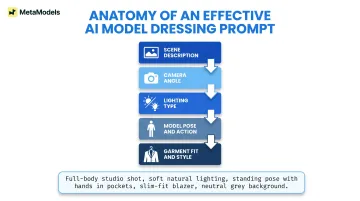
Prompt quality directly affects drape accuracy and fabric behavior. Vague prompts produce generic results—once your prompt is set, generate multiple variations to find the output that best represents your garment.
Step 5: Generate, Review, and Export
Generate 3-4 variations per request. AI outputs vary with each run—reviewing multiple options is standard professional workflow.
Review checklist:
- Garment accuracy (correct color, shape, proportions)
- Fabric drape (natural fall and movement)
- Logo and print preservation (sharp, legible, correctly positioned)
- Fit on model (appropriate to garment type)
Platforms like MetaModels.ai incorporate human review to verify garment accuracy before delivery, reducing manual quality checks at scale.
Export at the highest available resolution (4K where supported). Check platform terms for commercial usage rights before publishing.
What You Need Before You Start
Preparation determines whether you get usable output on the first try or waste credits regenerating images.
Garment Image Requirements
- Well-lit with even lighting (no harsh shadows or blown highlights)
- Full garment visible (complete hem-to-neckline view)
- Plain or transparent background (white, light grey, or cutout)
- Minimum 1000px resolution; 2048 x 2048 for professional use
- Preferred formats: PNG (best quality), JPEG (acceptable)
- Ghost mannequin or cutout flat-lay (outperform raw on-person shots)
According to a survey of 150+ fashion e-commerce brands, 57.2% use ghost mannequin photography—64% of high-end brands versus 34% of casual brands. Ghost mannequin shots give AI tools a clearer read on 3D shape and fabric drape, which translates directly to more accurate rendering.
With your garment images in order, the next step is making sure your platform setup matches the pace of your production needs.
Platform and Workflow Readiness
- Garment image library sorted by SKU
- Target model type and diversity requirements
- Brand style guidelines (consistent background, lighting, tone)
- Platform credit or generation limits for budget planning
Getting these details locked in before your first generation keeps quality consistent across every SKU.
Key Variables That Affect How Well Clothes Fit the AI Model
Four variables determine whether an AI-dressed model looks publish-ready or needs another pass: input image quality, prompt specificity, model pose, and generation settings. Getting each one right compounds the quality of the final output.
Input Image Quality and Garment Type
The AI uses the garment image as its primary reference. A poorly lit, wrinkled, or partially visible garment gives the model less information to work with — leading to distorted drape, missing details, or incorrect color rendering. Simple, solid-color garments reproduce reliably; complex garments require higher input quality and may still need post-generation review.
Research from LookBench, a peer-reviewed benchmark for fashion image retrieval, reveals dramatic accuracy variation by garment type:
| Garment Type | Accuracy (Studio Setting) |
|---|---|
| Blouses | 79.3% |
| Dresses | 72.7% |
| Pants | 57.6% |
| T-shirts | 45.2% |
| Sweatshirts | 39.7% |
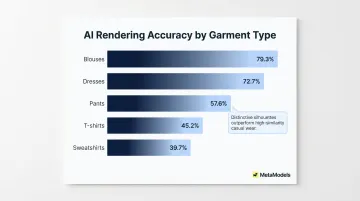
Garments with distinctive silhouettes (dresses, skirts) perform best. High intra-class similarity in casual wear (t-shirts, sweatshirts) causes the lowest accuracy. Sheer fabrics, intricate embroidery, small-text logos, and layered outfits require the highest input quality and may still need manual touch-up.
Prompt Specificity and Garment Fit Description
Without explicit instructions, the AI defaults to a neutral interpretation. Failing to specify "oversized hoodie" versus "fitted crop top" often produces a garment that looks physically wrong on the model. Prompts that describe fit, fabric behavior, and pose together yield more accurate results than generic ones.
Example comparison:
- Generic: "Model wearing blazer"
- Specific: "Slim-fit blazer, standing pose, studio lighting, hands in pockets, tailored fit at shoulders"
The specific prompt gives the AI clear direction on garment behavior and expected drape.
Model Body Type and Pose Selection
The model's body proportions and pose must be compatible with the garment type. A heavily structured coat on a pose with raised arms pushes the AI's fabric simulation to its limits — and artifacts show.
Front-facing, standing poses with natural arm placement consistently produce the most accurate garment rendering across all categories. Extreme poses or partial body shots increase artifact risk. As a rule: simple garments tolerate dynamic poses; complex garments need neutral ones.
Generation Mode and Number of Samples
Most platforms offer speed-versus-quality trade-offs across generation modes. Faster modes use fewer refinement steps, which can leave fabric edges rough or colors inconsistent. Running 3–4 samples in Balanced or Quality mode gives you enough variation to pick the strongest result without committing to a single generation that may have artifacts.
According to platform documentation from FASHN API, generation modes directly affect output:
- Performance: Faster processing, may sacrifice quality
- Balanced: Balance between speed and quality (default)
- Quality: Slower processing, highest quality results
Always generate multiple samples. Output variation is inherent to how diffusion models work — each generation explores a slightly different path through the same probability space, which is why no two results are identical.
Common Mistakes When Dressing AI Models in Specific Clothes
Most issues with AI model outputs trace back to a handful of avoidable errors at the input stage. Watch out for these:
- Using a worn-garment photo instead of a packshot causes the AI to confuse the original model's body with the garment itself — always use a ghost mannequin shot or background-removed cutout.
- Skipping the prompt produces generic studio outputs that miss the intended fit, fabric, or styling; even one sentence describing pose and fit improves accuracy.
- Treating the first output as final ignores how AI generation works — regenerating with the same or slightly adjusted inputs often yields dramatically better results.
- Uploading multiple items at once (tops, bottoms, accessories together) overloads the garment recognition layer, causing pieces to merge or disappear; add complementary items one at a time, or describe them in the prompt instead.
When AI Model Dressing Is (and Isn't) the Right Choice
AI model dressing excels in specific use cases but is not a universal replacement for every type of fashion content. Understanding where it works best helps brands allocate production budgets correctly.
When It Works Best
High-SKU e-commerce catalog production: Brands managing 500+ SKUs face $125,000-$250,000 in annual photography costs using traditional methods. AI platforms reduce per-image costs to under $1, delivering 91% labor hour savings.
Lookbook generation across diverse model representations: AI platforms offer model libraries filtered by ethnicity, body type, and age—enabling inclusive representation without booking dozens of models.
Social media content at scale: Shein adds approximately 2,000 new SKUs daily. Fashion brands average 8 images per product. Few other workflows can match this volume.
Pre-launch product previews: Generate on-model imagery before physical inventory arrives, enabling marketing campaigns to launch simultaneously with product availability.
The AI-generated fashion photography market was valued at $1.51 billion in 2024 and is projected to reach $14.9 billion by 2034 at a 33% CAGR—a signal that adoption is accelerating well beyond early adopters.

When to Reconsider or Supplement
Flagship brand campaign imagery: Hero campaigns demanding specific creative vision, artistic direction, or emotional storytelling benefit from traditional photography where human creative direction drives every detail.
Garments where physical texture is central: If material feel—cashmere softness, leather grain, silk sheen—is core to the brand story, traditional photography captures this more effectively.
Regulatory or platform requirements: Some contexts mandate real-model photography. Review platform guidelines before committing to AI-only workflows.
For most brands, the practical answer is a hybrid workflow: AI handles catalog and social content, while traditional photography covers hero shots and flagship campaigns.
Frequently Asked Questions
What type of garment photo works best for dressing AI models?
Ghost mannequin and flat-lay photos on plain or transparent backgrounds produce the most accurate results. The garment should be fully visible, well-lit, wrinkle-free, and at minimum 1000px resolution. Ghost mannequin shots outperform flat-lays for structured garments because they preserve 3D shape information.
Can AI models accurately render complex garments like sheer fabrics or embroidered details?
Simple garments render reliably, while complex ones (sheer, heavily textured, or small-logo items) require higher input image quality and may still need human review or minor post-production edits. According to LookBench research, garment accuracy varies from 79.3% for blouses to 39.7% for sweatshirts, with distinctive silhouettes performing best.
Do I need a separate model photo, or can I generate a model from a text description?
Some platforms require a reference model image from a curated library, while others allow you to describe the model's appearance from scratch using text prompts or custom model creation features. Choose based on whether catalog consistency or creative flexibility matters more to your project.
How many image variations should I generate before choosing a final output?
Generate at least 3-4 variations per request to account for natural variation in AI outputs. AI diffusion models produce different results with each run, so reviewing multiple options is standard professional workflow.
Are AI-generated fashion images legally usable for commercial purposes?
Most paid platforms grant commercial usage rights — review the platform's terms before publishing. AI-generated models eliminate model release requirements, though emerging regulations like New York's Fashion Workers Act and the proposed NO FAKES Act introduce new compliance considerations worth monitoring.
How is dressing an AI model in specific clothes different from virtual try-on?
Virtual try-on places clothes on an existing photo of a specific person for consumer-facing fit experiences. Dressing an AI model generates a new synthetic image designed for brand content production — e-commerce catalogs, social media, and advertising — rather than individual fit visualization.