Introduction
AI-generated fashion photography has moved from experimental novelty to a standard production tool. Major retailers and independent labels alike now produce the majority of their visual content without booking a single studio. The market reached $2.01 billion in 2025 and is forecast to hit $6.11 billion by 2029, growing at a 32.1% compound annual rate.
The pain point driving this shift is concrete: traditional photoshoots are expensive, slow, and impossible to scale. E-commerce brands managing hundreds of SKUs per season can't photograph every item traditionally — the result is delayed launches, inconsistent imagery, and production costs that erode margins.
This article covers the key use cases brands are deploying today, the top tools available in 2026, and actionable tips for generating catalog-ready imagery without booking a model or studio.
TLDR:
- AI fashion photography converts packshots into on-model images—no studios, models, or weeks-long timelines
- Top applications include e-commerce pages, virtual try-on, campaign visuals, social content, and background generation
- Platforms with human-reviewed output and diverse model libraries produce the most consistent, brand-safe results
- Brands report up to 70% cost reductions compared to traditional shoots when shifting to AI workflows
- Best results require clean input images, intentional model selection, and a final human quality check
Why AI Photography Is Reshaping Fashion Brands in 2026
The Cost Reality Check
Traditional fashion photography costs are no longer sustainable at scale. Industry analysis shows that AI-generated e-commerce imagery can reduce production costs by up to 70% compared to traditional studio shoots, with campaign work typically delivering around 50% savings.
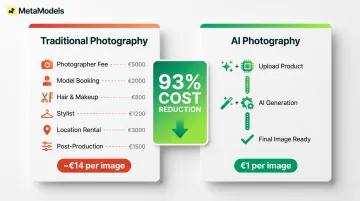
A traditional shoot includes photographer fees, model booking costs, hair and makeup crews, stylists, location rentals, and post-production editing. One documented case study found traditional photography cost approximately €14 per image versus €1 per image using AI—a 93% reduction. The case study comes from a vendor, so treat the numbers as directionally accurate rather than universal — but the shift is real and accelerating.
Hugo Boss has been using AI-generated e-commerce imagery since 2023, and German retail group Peek & Cloppenburg is now testing the same approach. Both have moved past testing into full production workflows.
Scale Becomes a Competitive Advantage
Brands launching 200+ SKUs per season face a simple constraint: you cannot photograph every product traditionally without massive cost or timeline compromise. AI breaks the linear relationship between catalog size and production cost.
Instead of booking separate shoots for each product drop, brands upload packshots and generate styled, on-model imagery across multiple poses, backgrounds, and model types. The production benefits compound quickly:
- Faster time-to-market on new drops
- More frequent A/B testing of visual formats
- Seasonal content refreshes without reshooting
- Consistent output regardless of team size
Diversity Without Casting Constraints
AI photography tools now let brands feature models of different ethnicities, body types, ages, and sizes without logistical or financial limits. Research from Accenture found that 41% of shoppers shifted business away from retailers that didn't reflect inclusion and diversity, and 42% would pay a 5% premium to shop with I&D-committed retailers.
Traditional casting has two hard limits: budget caps how many models you can book, and availability restricts who's actually an option. AI removes both — brands can represent the full range of their customer base without adding a dollar to production costs.
Key AI Fashion Photography Applications for Brands
Packshot-to-Model Conversion
For most brands, packshot-to-model conversion delivers the clearest return on investment. Take a flat-lay or ghost mannequin image of a garment and generate a realistic on-model version—no studio, no model booking, no multi-week timeline.
This is particularly valuable for:
- Brands with large back catalogs that were never photographed on models
- Fast-turnaround product drops where traditional shoots aren't feasible
- Seasonal refreshes where you need updated imagery without reshooting
For standard e-commerce product shots, output quality is now high enough that most shoppers can't tell the difference from traditional photography.
Virtual Try-On for E-Commerce Listings
Virtual try-on tools generate multiple on-body views of a product for different body types or poses directly from product images. Shoppers get a clearer sense of fit and drape—which directly reduces return rates.
Industry sources report that virtual try-on implementations can reduce return rates by 20-40%, though these figures vary by implementation and should be treated as indicative ranges rather than guaranteed benchmarks. Fashion e-commerce return rates average 25-45%, making even modest reductions financially material.
Campaign and Lookbook Visuals
Marketing teams are using AI to generate styled, editorial-quality imagery for seasonal campaigns, social ads, and digital lookbooks—without a studio or photographer.
Luxury brands are now publicly deploying AI for campaign imagery. Valentino used AI for a December 2025 campaign featuring the Garavani DeVain handbag, and Jil Sander, MCM Worldwide, and Burberry have all deployed AI-assisted campaign work in 2025. While some luxury campaigns received mixed consumer feedback, the trend is clear: AI is moving from test to production.
Social Media Content at Scale
Brands generate multiple visual variations of the same product for A/B testing across Instagram, TikTok ads, and email. Different backgrounds, model types, and styling combinations—at a fraction of traditional photography costs.
That testing velocity is simply not viable with traditional shoots. AI enables brands to:
- Test 5-10 creative variations per product launch
- Identify top-performing visuals quickly
- Scale winners without booking another shoot
Background and Scene Generation
Take an existing product or model shot and place it into a contextual lifestyle scene—outdoor, urban, editorial—using AI background tools. This is useful for brands that already have packshots but want lifestyle imagery without a full reshoot.
Top AI Fashion Photography Tools for Brands in 2026
The tool landscape has matured into distinct categories. The right choice depends on your specific workflow: packshot conversion, virtual try-on, campaign concepting, or background generation.
MetaModels.ai — Packshot-to-Model Conversion with Human Quality Review
MetaModels.ai is built specifically for fashion brands converting packshots into professional AI model imagery without physical photoshoots. The platform uses real-time fabric draping technology that preserves garment accuracy—color, texture, print placement, and construction details—critical for maintaining brand credibility.
Key differentiators include:
- Diverse AI model library covering ethnicity, body type, and demographics
- Human-reviewed outputs verified by fashion specialists before delivery
- Custom model creation matched to your brand identity
- 4K resolution output ready for e-commerce, social media, ads, and lookbooks
- No model booking fees, no royalties, no usage limits
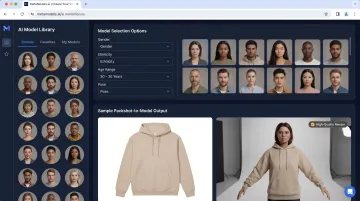
The platform is designed for brands that need catalog-scale production with consistent quality. MetaModels.ai handles e-commerce product pages, social content, paid advertising, and marketplace listings (Amazon, Myntra, Ajio, Flipkart).
Pricing is affordable on a per-image basis, with subscription plans ranging from a 20-credit tier up to a 300-credit tier, plus enterprise options with API access.
FASHN AI — Virtual Try-On and On-Model Generation
FASHN AI focuses on virtual try-on and product-to-model conversion for fashion brands and marketing agencies. Its v1.5 release (March 2025) cut processing times to as fast as 4 seconds in Performance Mode — a 2x speed improvement.
Notable strengths:
- Handles difficult garment types: baggy jeans, oversized tees, wedding gowns
- Preserves identity details including body shape, skin texture, and tattoos
- Delivers 4K output quality
- Third-party reviewed as "best for advanced virtual try-on and product-to-model imagery"
Adobe Firefly — Background and Scene Generation with Commercial Rights
Adobe Firefly serves brands inside the Adobe ecosystem needing background generation, lifestyle scenes, and edited product visuals with clear commercial usage rights. Key features for commercial use:
- Trained on licensed Adobe Stock and public domain content, minimizing IP risk
- Enterprise plans include IP indemnification for select Firefly outputs
- Automatically applies Content Credentials metadata to track provenance and editing history — relevant as brands face growing scrutiny over AI-generated content transparency
Firefly is particularly useful for brands that already have on-model shots but need contextual backgrounds, scene variations, or environmental storytelling without reshoots.
Midjourney and General-Purpose Tools — Concept and Campaign Visuals
General-purpose image generators like Midjourney are used by fashion teams for mood boards, campaign concept visuals, and early creative exploration. They're less reliable for accurate garment rendering and on-model product shots.
Documented limitations include:
- Frequent logo distortion or inability to replicate brand symbols accurately
- Altered product style or form that doesn't match the actual garment
- Overly artistic or "perfect" rendering that looks unrealistic for commercial use
- Inconsistent results across prompt iterations
Midjourney works well for creative exploration and textured backgrounds but struggles with garment detail accuracy and brand consistency at catalog scale.
Tool Stacking Strategy
Many brands use a purpose-built fashion photography tool for product imagery where garment accuracy matters, alongside a general AI image tool for campaign concept work and creative exploration. This hybrid approach balances accuracy with creative flexibility.
Practical Tips for AI Fashion Photography That Actually Converts
Start with High-Quality Input Images
AI output quality is directly tied to input image quality. Clean, well-lit packshots with no heavy creasing, clutter, or poor focus produce the best results.
Input Image Checklist:
- White or neutral background
- Full garment visible (no cropping at edges)
- Proper lighting with minimal shadows
- No wrinkles or heavy creasing
- Sharp focus on fabric details
- High resolution (minimum 1000px on the shortest side)
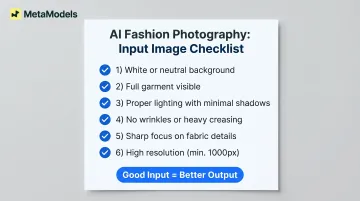
The better your source image, the more accurate the AI-generated output—especially for fabric texture, print placement, and garment construction.
Match Model Selection to Your Target Customer
Choosing AI models that reflect your brand's audience signals inclusivity and improves conversion among different customer segments. Diversity in skin tone, body type, and age is both the right call and a commercially smart one.
Vary model selection intentionally across your catalog rather than defaulting to a single type. Brands that represent their customers visually tend to see stronger engagement on the product pages that matter most.
Maintain Visual Consistency Across a Catalog
Brand consistency across AI-generated images matters for how customers perceive quality and professionalism. Same lighting tone, similar background style, consistent pose energy—these details add up.
Build a simple style brief or visual language document to guide model and scene selection across all generations:
- Preferred lighting style (natural, studio, dramatic)
- Background tone and environment (minimal, lifestyle, editorial)
- Pose direction (static, dynamic, casual, formal)
- Color palette and mood
Apply this brief consistently across product pages, social content, and campaign materials to maintain cohesion.
Always Run a Human Quality Review Before Publishing
Even the best AI photography tools occasionally produce garment inaccuracies—distorted text on a logo tee, unnatural fabric folds, missing buttons, incorrect print placement. A quick human review step protects brand credibility and prevents errors from going live unnoticed.
What to Check:
- Garment details (buttons, zippers, seams, logos)
- Print placement and pattern alignment
- Fabric drape and proportions
- Color accuracy compared to source image
- Overall image quality and realism
Platforms with built-in human review (like MetaModels.ai) reduce this burden, but always verify before publishing to high-visibility channels.
A/B Test AI-Generated Versus Traditional Imagery
Don't assume AI imagery will outperform traditional shots by default—and don't assume the reverse either. Run structured A/B tests on product pages or ad sets to measure conversion impact, then roll out AI imagery to the full catalog once performance data supports it.
Test variables include:
- On-model AI imagery vs. flat-lay packshots
- AI-generated backgrounds vs. traditional studio backgrounds
- Different AI model types for the same product
- Virtual try-on views vs. single static images
Track click-through rate and add-to-cart as your primary signals—those two metrics move fastest and give you a reliable read within two to four weeks of testing.
What to Look for in an AI Fashion Photography Tool
Garment Accuracy and Fabric Rendering
Garment accuracy is the first thing to evaluate. Can the tool reliably render fabric texture, drape, print placement, and construction details?
Tools that distort logos, flatten textures, or misrepresent fit damage brand credibility — and drive returns when the delivered product doesn't match the image. Prioritize platforms that use real-time fabric draping technology or garment-aware AI models, and always verify outputs against original packshots.
Model Diversity and Customization
Brands need access to a wide range of AI models to represent their audience inclusively. The strongest platforms offer diverse ethnicity, age, and body type options — plus the ability to create or train a custom model that reflects brand identity.
A curated library with demographic filtering speeds up selection and keeps visuals consistent across catalog production.
Output Resolution, Commercial Rights, and Workflow Fit
Before choosing a platform, confirm it delivers on three practical requirements:
- Resolution: Images at or near 4K for professional and print-ready use
- Commercial rights: Clear, royalty-free licensing with no usage restrictions buried in the fine print
- Workflow fit: Bulk upload capability, e-commerce platform integration, and realistic turnaround times
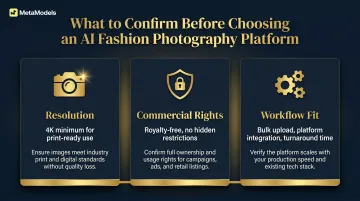
Entry-level pricing rarely holds at catalog scale, and commercial rights terms vary widely across providers. Nail down both before you commit.
Frequently Asked Questions
How realistic do AI fashion model photos look in 2026?
Modern AI fashion photography tools produce images that are often indistinguishable from traditional photography for standard e-commerce product shots. Quality varies by tool and input, with purpose-built fashion platforms generally outperforming multipurpose AI image generators in garment detail accuracy and fabric rendering.
Can AI fashion photography fully replace traditional photoshoots?
AI handles high-volume e-commerce and social imagery well, but brands often keep traditional photography for hero campaign imagery, runway, or editorial content requiring authentic human expression. The practical approach is a hybrid model where AI handles scale and traditional photography handles high-impact moments.
How much can brands realistically save by switching to AI fashion photography?
Industry sources report that brands typically achieve up to 70% cost reduction for e-commerce imagery when shifting to AI-generated workflows, with campaign work delivering approximately 50% savings. Actual results vary by shoot volume and current spend.
What image input do AI fashion photography tools require?
Most tools work best with a clean, well-lit flat-lay or packshot on a neutral background. The cleaner the input image, the more accurate the generated output. Some platforms can work with mannequin images or informal product photos, but quality improves with professional packshots.
Is AI-generated fashion photography legally safe to use commercially?
Most reputable platforms grant full commercial usage rights, but verify the terms of service for your specific tool — particularly around model image rights, third-party IP, and royalty conditions. EU AI Act requirements (effective August 2026) also mandate transparency disclosures for AI-generated content used commercially.
How do I keep my brand's visual identity consistent when using AI photography at scale?
Create a visual style brief covering preferred model types, background tones, lighting style, and pose direction — then apply it consistently across all AI generations to maintain cohesion. Platforms with custom model creation and saved preset capabilities make this straightforward at scale.