
The stakes are high. 61% of shoppers cite product images and videos as the most important factor in their purchase decision, outranking price and descriptions. Meanwhile, 45% of shoppers will abandon a purchase because of low-quality product images. Your visuals don't just support the sale — they make or break it.
This article delivers 10 actionable visual content tactics organized across key areas — from product photography to emerging AR experiences — that reduce returns, increase conversions, and build brand trust. The tactics range from low-cost quick wins (like UGC) to scalable modern approaches (like AI-generated model imagery), so there's something applicable for every stage of growth.
Key Takeaways
- Lifestyle and on-model imagery converts better than plain packshots — make it the standard, not the exception
- Short-form video and 360-degree viewers are now baseline expectations for mobile shoppers
- User-generated content builds trust at scale and costs far less than traditional content production
- Shoppable images and visual social proof collapse the gap between discovery and purchase
- AR and virtual try-on have crossed into mainstream adoption in fashion and home décor
Upgrade Your Product Photography
Product photography is the cornerstone of ecommerce visual strategy. "Good enough" images are no longer competitive — 53% of the time, an Amazon listing with more images will convert at a higher rate and outrank its top competitor. Image quality directly affects add-to-cart rates and purchase confidence.
Use High-Quality, Multi-Angle Product Shots
The baseline standard requires sharp, consistently lit images on clean or lifestyle backgrounds, shot from multiple angles. Essential views include:
- Front-facing product view
- Back view showing construction details
- Close-ups highlighting texture, materials, and craftsmanship
- Side angles revealing depth and proportion
Zoom functionality is critical. Shoppers expect to inspect details closely, mimicking the in-store experience. Maintain consistency across your product catalogue pages — uniform lighting, background treatment, and image dimensions create a professional, trustworthy presentation.
Going from 4 to 7 images increases sales by about 120%. More angles mean fewer unanswered questions.
Show Products on Real-Looking Models
Flat lay and ghost mannequin shots fail to convey fit, drape, and proportion — particularly in fashion. Shoppers want to see how a garment looks on a body that resembles theirs. Product pages with on-model imagery see 20–30% higher conversion rates than those with mannequin shots, and 76% of shoppers state that on-model photos are the most useful format for buying decisions.
Traditional model photography is expensive, time-consuming, and limits representation. A single photoshoot can easily exceed $5,000 when you add up:
- Photographer day rates: $500–$5,000+
- Model fees: $500–$3,000+
- Studio rental: $300–$2,000
- Hair and makeup: $400–$1,500
- Retouching: $25–$150 per image
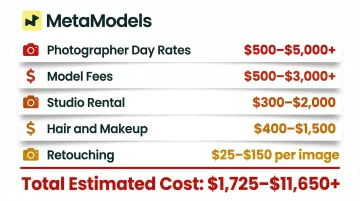
AI model imagery removes those constraints entirely. Tools like MetaModels.ai convert flat packshots into realistic on-model images with diverse body types, ethnicities, and demographics — at a fraction of traditional photoshoot costs. Fashion brands can generate professional on-model content without booking models, renting studios, or managing shoots. The platform delivers human-reviewed imagery in up to 4K resolution, verifying garment accuracy for color, shape, and proportions before delivery.
That means inclusive representation is no longer a budget question. Brands can show products on models that genuinely reflect their customer base, across every SKU.
Turn Product Photos Into Infographics
Product infographics overlay feature callouts, dimensions, materials, or benefit labels onto a product photo, educating shoppers at a glance. This approach is especially effective on marketplace listings (like Amazon) where layout is constrained.
Amazon claims that adding A+ Content to a product listing can help boost sales by up to 20%, with some sellers seeing increases up to 58%.
Product infographics work well for:
- Tech accessories (highlighting ports, battery life, compatibility)
- Apparel with technical features (moisture-wicking fabric, UV protection, stretch panels)
- Furniture (dimensions, weight capacity, assembly requirements)
- Beauty products (ingredient callouts, usage instructions)
Shoppers who grasp key features from a single image have fewer objections — and fewer objections mean fewer abandoned carts.
Bring Products to Life with Video and 3D
Static images alone can't fully convey motion, texture, or scale. Video and interactive formats fill that sensory gap. Adding video to product pages increases conversion rates by up to 80% for ecommerce businesses, and 87% of consumers have been convinced to make a purchase after watching a video.
Add Demo and Short-Form Video to Product Pages
Prioritize two main video formats:
- Product demos on PDPs: A 30–60 second video showing a backpack being packed, zippers opening, and straps adjusting answers practical questions about functionality and size that static images can't.
- Short-form social videos (Reels, TikToks) repurposed onto product pages or landing pages feel authentic and relatable — building emotional connection while still showcasing the product.
Product demos reduce pre-purchase uncertainty; social videos create desire. Used together, they cover both the rational and emotional sides of a buying decision.
Implement 360-Degree Views and 3D Product Viewers
360-degree spin photography and interactive 3D viewers let shoppers examine a product from every angle — mimicking the in-store "pick it up and turn it over" experience. This is particularly valuable for:
- Footwear (seeing heel height, sole design, stitching)
- Bags (exploring compartments, closures, hardware)
- Jewelry (examining settings, clasps, engraving)
- Furniture (assessing proportions, construction, finish)
Research shows that interactive 360-degree product views reduce ecommerce return rates by an average of 37%, with jewelry returns reduced by up to 42% and furniture by 39%. Shoppers who interact with 360-degree views were 44% more likely to add an item to their cart.
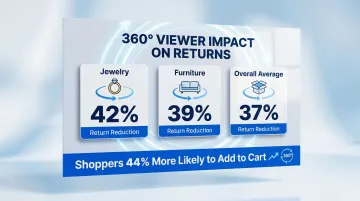
For high-consideration categories — furniture, jewelry, technical gear — 360-degree views are one of the highest-ROI investments on a product page.
Make User-Generated Content Work for You
UGC is uniquely powerful because it shows real customers using and enjoying products — providing the peer-level authenticity that branded content cannot replicate. Visitors who interact with user-generated photos and videos convert at a 103.9% higher rate, and 60% of consumers believe UGC is the most authentic marketing content.
Run Branded Hashtag Campaigns to Collect UGC
Launch a UGC campaign by following this framework:
- Create a memorable branded hashtag tied to a theme or value (not just a product)
- Incentivize participation — feature on homepage, giveaway entry, loyalty points, exclusive discounts
- Build a library of diverse real-world content that showcases authentic product usage
The best campaigns align with a brand value. Aerie's #AerieReal campaign launched in Spring 2014, featuring models of all sizes in unretouched photos to promote natural beauty. Following the pledge to stop retouching, Aerie's comparable sales increased by 32% in Q1 2016, with growth continuing through a 34% comparable sales increase in Q4 2017.
When your campaign reflects a genuine value, customers participate because they believe in what you stand for — not just because they want a prize.
Embed Review Photos and Shoppable Social Content
Two tactics amplify UGC impact:
Review photos on PDPs — Ask customers to include images with their reviews, then display them above the fold on product pages. Customer-submitted images show the product in a real, uncontrolled context — revealing true color, fit, and scale — which reduces purchase hesitation by setting accurate expectations.
Shoppable social feeds on-site — Embed Instagram or social content so visitors can click directly from a real customer's photo to a purchase page. When shoppers interact with UGC galleries on product pages, they experience 140% higher conversion rates and a 308% increase in time on site.
Together, these placements turn your existing customer base into a continuous source of conversion-ready visual content.
Optimize Your On-Site Visual Experience
Having great visual assets means nothing if they're not deployed strategically across your site. Placement and interaction design amplify the impact of your visual content.
Make Images Shoppable Across Your Site and Social
Shoppable image functionality tags products within lifestyle photos on-site (homepage banners, lookbook pages) and on Instagram/Pinterest so shoppers can click directly from a visual to a product page or cart. This collapses the consideration phase and reduces drop-off between discovery and purchase.
The numbers back this up:
- The Natori Company saw a 1,416% increase in referral traffic and a 100% increase in revenue week-over-week by consistently tagging products in Instagram posts
- Native Union achieved a 2,670% increase in traffic month-over-month with just 9 shoppable posts on Instagram
- Shopping pins on Pinterest deliver a 15% higher return on ad spend and 2.6 times higher conversion rates compared to standard pins
Shoppable content works because it meets shoppers where intent is already high — inside the visual that sparked interest in the first place.
Use Visual Social Proof Strategically
Once shoppers arrive on a product page, their next question is simple: can I trust this? Star ratings, review count badges, and "X people bought this today" notifications answer it instantly — turning hesitation into confidence before a shopper reads a single word of copy.
The purchase likelihood for a product with five reviews is 270% greater than the purchase likelihood of a product with no reviews. Meanwhile, 83% of consumers found a business with user-generated reviews on a landing page to be trustworthy, and 74% said they would contact the business.
Place review photo galleries above-the-fold on product detail pages (PDPs), and add social proof indicators near add-to-cart buttons. These small visual cues create urgency and validation at the moment of decision.
Experiment with Augmented Reality Try-Ons
AR try-on uses smartphone cameras or webcams to overlay a digital version of a product onto the user (clothing, glasses, makeup) or into their environment (furniture, décor). This has moved from a differentiator to a baseline expectation, especially in fashion and beauty.
Products featuring AR content achieve an average conversion rate increase of 94% compared to products relying solely on 2D visuals. Eyewear retailers using virtual fitting report up to a 28% reduction in product returns.
Brands using AR effectively include:
- IKEA Place for furniture — reduced product returns by 20% and increased online sales by 35%
- Warby Parker for glasses — experienced a 50% increase in online sales and a 35% reduction in product returns
- Sephora Virtual Artist for makeup — achieved conversion rates up to 90% higher than non-AR shoppers

Fewer returns, higher checkout confidence, and longer engagement sessions follow from the data. Over 100 million consumers have already shopped using AR, and 80% report feeling more confident in their purchase as a result.
While full AR implementation can require investment, many platforms now offer plug-and-play AR integrations. Evaluate AR for high-return-rate product categories first.
Frequently Asked Questions
What are ecommerce visuals?
Ecommerce visuals are all image and video assets used to represent products and brand identity in an online store — including product photos, lifestyle imagery, videos, infographics, 360-degree views, and user-generated content.
What is the role of visual content in ecommerce marketing?
Visual content replaces the sensory experience of in-store shopping, influencing purchase confidence, reducing return rates, and driving higher conversion rates across product pages, social ads, and email campaigns.
What are examples of visual content for ecommerce?
Common types include high-quality product photography, lifestyle and on-model imagery, demo videos, 360-degree views, customer review photos, shoppable social images, product infographics, and AR try-on experiences. Each format serves a different stage of the buyer journey.
What is a visual content strategy for ecommerce?
A visual content strategy is a planned approach to creating, organizing, and deploying visual assets across every customer touchpoint — from homepage banners to product pages to social media. The goal is to make the path from discovery to purchase as seamless as possible.